Segments as Breakdowns - Data Warehouse API | Community
Skip to main content
New Participant
June 14, 2023
Solved

Segments as Breakdowns - Data Warehouse API

  • June 14, 2023
  • 2 replies
  • 608 views

I am trying to pull reports from Data Warehouse that use multiple breakdown dimensions, including segments, but am not able to add segments as a dimension. Found this old thread suggesting it is not supported in Adobe Analytics 1.4 API, is that still the case?


If it is still the case, how could I use Adobe Analytics 2.0 API to get the same reports with multiple breakdowns including segments as a dimension?

This post is no longer active and is closed to new replies. Need help? Start a new post to ask your question.
Best answer by Jennifer_Dungan

Workspaces are built using API 2.0.. if you can create a report there that does what you need, you can actually get a copy of the API calls to use "as-is" or manipulate to your desired need.


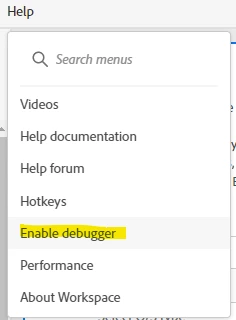
First, enable debugging on your Workspace:


Now, you will see a new icon on your tables:


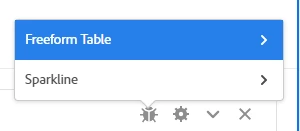
Click on this, and you will be presented with options for the Freeform Table or the Sparkline (you will want the table):


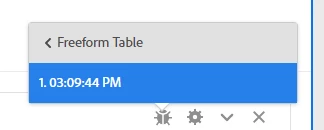
Now, when you click on that, you will be presented with timestamps of API runs, when you choose any of these, a page will open up showing you the API request (in multiple formats) that was run to retrieve data:


You can copy that request and use it as needed....


But can I ask what the final use of the data will be? Would a scheduled project (in CSV format) work? Or a Scheduled Report Builder report?

There are many ways to get the data, ones that might be less effort than the API....

2 replies

New Participant
January 8, 2025

Hello, i'm facing the same need. Were you able to resolve this issue using Adobe Analytics 2.0 API?

Jennifer_Dungan
Jennifer_DunganAccepted solution
New Participant
June 14, 2023

Workspaces are built using API 2.0.. if you can create a report there that does what you need, you can actually get a copy of the API calls to use "as-is" or manipulate to your desired need.


First, enable debugging on your Workspace:


Now, you will see a new icon on your tables:


Click on this, and you will be presented with options for the Freeform Table or the Sparkline (you will want the table):


Now, when you click on that, you will be presented with timestamps of API runs, when you choose any of these, a page will open up showing you the API request (in multiple formats) that was run to retrieve data:


You can copy that request and use it as needed....


But can I ask what the final use of the data will be? Would a scheduled project (in CSV format) work? Or a Scheduled Report Builder report?

There are many ways to get the data, ones that might be less effort than the API....