Share with anyone only works if the person is product administrator | Community
Skip to main content
New Participant
July 25, 2023
Solved

Share with anyone only works if the person is product administrator

  • July 25, 2023
  • 2 replies
  • 1580 views

Hi everyone,


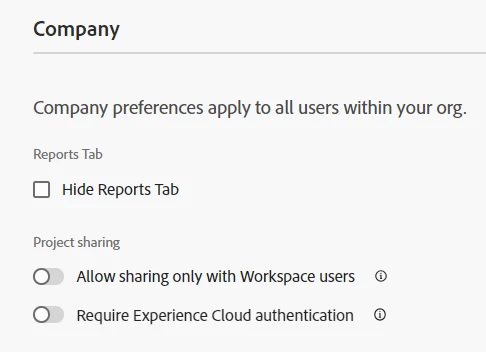
is it right that the "Share with anyone" option in Adobe Workspace only shows up if you have product administrator rights? The option is not toggeled out in the preferences but still only analytics administrators can see it. Do you have any idea how I can solve this issue?


Thanks,

Constanze
This post is no longer active and is closed to new replies. Need help? Start a new post to ask your question.
Best answer by PratheepArunRaj

Dear @constanzebo ,

Yes! The option to edit the 'Company Preferences' is only available for Product Administrators.

Do you see 'Company Preferences' where the option is not 'togged on'? If yes, you are already a Product Administrator. If not, you are not a Product Administrator.

Thank You, Pratheep Arun Raj B (Arun) | NextRow DigitalTerryn Winter Analytics


2 replies

FarazHusain
Employee
July 26, 2023

Just to add -


In order for 'share project with anyone' links to work, it needs to happen at three levels:

Overall UI: Can be restricted in the analytics UI. if restricted, no one, not even admins, can share projects with anyone.
Admin console permissions: There's a permission item in product profiles that can be included in the permission list. if you don't belong to a product profile with that permission item, you can't share links with everyone. Product admins don't need to worry about this.
Project level: You need to actually share the project with everyone in order to get that link,

PratheepArunRaj
PratheepArunRajAccepted solution
New Participant
July 25, 2023

Dear @constanzebo ,

Yes! The option to edit the 'Company Preferences' is only available for Product Administrators.

Do you see 'Company Preferences' where the option is not 'togged on'? If yes, you are already a Product Administrator. If not, you are not a Product Administrator.

Thank You, Pratheep Arun Raj B (Arun) | NextRow DigitalTerryn Winter Analytics


New Participant
July 25, 2023

Hi @pratheeparunraj,


yes I can see it but other users that do not have Product Administrator rights can not see the "share with anyone" option eventhough if unset the toggle. Do you know why?


Thanks,

Constanze

PratheepArunRaj
New Participant
July 25, 2023

Dear @constanzebo ,

You need to add the rights to the user in their product permissions.

Thank You, Pratheep Arun Raj B (Arun) | NextRow DigitalTerryn Winter Analytics