Typed/Bookmarked from Reffering Domain not realistic nor accurate! How to solve? | Community
Skip to main content
New Participant
August 15, 2023
Solved

Typed/Bookmarked from Reffering Domain not realistic nor accurate! How to solve?

  • August 15, 2023
  • 1 reply
  • 3917 views

Hi, 


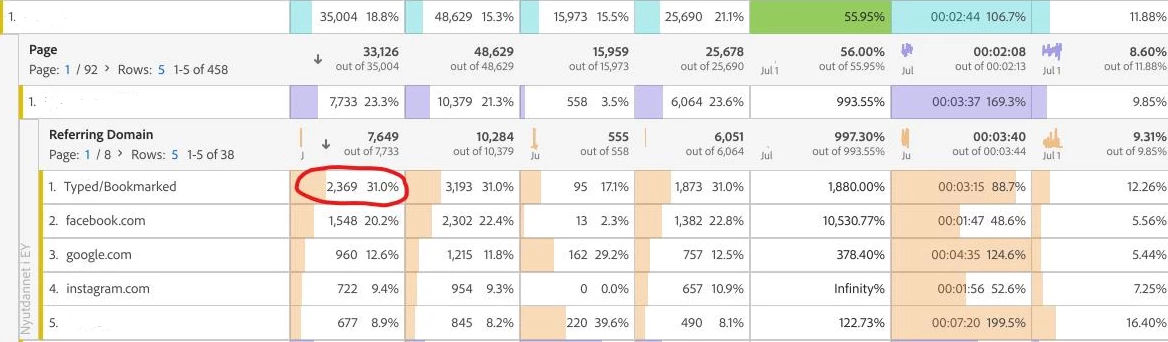
I've been encountering a significant uptick in traffic labeled as "Bookmarked/Typed" within Adobe Analytics, and it's proving to be quite wrong. I'm seeking guidance on how to make sense of this situation. At the moment, the data seems rather unreliable, which is causing challenges in providing accurate reports to stakeholders and effectively addressing crucial internal projects. I'd greatly appreciate your best recommendations. Having been accustomed to the user-friendly and seamless nature of Google Analytics, I now find myself repeatedly investigating issues with Adobe Analytics. Any insights you could provide would be very helpful!


This post is no longer active and is closed to new replies. Need help? Start a new post to ask your question.
Best answer by yuhuisg

"Typed/Bookmarked" is really AA's label for Direct traffic.

The Referring Domain gets its data from the information in document.referrer from the user's browser. Traditionally, the only time when the document.referrer would not be set was when the user typed in the URL directly or opened a bookmark in his browser.

These days, that assumption is invalid. For example, clicking a link from a WhatsApp message will result in the document.referrer not being set too, but that is certainly not via a typed URL nor a browser bookmark. Also, nowadays, server administrators can impose restrictions in their server information such that their URLs never appear in a user's document.referrer.

It could be that you're experiencing an increase in traffic from campaigns, e.g. campaigns that are targeted at users of your mobile apps who are then directed to your website. Try breaking down your "Typed/Bookmarked" row by Tracking Code to see if that yields any clues for you.

You can also try breaking "Typed/Bookmarked" row by Browser, Operating System, and even Country or City to see if there's any pattern that suggests bot-like traffic.

1 reply

yuhuisg
yuhuisgAccepted solution
New Participant
August 15, 2023

"Typed/Bookmarked" is really AA's label for Direct traffic.

The Referring Domain gets its data from the information in document.referrer from the user's browser. Traditionally, the only time when the document.referrer would not be set was when the user typed in the URL directly or opened a bookmark in his browser.

These days, that assumption is invalid. For example, clicking a link from a WhatsApp message will result in the document.referrer not being set too, but that is certainly not via a typed URL nor a browser bookmark. Also, nowadays, server administrators can impose restrictions in their server information such that their URLs never appear in a user's document.referrer.

It could be that you're experiencing an increase in traffic from campaigns, e.g. campaigns that are targeted at users of your mobile apps who are then directed to your website. Try breaking down your "Typed/Bookmarked" row by Tracking Code to see if that yields any clues for you.

You can also try breaking "Typed/Bookmarked" row by Browser, Operating System, and even Country or City to see if there's any pattern that suggests bot-like traffic.

Jennifer_Dungan
New Participant
August 15, 2023

This ^.


Unfortunately, if there is no referrer information in the header, there is nothing that Adobe or any analytics service can so to identify where that traffic came from.


Whether the traffic is driven from someone opening content direct, from an app (desktop has always had this issue, and some mobile apps are just failing to code in a referrer), or from another website where the "noreferrer" directive has been set; they all result in lack of header information.


This is why it's good to work with your partnered websites and apps that are linking to you often to add campaign parameters to the links, so even if there is no referrer, you should be able to identify the traffic from the campaign.


Another option, though it requires more effort to set up and monitor, is that some apps that open "webviews" inside of their app actually have a modified User Agent string, appending something like [FB] which will let you know that the page was opening inside the Facebook app... you can set up custom tracking to read these amended values and track this as an extended source of traffic.

AliaaAuthor
New Participant
August 16, 2023

Hi, 


Thank you for your reply.


1. To start with, could you please explain the process of including referral information in the header?

2. What exactly is meant by the phrase "where the "norefferer" directive has been set"? Additionally, where can this directive be configured?

3. When you refer to campaign parameters, are you talking about Tracking Codes? Could you elaborate on this concept?

4. Is it possible for you to share a link containing this User Agent string? Also, do you have any suggestions on how to go about configuring this?