"Unspecified" Values in report for ECID (Marketing Cloud Visitor ID) | Community
Skip to main content
New Participant
May 30, 2023
Solved

"Unspecified" Values in report for ECID (Marketing Cloud Visitor ID)

  • May 30, 2023
  • 2 replies
  • 3287 views


Hi all, I need help with this issue that I am facing for my adobe analytics report.

Based on the screenshot attached, only ~30k ECIDs were captured in the report suite. 
For the ECID, I used an extension called Experience Cloud ID Service to capture these values. 
What does it mean when there are unspecified values in the report suite for ECID values? Could this be a configuration issue?


This post is no longer active and is closed to new replies. Need help? Start a new post to ask your question.
Best answer by PratheepArunRaj

Dear @raudhah ,

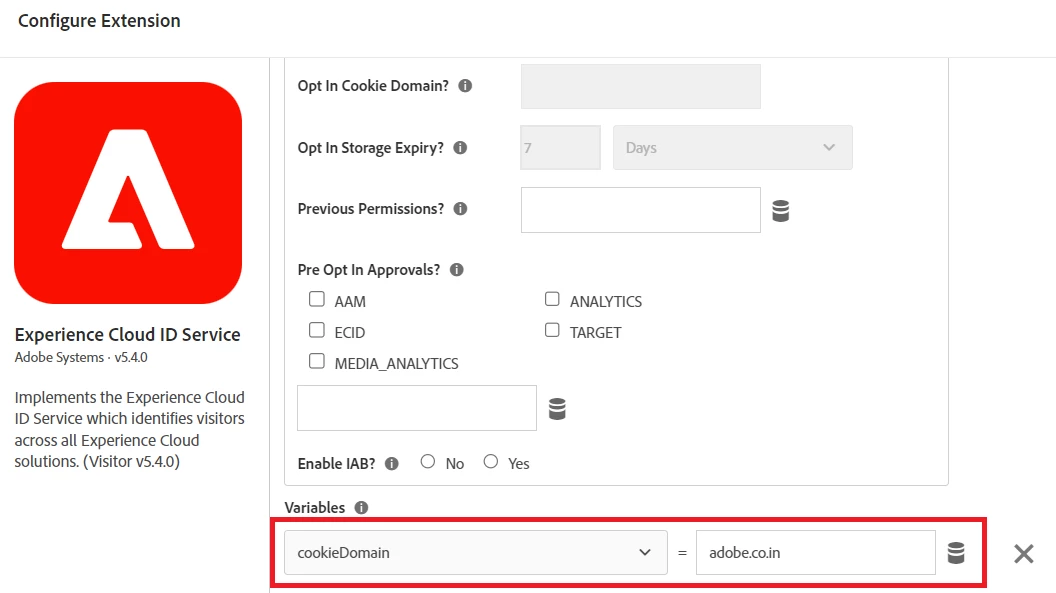
Often the main culprit would be the 'cookie domain'. Check whether the cookie domain value is set properly in Experience Cloud ID Service Extension with 'Opt-In' disabled (Are you using Opt-in functionality?).

Or, if possible, kindly share the public URL, we will validate and revert you.

Thank You, Pratheep Arun Raj B (Arun) | NextRow DigitalTerryn Winter Analytics

2 replies

yuhuisg
New Participant
May 30, 2023

Instead of getting the ECID value from the extension, make use of Adobe Analytics' Dynamic Variables to get the value more reliably.

In the AA hits, the ECID value is tracked with the "mid" parameter. Assuming that eVar12 corresponds to your "Marketing Cloud Visitor ID" dimension, then you can set your eVar12's value to "D=mid". Then, when AA processes your hits, it will copy the ECID value to eVar12 automatically. And since AA's hits always have the "mid" parameter when ECID is implemented, then using "D=mid" is almost guaranteed to always set your eVar12 reliably.

raudhahAuthor
New Participant
June 1, 2023

Alright, thank you for the solution. I've made the changes on my end but I'm still getting unspecified values in my AA dashboard. What could be the reason for this?
Is it possible that if a user is using incognito mode, ECID will not be captured into AA and classify them as unspecified?


PratheepArunRaj
New Participant
June 1, 2023

This should not be the case. Do you have a public URL for us to validate?

PratheepArunRaj
PratheepArunRajAccepted solution
New Participant
May 30, 2023

Dear @raudhah ,

Often the main culprit would be the 'cookie domain'. Check whether the cookie domain value is set properly in Experience Cloud ID Service Extension with 'Opt-In' disabled (Are you using Opt-in functionality?).

Or, if possible, kindly share the public URL, we will validate and revert you.

Thank You, Pratheep Arun Raj B (Arun) | NextRow DigitalTerryn Winter Analytics

raudhahAuthor
New Participant
May 30, 2023

Hi Arun, 

The 'Opt-in' function is disabled. 
Currently, there is no variables declared under this extension set up. 
If I were to update with these values below, will the issue be resolved?

Also, do you know why the adobe analytics report is able to capture the ~30k ECIDs mentioned above? 

PratheepArunRaj
New Participant
May 30, 2023

Are you dealing with multiple domains?