Visit volume filter (why is this so hard?) | Community
Skip to main content
simone89947810
Level 2
Jul 21, 2017 11:39 AM UTC
Solved

Visit volume filter (why is this so hard?)

SO, this seems to have been asked on the forum over and over again based on the search I just did. No answers though....

How can you create a (pretty basic) filter to show only pages with > x visits? I'm particularly interested in doing this in workspace, but any help or advice would be welcome.

Its pretty annoying that such a basic thing which is asked for over and over, with posts going back 5 or 6 years is still not available in what is supposed to be a premium, enterprise level analytics product.

Also.... Report builder for Mac would be nice

This post is no longer active and is closed to new replies. Need help? Start a new post to ask your question.
EricMatisoff
EricMatisoffAccepted solution
Employee
Jul 21, 2017 4:09 PM UTC

I'm curious what you're looking to do with this filter, once you have it applied.

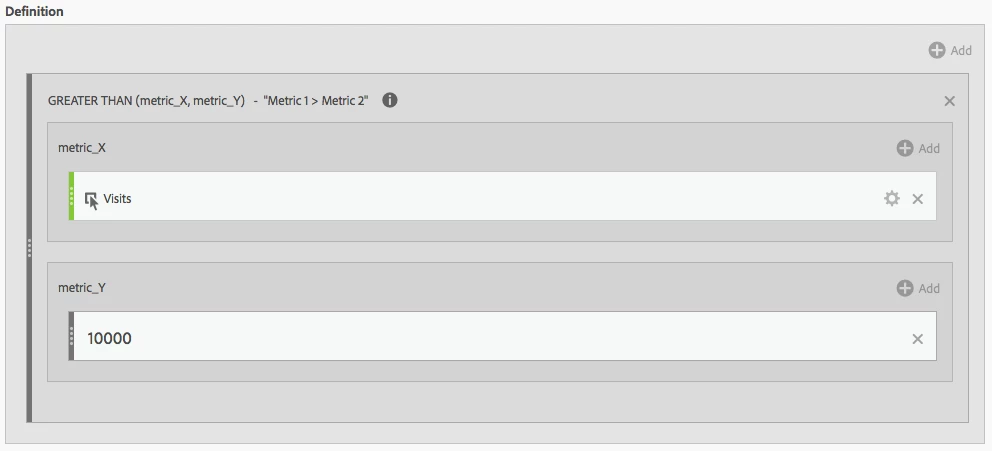
Right now, your best option is to leverage Calculated Metrics and sort by them:

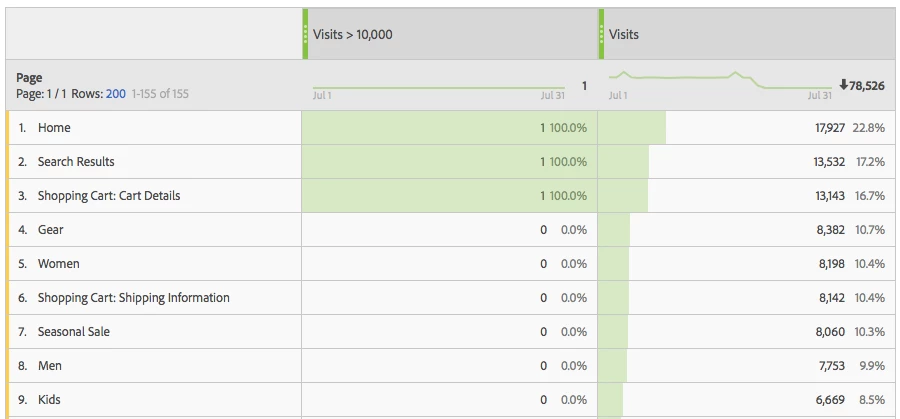
Which would result in:

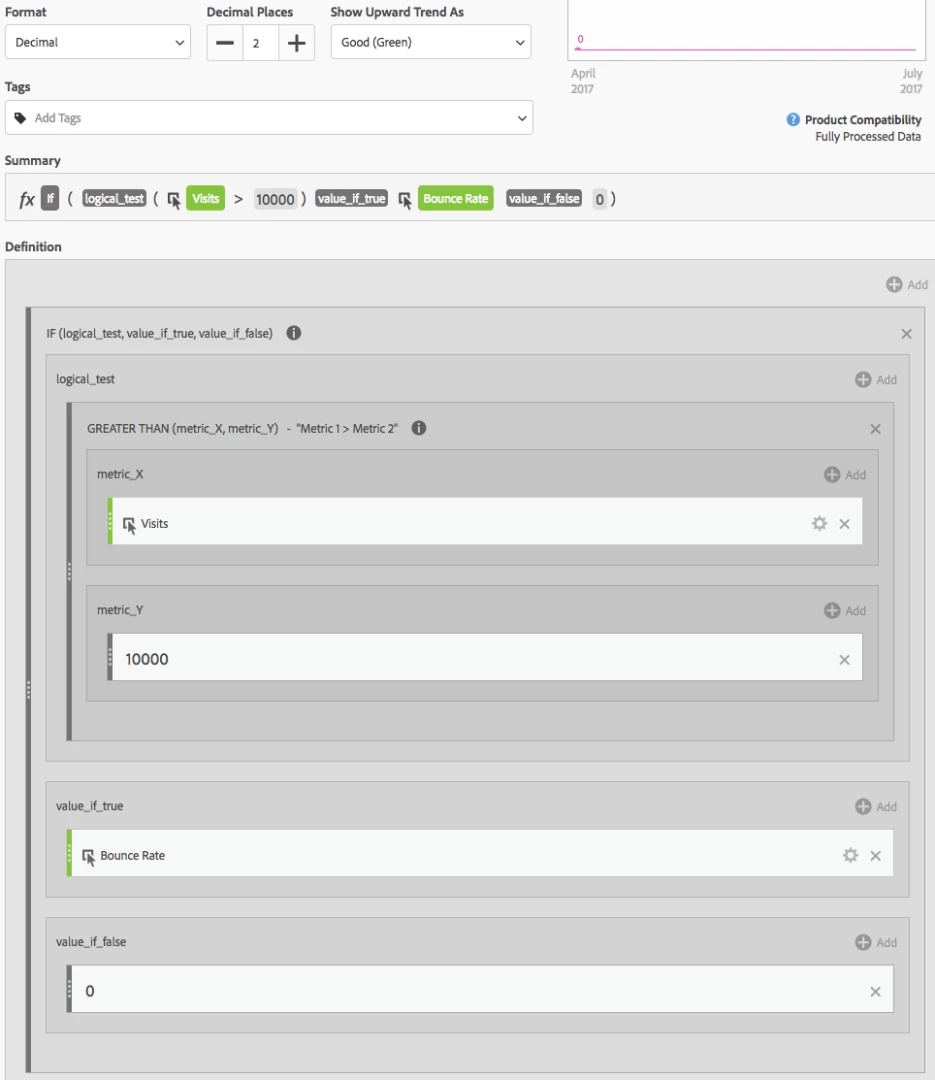
You could also leverage a combination of the IF and GREATER THAN functions if this is your goal. For example, if Visits are greater than 10,000, show Bounce Rate:

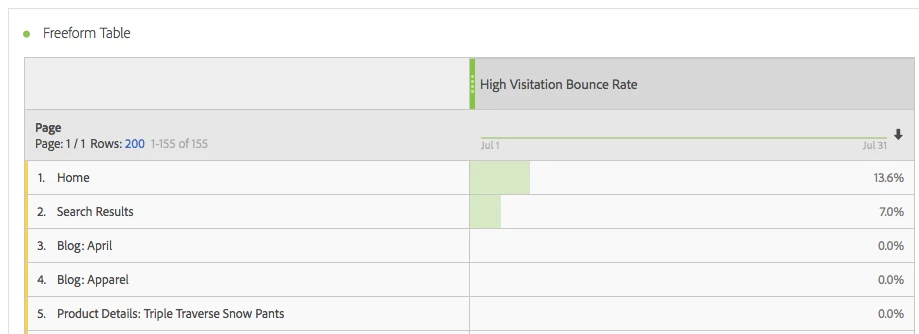
Which would result in:

Does that help get you where you're looking to go?

6 replies

simone89947810
Level 2
Aug 11, 2017 7:57 AM UTC

I think thats pretty much the same solution, but with some formatting added to the report to remove the 0? Its a good work around, but Adobe should really provide a way to filter by metric volume. Its a pretty simple ask really.

Translate
Hyder_Ziaee
Employee
Aug 10, 2017 6:49 AM UTC

Have been thinking about this for a long time as well. I went ahead and created an idea for this.

Allow items with zero value to be not shown in workspace

Hope this helps. Do add if I have missed any details or impact of having the idea implemented or not.

-Hyder

Translate
New Participant
Aug 10, 2017 12:19 AM UTC

Hi Eric

Is it possible to have the irrelevant "0" results in your first picture not show up at all? Reason being, I am trying to filter a metric to export the results to a CSV file. I would rather just export a small number of relevant results than a large number which I would then have to take the extra step of manually excluding 0 values.

Translate
simone89947810
Level 2
Jul 24, 2017 8:12 AM UTC

Hey Eric,

Thanks for this.

I think the If Then Else might work for what I need. Basically, I have a calculated metric which works out a % of calls generated from each page (Calls / Visits). I want to create a report which I can order by the % column, but exclude any pages with less than say 100 visits or so.

Again, this seems like such a basic thing, while creating the If Then Else might work, it feels like a more complex solution that it should need to be. I’ll give it a try though.

Thanks again!

Simon.

Translate
EricMatisoff
EricMatisoffAccepted solution
Employee
Jul 21, 2017 4:09 PM UTC

I'm curious what you're looking to do with this filter, once you have it applied.

Right now, your best option is to leverage Calculated Metrics and sort by them:

Which would result in:

You could also leverage a combination of the IF and GREATER THAN functions if this is your goal. For example, if Visits are greater than 10,000, show Bounce Rate:

Which would result in:

Does that help get you where you're looking to go?

Translate
Jeff-Wright
New Participant
Feb 27, 2021 4:44 AM UTC
Not quite. I'd like the 0 rows to disappear altogether. Reason: When comparing date ranges, the rows with the lowest values have the greatest percentage change. We want filter reports what show only rows with, say, 500 or more visits.
Translate