
Why don't I get compare time periods functionality for Time dimension? | Community
Skip to main content
Level 2
May 24, 2024 9:02 AM UTC
Solved

Why don't I get compare time periods functionality for Time dimension?

I am trying to create a freeform table where I want month wise visits level data for last 2 years and want YoY Percentage change in number of visits and Month on percentage change from Jan to Dec, How can I do that? Why am I not able to Compare time periods option when I take Month or any Time Dimensions in my freeform table? 

This post is no longer active and is closed to new replies. Need help? Start a new post to ask your question.
pradnya_balvir
pradnya_balvirAccepted solution
New Participant
May 28, 2024 4:15 PM UTC

Thanks a lot for response.

I am not getting Percentage Change option in my workspace. Please check screenshot below. What could be possible reason for this?
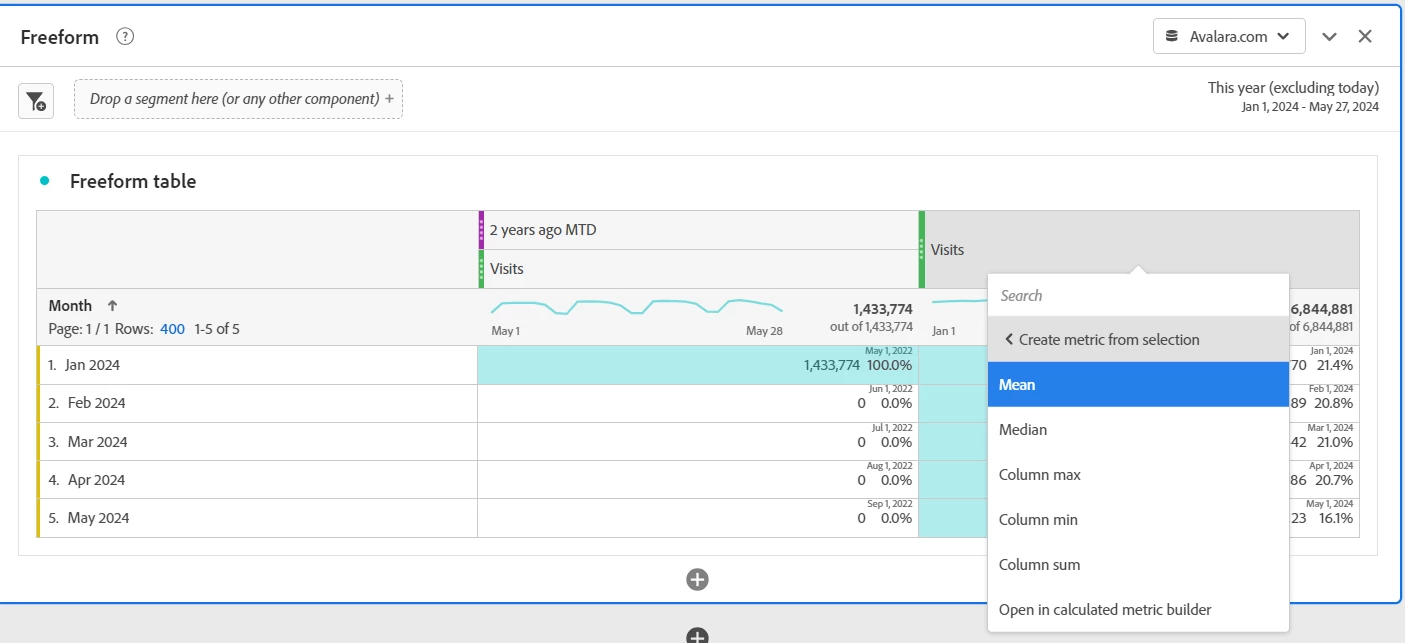


@dipikasomvanshi , Because you have selected only this year Visits metric.


Can you please select Visits from both column and then right click.


6 replies

pradnya_balvir
New Participant
May 24, 2024 2:15 PM UTC

Hi @dipikasomvanshi ,


Yes, compare time period option is not visible for Time dimension report and visible for other dimensions.


In this case you can add visits report for specific year then click on add time period column -> Prior year to this date range. 

Use bar chart for performance visualisation. 


For percent change number, you can select the rows. - > Right click - > Visualize - > Summary change.

You can use this for your manual creation report.


Translate
Level 2
May 28, 2024 11:01 AM UTC

Thanks for your reply. Can I able to create any custom metric like YoY Percentage Change for each month in this case?

Translate
pradnya_balvir
New Participant
May 28, 2024 1:26 PM UTC

Summary change report is best way to calculate the % of change for month. You need to manually select each month and observe and note the change value.


Also, you can try quick calculated metrics in analysis workspace

Select both visit metrics -> right click on it -> Click metric from selection -> click on percent change


https://experienceleague.adobe.com/en/docs/analytics-learn/tutorials/components/calculated-metrics/quick-calculated-metrics-in-analysis-workspace


Translate