Workspace- Change Row Default Setting for Large Breakdowns | Community
Skip to main content
New Participant
June 30, 2020
Solved

Workspace- Change Row Default Setting for Large Breakdowns

  • June 30, 2020
  • 1 reply
  • 1661 views

Hi All, 


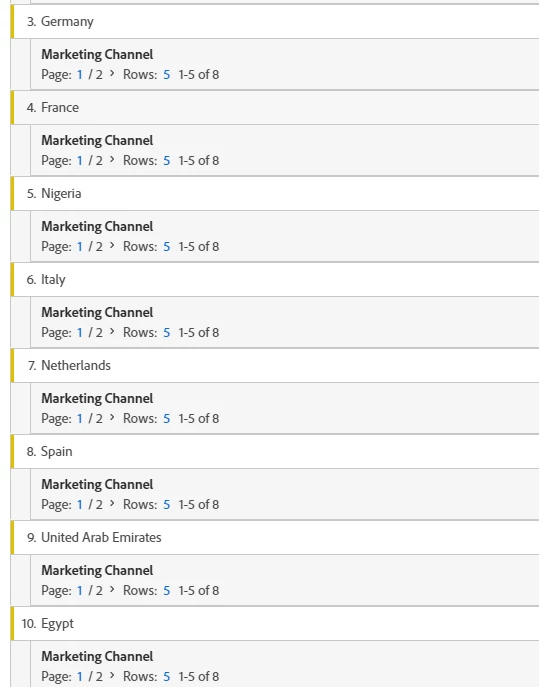
I have a free form table that shows countries (192 rows) and I broke it down by Marketing Channel. The Marketing Channel breakdown by default shows just 5 rows (we need to show 10). Is there an easy way to change rows from 5 to 10 without having to go through each country? Screen shot below. Thanks!
This post is no longer active and is closed to new replies. Need help? Start a new post to ask your question.
Best answer by raj_mandalapu

Can you please try to build using Table Builder in the free form table, seems they delivered this functionality recently  

Check this video https://www.youtube.com/watch?v=GUMWiJAmMGI

Refer this link for more information

https://experienceleaguecommunities.adobe.com/t5/adobe-analytics-ideas/default-breakdown-rows-in-workspace/idc-p/352334#M14204

1 reply

raj_mandalapu
raj_mandalapuAccepted solution
New Participant
June 30, 2020

Can you please try to build using Table Builder in the free form table, seems they delivered this functionality recently  

Check this video https://www.youtube.com/watch?v=GUMWiJAmMGI

Refer this link for more information

https://experienceleaguecommunities.adobe.com/t5/adobe-analytics-ideas/default-breakdown-rows-in-workspace/idc-p/352334#M14204

EMeyer79Author
New Participant
July 8, 2020
Thank you! That worked!