Workspace: Copy + Paste Segment Containers | Community
Skip to main content
v-tiwri
Level 3
Apr 24, 2018 3:48 AM UTC
New

Workspace: Copy + Paste Segment Containers

Current Issue:

Users do not have the ability to copy + paste segment containers in segment builder, resulting in extra clicks needed to build segments where the same containers must be repeated throughout the segment.

Proposed Idea/Resolution:

Add the ability to copy a container in Segment Builder and paste as another container within the segment you are building -- including all the logic within the container.

Benefit:

Makes it faster to build complex segments when a specific container and its logic are repeated within other containers in the segment.

See example below:
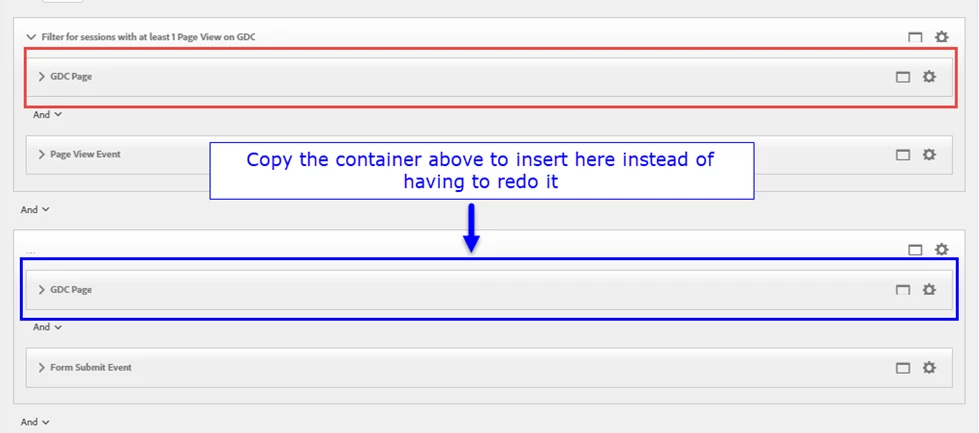
Thanks!

4 replies

Community Manager
Oct 5, 2022 7:04 PM UTC
No text available
Translate
jantzen_b
Employee
Oct 27, 2020 10:36 PM UTC
No text available
Translate
v-tiwri
v-tiwriAuthor
Level 3
May 2, 2018 3:27 PM UTC

Nice! Didn't realize holding the CTRL key and dragging down copied the container and pasted it. Not as intuitive, but it works! Thanks Andy. Since it already exists as a feature, it would be nice if it was enhanced to be more intuitive (e.g. allowing users to right click and see a drop down menu with the option to 'copy to clipboard' similar to what's done with workspace visuals)

Translate
apowersadobe
Employee
May 2, 2018 5:06 AM UTC

v-tiwri​, you can do this already. Hold the CTRL key and drag the container / criteria to the location desired.

Still like the idea, especially if you are working with a very large segment definition. In those cases, it is harder to CTRL-drag from one end to the other.

Translate