Workspace multiple breakdowns | Community
Skip to main content
New Participant
Apr 15, 2021 8:18 AM UTC
Solved

Workspace multiple breakdowns

Hi there, 


I am looking to create a report that pulls a property showing only 1 breakdown, and then showing one breakdown underneath this. The default is 5 which I can't seem to change to 1 for all rows. Also I have to manually add the second breakdown to each row. 


I knew how to create this report quickly in Ad Hoc analysis but it seems like a very manual process in Workspace. 


I need this report to be sent to me each month so I don't have time to manually add and edit the breakdowns.
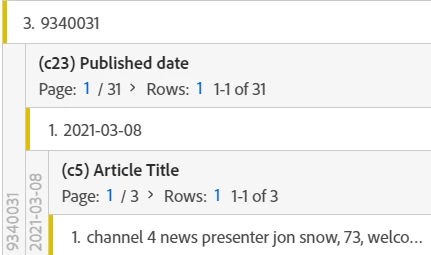


Any ideas would be greatly appreciated.

This post is no longer active and is closed to new replies. Need help? Start a new post to ask your question.
Andrey_Osadchuk
Andrey_OsadchukAccepted solution
Level 10
Apr 15, 2021 2:50 PM UTC

When you add a new Freeform table in the panel, click on the button "enable table builder". It will let you configure the breakdowns before the table gets populated with data (it works similar to Ad Hoc Analysis). Unfortunately, it's not so flexible in terms of the number of breakdowns, but may help you anyway.


1 reply

Andrey_Osadchuk
Andrey_OsadchukAccepted solution
Level 10
Apr 15, 2021 2:50 PM UTC

When you add a new Freeform table in the panel, click on the button "enable table builder". It will let you configure the breakdowns before the table gets populated with data (it works similar to Ad Hoc Analysis). Unfortunately, it's not so flexible in terms of the number of breakdowns, but may help you anyway.

 
Translate