Configure Events Contains Data in AA but No Data in AAM | Community
Skip to main content
New Participant
September 27, 2019
Solved

Configure Events Contains Data in AA but No Data in AAM

  • September 27, 2019
  • 7 replies
  • 8390 views

Hi AAM Experts,

Newbie here :-)

I've notice data for ‘event x’ inside Adobe Analytics but no data is being set to Audience Manager.

Stupid question: How do I validate the ‘event x’ sending data to AAM or not .

Thanks,

PV
This post is no longer active and is closed to new replies. Need help? Start a new post to ask your question.
Best answer by franciscor54562

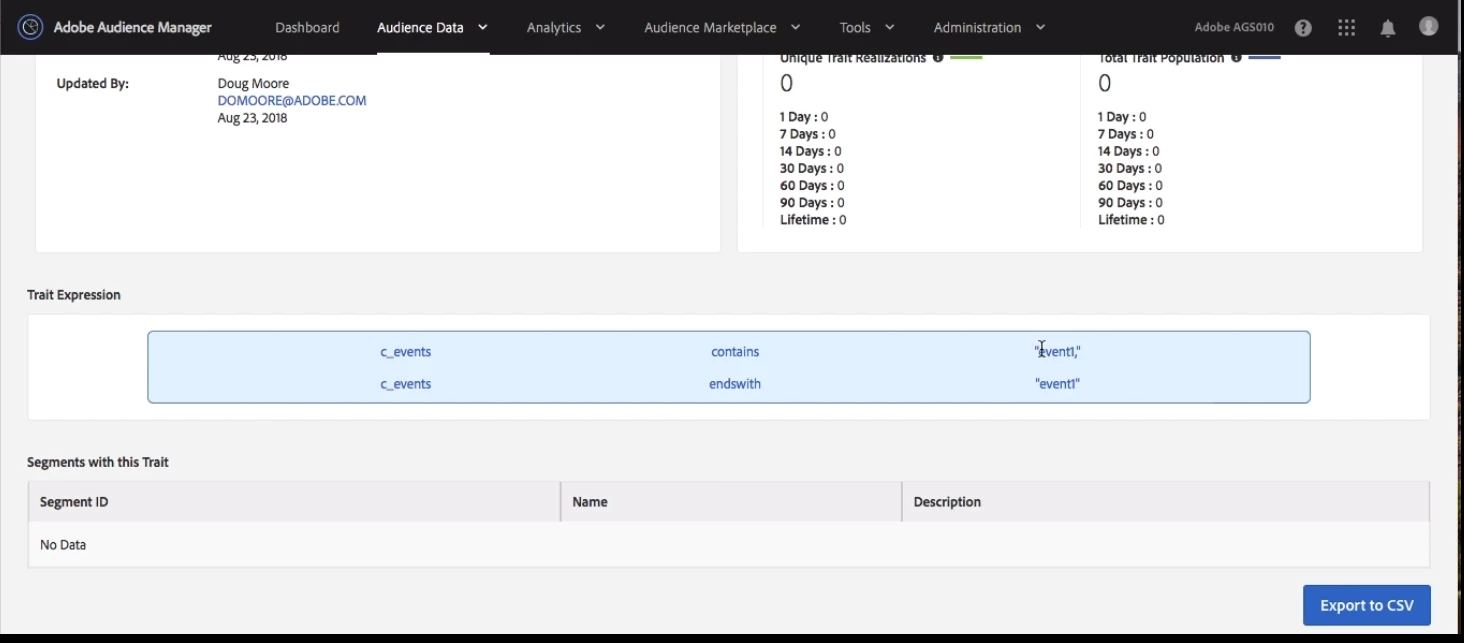
If you want to catch only an specific event in a call you have to configurate as follows:

Contains "eventx" and endswith "eventx" due to a user could send more than one value for event ie "event: event1,event2,event3" and you would collect "event1,event2,event3" I watched it on a video training

shweta_singh​ could you confirm it?

7 replies

New Participant
October 3, 2019

Thank you, of course...its an important point to take into account!

Employee
October 3, 2019

Hi franciscor54562584

I don't think so that events value will be such that it starts and ends with same eventx. To capture a particular from the list of events,we can also build regex for that eventx.

Regards,

Shweta

franciscor54562Accepted solution
New Participant
September 27, 2019

If you want to catch only an specific event in a call you have to configurate as follows:

Contains "eventx" and endswith "eventx" due to a user could send more than one value for event ie "event: event1,event2,event3" and you would collect "event1,event2,event3" I watched it on a video training

shweta_singh​ could you confirm it?

Employee
September 27, 2019

Hi there,

Another way to validate if event x is being sent to audience manager or not is using browser developer tools.

1.Open the page in your website where "eventx" is fired and filter the network calls in browser developer tools using b/ss.

2.b/ss is the filter for adobe analytics call.

3.Open the analytics call and check for events:"eventx" value in query string parameters.

4.If the value is present that means eventx is being passed to audience manager.

Something like below:

Regards,

Shweta

Andrey_Osadchuk
New Participant
September 27, 2019

Check how many times that event was fired in Adobe Analytics for the last week/month.

Check if server-side forwarding or AAM integration code was set up in your implementation.

prathiv23Author
New Participant
September 27, 2019

Thank you

Andrey_Osadchuk
New Participant
September 27, 2019

Go to Audience Data > Signals > Search.

Enable Advanced search for Adobe Analytics.

Apply a filter as Key "c_events" contains "event x".

You will see how often "event x" was sent to AAM as a signal.

Note: this search capability will show you only those signals that were captured at least 1000 times.