unmap a destination | Community
Skip to main content
johnl87222593
New Participant
August 1, 2019
Solved

unmap a destination

  • August 1, 2019
  • 1 reply
  • 3332 views

how do remove a segment from a destination.

This post is no longer active and is closed to new replies. Need help? Start a new post to ask your question.
Best answer by shweta_singh

Hi @johnl87222593,

We can un-map segments from destination using audience manager UI. Below are the steps you can follow to do the same:

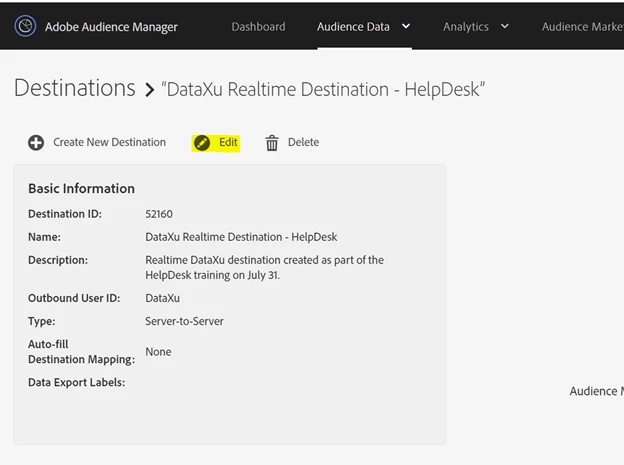
1. Go to Destinations in audience data.Once destinations are opened choose the desired destination from which you want to un-map segments and click on edit.
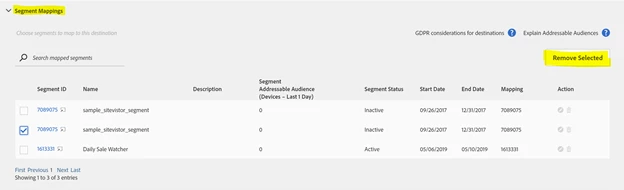
           2. In the segment mappings section, select the desired segment which you want to un-map and click on remove selected.
              

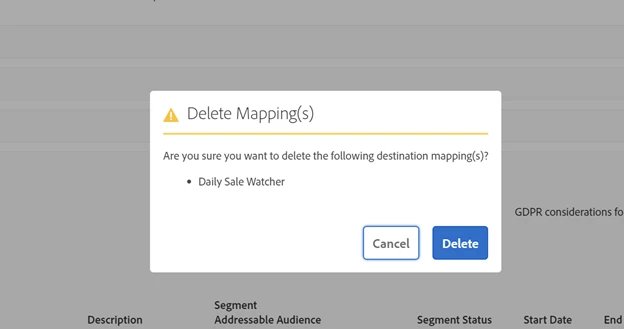
3. Click on Delete in dialog box and segment will be un-mapped from the destination.
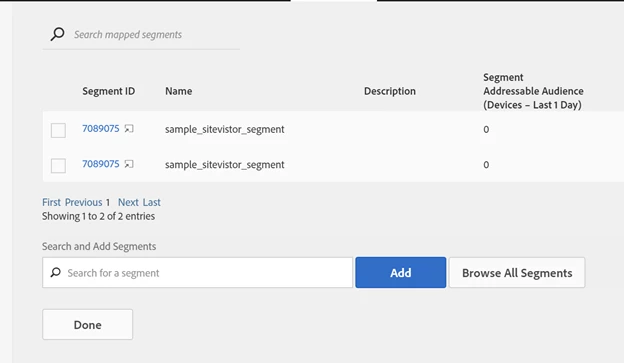
4. Click on Done to save the changes.
Regards,

Shweta

1 reply

shweta_singhAccepted solution
Employee
August 1, 2019

Hi @johnl87222593,

We can un-map segments from destination using audience manager UI. Below are the steps you can follow to do the same:

1. Go to Destinations in audience data.Once destinations are opened choose the desired destination from which you want to un-map segments and click on edit.

           2. In the segment mappings section, select the desired segment which you want to un-map and click on remove selected.


3. Click on Delete in dialog box and segment will be un-mapped from the destination.

4. Click on Done to save the changes.

Regards,

Shweta