Not able to send Reminder mail | Community
Skip to main content
New Participant
April 17, 2025
Question

Not able to send Reminder mail

  • April 17, 2025
  • 2 replies
  • 421 views

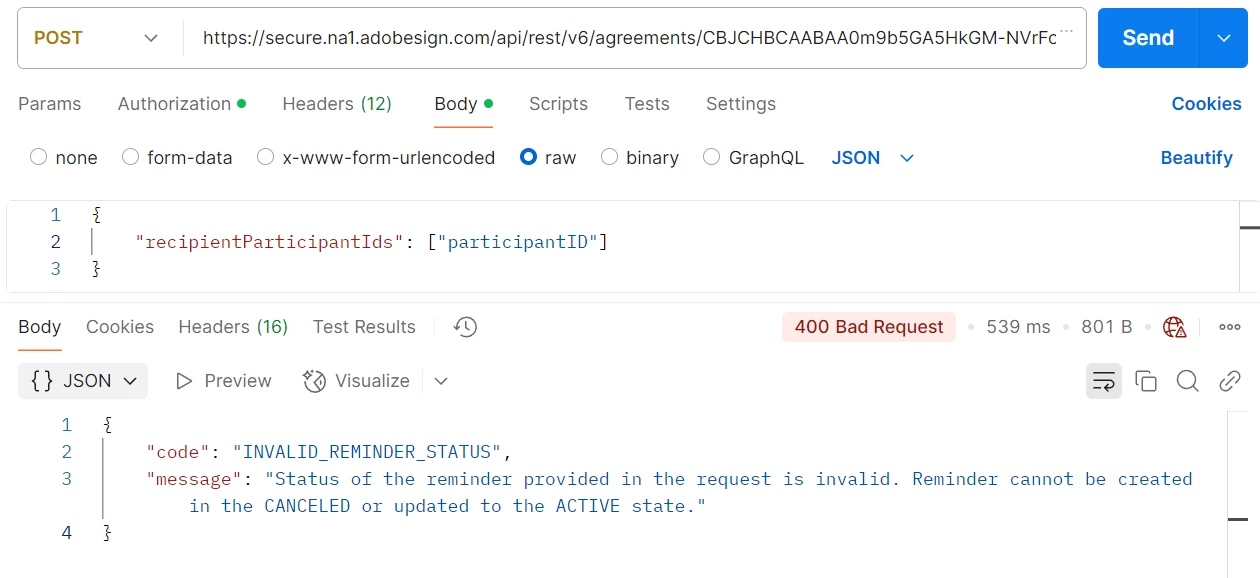
I just created an agreement. Now I'm trying to send reminder mail to the participants. Getting error.  

Please find below screenshot for reference.
 

2 replies

AmitVishwakarma
New Participant
April 30, 2025

Hi @bla3 ,

Step 1: Get Agreement Status

Use this API to check the current state of the agreement:

GET https://secure.na1.adobesign.com/api/rest/v6/agreements/{agreementId} Authorization: Bearer {access_token}

Look for this in the response:

"status": "OUT_FOR_SIGNATURE"

Only proceed if status is one of these:
- OUT_FOR_SIGNATURE
- IN_PROCESS
- WAITING_FOR_MY_SIGNATURE

Do not proceed if status is:
- DRAFT
- CANCELLED
- EXPIRED
- SIGNED
- ARCHIVED

Step 2: Confirm the Participant ID

Use this API to list participants and get the correct participant ID:

Step 2: Confirm the Participant ID Use this API to list participants and get the correct participant ID:

Copy the exact participantId from the response.

Step 3: Send the Reminder

Now use the POST request (like you did) but with verified active agreement and valid participantId:

POST https://secure.na1.adobesign.com/api/rest/v6/agreements/{agreementId}/reminders Authorization: Bearer {access_token} Content-Type: application/json { "recipientParticipantIds": ["{valid_participantId}"] }

If everything above is correct, this request will succeed.

If you’re calling this right after creating the agreement, wait 5–10 seconds before sending the reminder. Sometimes Adobe Sign takes a few seconds to mark the agreement as active.

Regards,
Amit

AnkitJasani29
New Participant
April 24, 2025

Hi @bla3 ,


You're trying to send a reminder for an agreement that is either:

  • Canceled, or
  • Not yet in an ACTIVE state


Make sure the agreement is in an active state before sending a reminder. An agreement becomes active after:

  • All parties have viewed or interacted with it
  • It's not in a draft, canceled, or expired state

Steps to Check:

1) Get Agreement Status Use this API to check agreement status:

GET /agreements/{agreementId}
Look for the "status" field in the response. It should be:

"status": "IN_PROCESS"
or another valid active state (like OUT_FOR_SIGNATURE, etc.)


2) Ensure You're Not Sending to a Canceled Agreement If the agreement was canceled, you'll need to re-create it and ensure it's sent properly.


3) Wait a Bit If Just Created Sometimes newly created agreements take a few seconds to move to an active state. Wait briefly and try again.