AA - Product String Builder Errors | Community
Skip to main content
New Participant
September 5, 2021
Solved

AA - Product String Builder Errors

  • September 5, 2021
  • 2 replies
  • 2394 views

Anyone gotten the Launch AA Product String Builder to work without their Data Layer management tool??  I just tested it on Adobe's AEM we.retail demo site and either it won't recognize a direct object reference (like typing digitalData.cart.products instead of using a data element) or if I use a data element throws a runtime error.


launch-54a7599c3ecf-development.min.js:3 Uncaught (in promise) TypeError: this.settings.productCollectionPath.replace is not a function at n.getProductCollectionPath (launch-54a7599c3ecf-development.min.js:3) at n.setProductBase (launch-54a7599c3ecf-development.min.js:3) at n.buildProductMapping (launch-54a7599c3ecf-development.min.js:3) at launch-54a7599c3ecf-development.min.js:3


Sometimes it will recognize the data layer; when it does - the error above is thrown.
 

This post is no longer active and is closed to new replies. Need help? Start a new post to ask your question.
Best answer by atusingh17

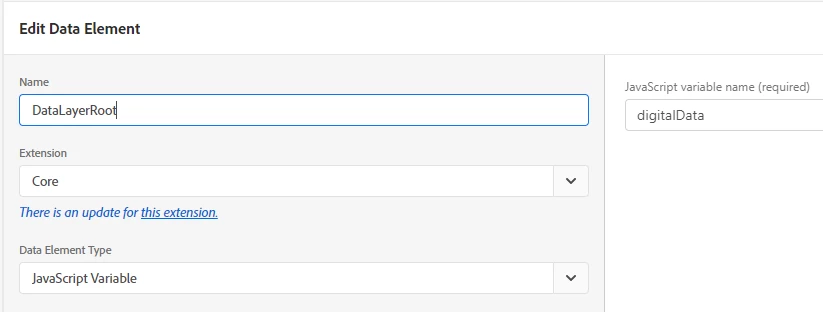
Core > JavaScript Variable returns "digitalData"


If you are using the data element definition as:

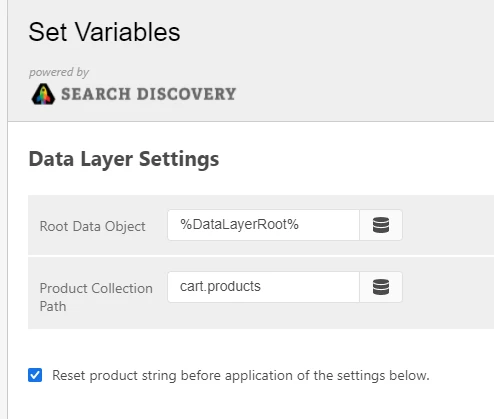
and using the data element as below:

It should work.
If it still doesn't work, I suspect, if the data layer is being overwritten by the time code runs ?

2 replies

yuhuisg
New Participant
September 7, 2021

Try this:

1. Use %dataLayerRoot.cart% as the Root Data Object.

2. Use "products" as the Product Collection Path.

You will need a data element named "dataLayerRoot.cart" of JavaScript variable type to return your "dataLayerRoot.cart" object for step 1.

New Participant
September 7, 2021

Tried a number of variations without success; either I still get the error in the original screenshot, it fails silently or the products string is malformed.  Simple Data Layer below:


digitalData.cart.products[0].product
digitalData.cart.products[0].price
digitalData.cart.products[0].quantity
digitalData.cart.products[1].product
digitalData.cart.products[1].price
digitalData.cart.products[1].quantity

The documentation from the extension says it's expecting "digitalData" in the root, "cart.products" in the Product Collection path and "product" in Path to Product ID box.


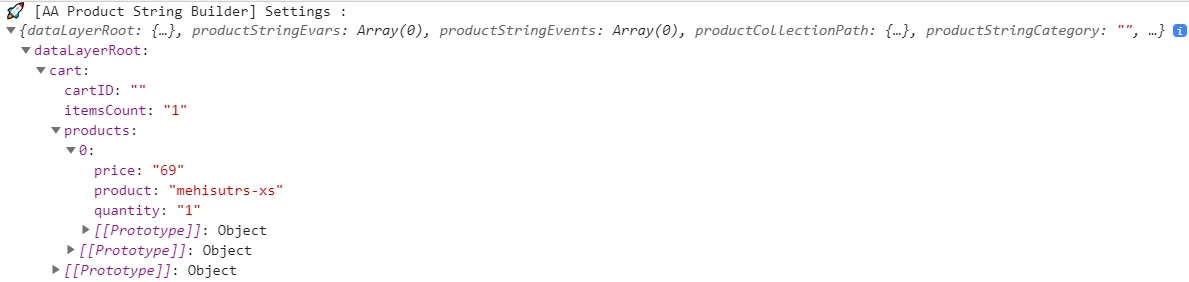
Except, that doesn't work for me.  Unless I'm doing it incorrectly, the extension tracks "_0" as the product id (you can see the actual id in the original screenshot).


Employee
September 7, 2021

@expcloudmember  Can you share the definition within digitalData data-element, that you're using in Root ?

Employee
September 7, 2021

Hi @expcloudmember 


For the error you're facing, could you please share the value you're passing to AA product string extension ?


I believe you're using Search discovery extension to set products variable.

Ideally, the way you pass values to "AA Product String Builder" in rule action as-


Root Data Object = Dataelement (which return root object, for example: dataLayerRoot)

Product Collection Path = cart.products

Product Strings Core Settings:
Category = product

Product ID = productsku