
Adobe Launch - How to read CustomEvent payloads and properties (event.detail.obj) - Core Extension 3.1+ | Community
Skip to main content
bsimoes-lcg
New Participant
December 23, 2021
Solved

Adobe Launch - How to read CustomEvent payloads and properties (event.detail.obj) - Core Extension 3.1+

  • December 23, 2021
  • 3 replies
  • 4846 views

Hey community,


It seems that since the release of Core extension 3.1+ in Adobe Launch, our code to retrieve a property of "event.detail" does not work.

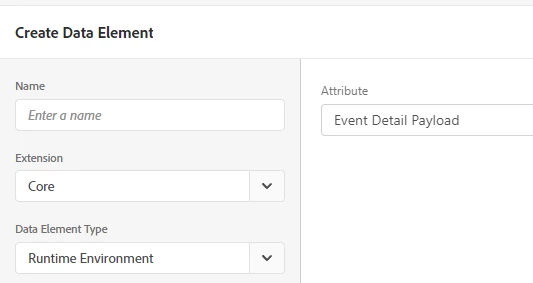
We used to create a Data Element of type "Javascript Variable" with "event.detail.myproperty". Now it seems that a "Javascript Variable" no longer has access to the "event" object. Probably replaced by the new "Runtime Environment" (I guess for performance??).

https://experienceleague.adobe.com/docs/experience-platform/tags/extensions/adobe/core/release-notes.html?lang=en#september-16%2C-2021


To fix this, we created a Custom Code that tests the object and returns the property. At least this still has "event" access.

However, this seems to be a less elegant solution than before.


How would I elegantly retrieve a property of "event.detail" using the new "Runtime Environment"?

Using "Event Detail Payload" only returns "event.detail", and it does not provide a flexible way to read properties (in my case 'event.detail' is an object, and not a string or a decimal).


This post is no longer active and is closed to new replies. Need help? Start a new post to ask your question.
Best answer by yuhuisg

Generally, if you want to use event.detail.myProperty, where event.detail was set by a Custom Event browser event, then you can use it directly in your Rule's conditions and actions directly, without needing a separate data element.


E.g. in a Value Comparison condition, you can use

%event.detail.myProperty%

equals

foobar

E.g. in a Adobe Analytics Set Variables action, you can use in Custom Code:

s.eVar3 = event.detail.myProperty


The above will work even when you don't have an explicit Data Element called "event.detail.myProperty".

3 replies

bsimoes-lcg
New Participant
December 27, 2021

Thanks @serban_andreist and @yuhuisg,

I have found by accident that using %event.detail.myProperty% on an Action like "Adobe Analytics Set Variables" works without creating the Data Element. I thought I was going crazy.
Even if I have created a Data Element with the same name, I guess that Launch is not using the Data Element.
Thanks for explaining that it is the intended outcome!

yuhuisg
yuhuisgAccepted solution
New Participant
December 24, 2021

Generally, if you want to use event.detail.myProperty, where event.detail was set by a Custom Event browser event, then you can use it directly in your Rule's conditions and actions directly, without needing a separate data element.


E.g. in a Value Comparison condition, you can use

%event.detail.myProperty%

equals

foobar

E.g. in a Adobe Analytics Set Variables action, you can use in Custom Code:

s.eVar3 = event.detail.myProperty


The above will work even when you don't have an explicit Data Element called "event.detail.myProperty".

Employee
December 23, 2021

Hi,

As far as I am aware data elements never had access to the `event`. The `event` is sent to conditions and action modules. The JavaScript data element reads the values from the `window` object. When you create a JavaScript data element with `event.detail.myproperty`, it is translated to `window.event.detail.myproperty`. Are you sure you didn't have maybe a piece of code that was setting the `window.event` property? 


UPDATE: I was wrong, it seems data elements modules have access to the `event`. But JavaScript data elements doesn't use that and the code wasn't changed in 5 years: https://github.com/adobe/reactor-extension-core/blob/master/src/lib/dataElements/javascriptVariable.js. I still think there is a possibility that somewhere in the code you were setting `window.event`.