
Assigning multiple enum values to one label | Community
Skip to main content
Ella_Taylor
New Participant
September 7, 2022
Solved

Assigning multiple enum values to one label

  • September 7, 2022
  • 2 replies
  • 812 views

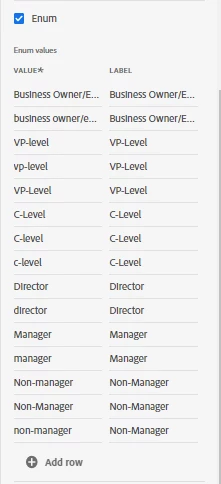
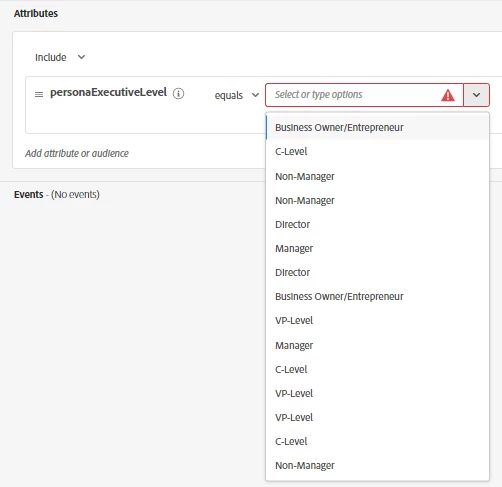
Is it possible to assign multiple enum values to one label? We have various spellings of the same value (ex. vp-level, VP-level, VP-Level) across our data but I would like to display only one version (ex. VP-Level) in the attribute drop-down list. I tried to do this by adding all the enum values and pointing duplicates to the same label but I end up with an equally long drop-down. My goal is to have a clean and condensed drop-down list without missing any contacts due to discrepancies in spelling. Is there another way to achieve this?


This post is no longer active and is closed to new replies. Need help? Start a new post to ask your question.
Best answer by Anil_Umachigi

Right so based on where you would use it, there are couple of options. 


a.) Segmentation/Profile Usage: Modify at source level, i.e a you format the "raw data" before ingestion using the Data prep. Create a regex of those possible values to match against raw data, if true return "VP-Level". 

b.) For reporting purpose (CJA): This would be a component setting feature, where you could create rules to match similar items. 


Hope that helps 

2 replies

ChetanyaJain-1
New Participant
September 8, 2022

@ella_taylor when you create the Enum field, create with the standard value. During the data ingestion apply the transformation during the data preparation step to map correctly. 

How are you ingesting the data? Batch or streaming?

Anil_Umachigi
Anil_UmachigiAccepted solution
Employee
September 8, 2022

Right so based on where you would use it, there are couple of options. 


a.) Segmentation/Profile Usage: Modify at source level, i.e a you format the "raw data" before ingestion using the Data prep. Create a regex of those possible values to match against raw data, if true return "VP-Level". 

b.) For reporting purpose (CJA): This would be a component setting feature, where you could create rules to match similar items. 


Hope that helps