Can't Get Analytics Plugins Working | Community
Skip to main content
MktgCloudUser
New Participant
October 4, 2018
Solved

Can't Get Analytics Plugins Working

  • October 4, 2018
  • 1 reply
  • 4896 views

Hello,

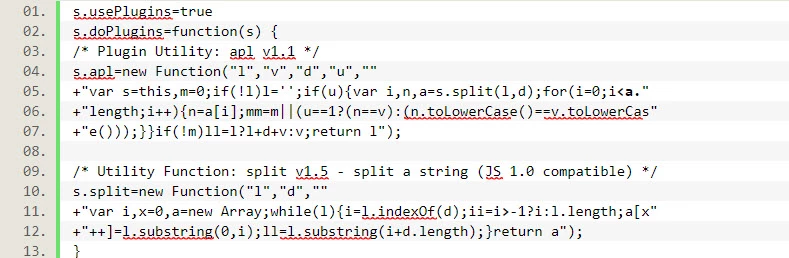
I can't get Adobe Analytics Plugins working.  Keep getting errors in console or Analytics doesn't load at all.  Below is a simple example using an Adobe plugin; here's my setup:

Analytics Extension

Manage the library for me (checked)

Custom Code Section (below)
Load Rule

Set Variables > Custom Code

  if (_satellite.getVar('Page: External Campaign (URL)') != '') {

    s.events=s.apl(s.events,"event3",",",1)

  }

I've tried several variations of putting all of the plugin code in the Load Rule, Extension and half-in-half, they all generate some form of client error like below:

Uncaught (in promise) TypeError: t.apl is not a function

How do I get plugins working.

This post is no longer active and is closed to new replies. Need help? Start a new post to ask your question.
Best answer by thomas_amsler

You have to define your plugins before your doPlugins function and only call them within doPlugins. doPlugins will get executed after your rule so s.apl isn't defined yet.

As you posted an image and not code I am not gonna retype everything but to get you an idea:

s.apl=newFunction(...);

s.split=new Function(...);

s.usePlugins=true;

s.doPlugins=function(s) {

//...

}

1 reply

thomas_amslerAccepted solution
New Participant
October 8, 2018

You have to define your plugins before your doPlugins function and only call them within doPlugins. doPlugins will get executed after your rule so s.apl isn't defined yet.

As you posted an image and not code I am not gonna retype everything but to get you an idea:

s.apl=newFunction(...);

s.split=new Function(...);

s.usePlugins=true;

s.doPlugins=function(s) {

//...

}