Cannot send beacon: TypeError: window.location.query is not a function | Community
Skip to main content
New Participant
May 12, 2021
Solved

Cannot send beacon: TypeError: window.location.query is not a function

  • May 12, 2021
  • 4 replies
  • 1820 views

Hi there -

Hoping you can help me understand why I a getting the error: 

Cannot send beacon: TypeError: window.location.query is not a function


Here is the window.location.query code I found in the Launch library that I think is causing the issue:

settings: {
orgId: "Xreplaced the value hereX@AdobeOrg",
customSetup: {
source: function() {
console.log(window.location.query("cmp"))
}
}, 


In Launch, I have a data element %campaignid% that is set to capture value from cmp query string parameter. 
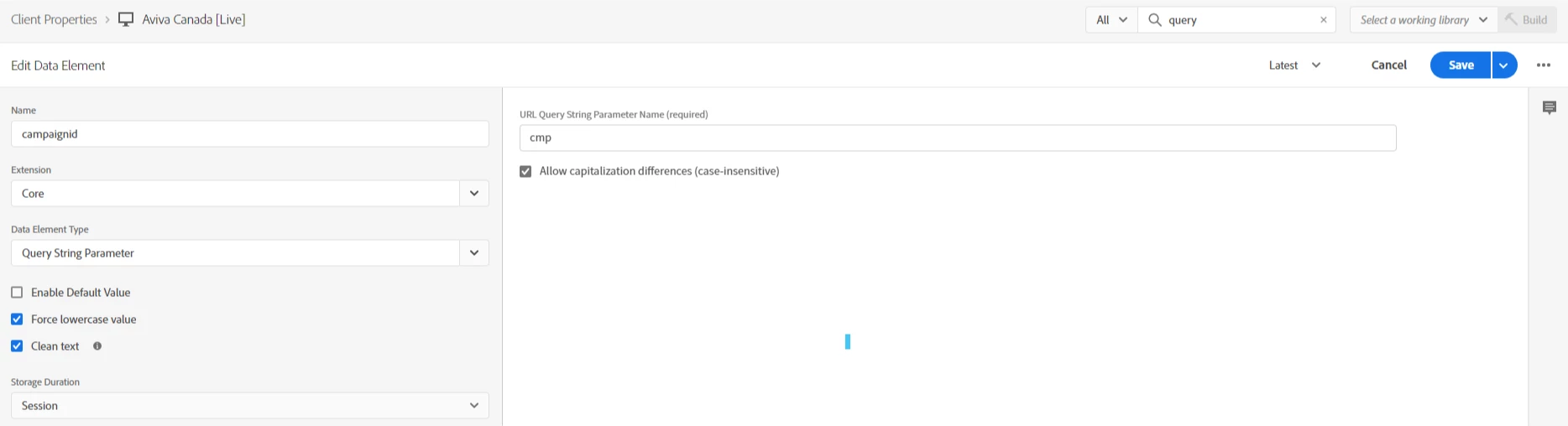
 

This value is passed on global page view and one other rule.


The page view isn't showing up in Adobe.


Am I missing something? Is there something else I can share to make the scenario more clear?


Thanks,


PFeach

 

This post is no longer active and is closed to new replies. Need help? Start a new post to ask your question.
Best answer by tim_funk

I see the Storage duration is set to session - So I suspect the initial page view was missing that parameter so that value carried as empty the rest of the session.


https://experienceleague.adobe.com/docs/launch/using/ui/data-elements.html?lang=en

4 replies

tim_funk
tim_funkAccepted solution
New Participant
May 13, 2021

I see the Storage duration is set to session - So I suspect the initial page view was missing that parameter so that value carried as empty the rest of the session.


https://experienceleague.adobe.com/docs/launch/using/ui/data-elements.html?lang=en

yuhuisg
New Participant
May 13, 2021

I'm not sure where that code is coming from. I'm pretty sure it's not from the Core extension itself. It looks like it could be coming from a Condition or Action in one of your Rules.

Anyway, try replacing "window.location.query" with just "location.query".

tim_funk
New Participant
May 13, 2021
query is not an property on location. Based on the name, it seems like query means query-string is desired. In which case - that would be "location.search"
Stewart_Schilling
New Participant
May 13, 2021

I didn't do it.  😉

New Participant
May 12, 2021

Someone added console.log(window.location.query("cmp")) to custom code section in Adobe Analytics extension. Was it me? May very well have been. I am not here to point fingers, lay blame; I'm here for the laughs - the highs, the lows and all the in-betweens.

Thanks.