Cannot set variables: Error: Cannot find the global variable name: "s" | Community
Skip to main content
courtneya707225
New Participant
January 16, 2020
Solved

Cannot set variables: Error: Cannot find the global variable name: "s"

  • January 16, 2020
  • 3 replies
  • 5881 views

I am migrating our implementation from DTM to Launch and I chose the "Manage the Library for me" option and when I load the page I am seeing rules fire, but then I am receiving this error message: [Adobe Analytics] Cannot set variables: Error: Cannot find the global variable name: "s".


This post is no longer active and is closed to new replies. Need help? Start a new post to ask your question.
Best answer by Joe_Y_1

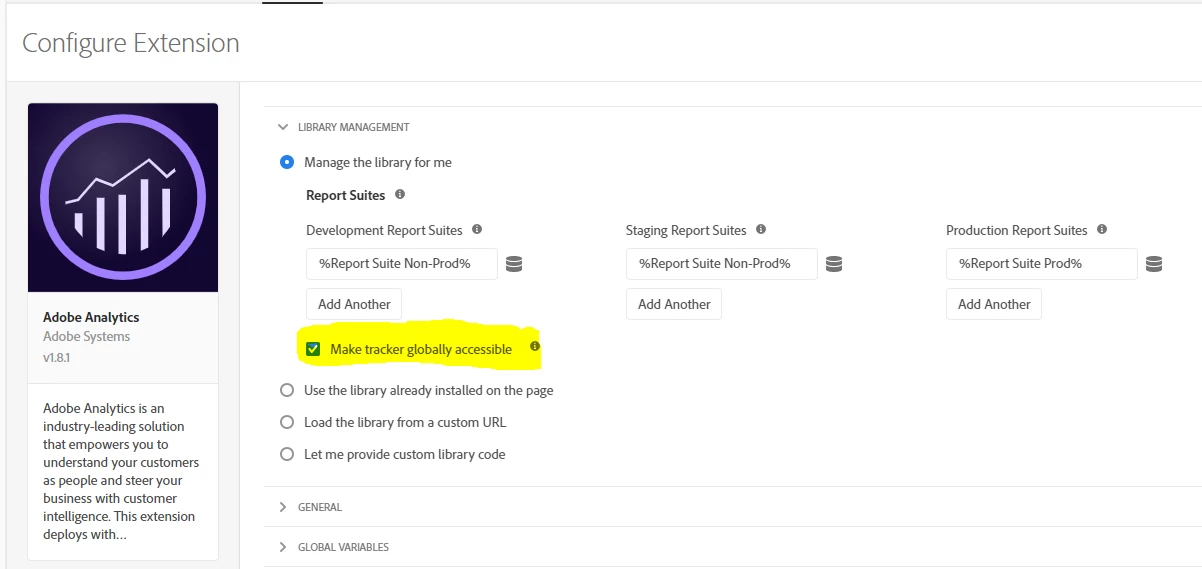
If you do not already have it checked, you may want to try checking the "Make tracker globally accessible" checkbox in the Adobe Analytics extension configuration.


3 replies

Haran_Huang
New Participant
February 21, 2020


Need to check Make tracker globally accessible in LIBRARY MANAGERMENT in Adobe Analytics Extension.


Joe_Y_1Accepted solution
New Participant
January 29, 2020

If you do not already have it checked, you may want to try checking the "Make tracker globally accessible" checkbox in the Adobe Analytics extension configuration.


franzli
New Participant
January 17, 2020

In general, the s object should be available in all custom code blocks but could it be that you are using the s object somewhere else apart from the custom code blocks?


If so, you will need to create a localized copy of the s object.


More details here:

https://www.digitaldatatactics.com/index.php/2016/01/15/how-to-get-a-global-s-object-in-dtm/