Console warnings about deprecated properties | Community
Skip to main content
New Participant
October 15, 2021
Solved

Console warnings about deprecated properties

  • October 15, 2021
  • 2 replies
  • 3437 views

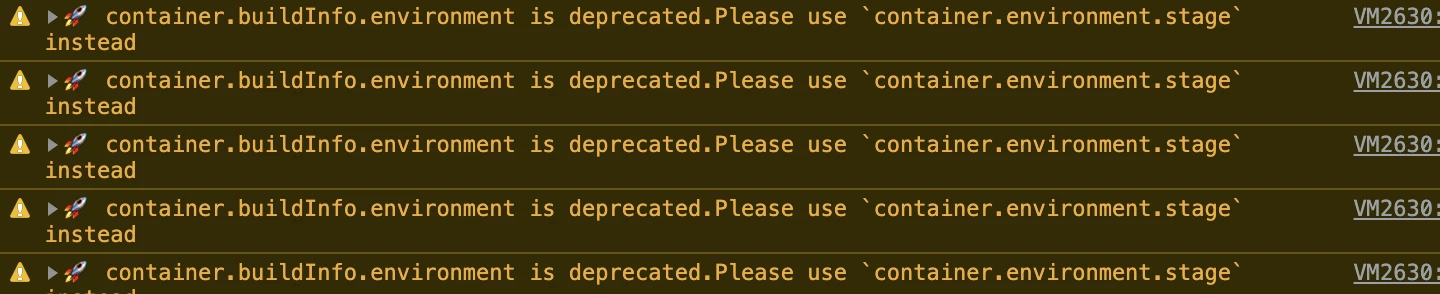
I've upgraded all my extensions and even searched for the property in Launch but it finds nothing. Not sure how to remove these warnings.



This post is no longer active and is closed to new replies. Need help? Start a new post to ask your question.
Best answer by Joe_Y_1

Do you have the Adobe Experience Platform Debugger installed by any chance? The debugger will cause those types of warnings.

If you mouseover the "VM###.##" link in the console log entry, it might display something like, "debugger:///VM###.##". If you click the link, it will take you to the offending code that the debugger injects into the page. Disable the debugger and see if the warnings cease.


2 replies

Joe_Y_1Accepted solution
New Participant
November 3, 2021

Do you have the Adobe Experience Platform Debugger installed by any chance? The debugger will cause those types of warnings.

If you mouseover the "VM###.##" link in the console log entry, it might display something like, "debugger:///VM###.##". If you click the link, it will take you to the offending code that the debugger injects into the page. Disable the debugger and see if the warnings cease.


Andrey_Osadchuk
New Participant
October 15, 2021

Look for buildInfo.
"container" in the message is referring to "_satellite", there must be custom code in your property with "_satellite.buildInfo.environment".

 
New Participant
October 28, 2021

We must have the same custom code!
