Data Element is not populating values from Adobe Client Data Layer | Community
Skip to main content
SkyGazer
New Participant
May 9, 2022
Solved

Data Element is not populating values from Adobe Client Data Layer

  • May 9, 2022
  • 1 reply
  • 5084 views

Hi All,


I am using Adobe Client Data Layer provided by AEM.


Created a Rule name "General Page Load" in Data Collection Platform and added the below Javascript code under "Event"

var pageShownEventHandler = function(evt) {
   // defensive coding to avoid a null pointer exception
   if(evt.hasOwnProperty("eventInfo") && evt.eventInfo.hasOwnProperty("path")) {
      //trigger Launch Rule and pass event
      console.debug("cmp:show event: " + evt.eventInfo.path);
      var event = {
         //include the path of the component that triggered the event
         path: evt.eventInfo.path,
         //get the state of the component that triggered the event
         component: window.adobeDataLayer.getState(evt.eventInfo.path)
      };

      //Trigger the Launch Rule, passing in the new `event` object
      // the `event` obj can now be referenced by the reserved name `event` by other Launch data elements
      // i.e `event.component['someKey']`
      trigger(event);
   }
}

//set the namespace to avoid a potential race condition
window.adobeDataLayer = window.adobeDataLayer || [];
//push the event listener for cmp:show into the data layer
window.adobeDataLayer.push(function (dl) {
   //add event listener for `cmp:show` and callback to the `pageShownEventHandler` function
   dl.addEventListener("cmp:show", pageShownEventHandler);
});


after adding this created a data element using the custom code 

if(event && event. Component && event.component.hasOwnProperty('@type')) {
    return event. Component['@type'];
}


But the event object is coming as undefined when we executed this rule. And I am not able to get the expected values also.


Please help us in resolving this issue.


https://experienceleague.adobe.com/docs/experience-manager-learn/sites/integrations/analytics/collect-data-analytics.html?lang=en - Referred this link for above implementation


Cheers,

Chandru A



This post is no longer active and is closed to new replies. Need help? Start a new post to ask your question.
Best answer by yuhuisg

I suggest doing the following in Adobe Launch instead:

  1. Install the Adobe Client Data Layer extension.
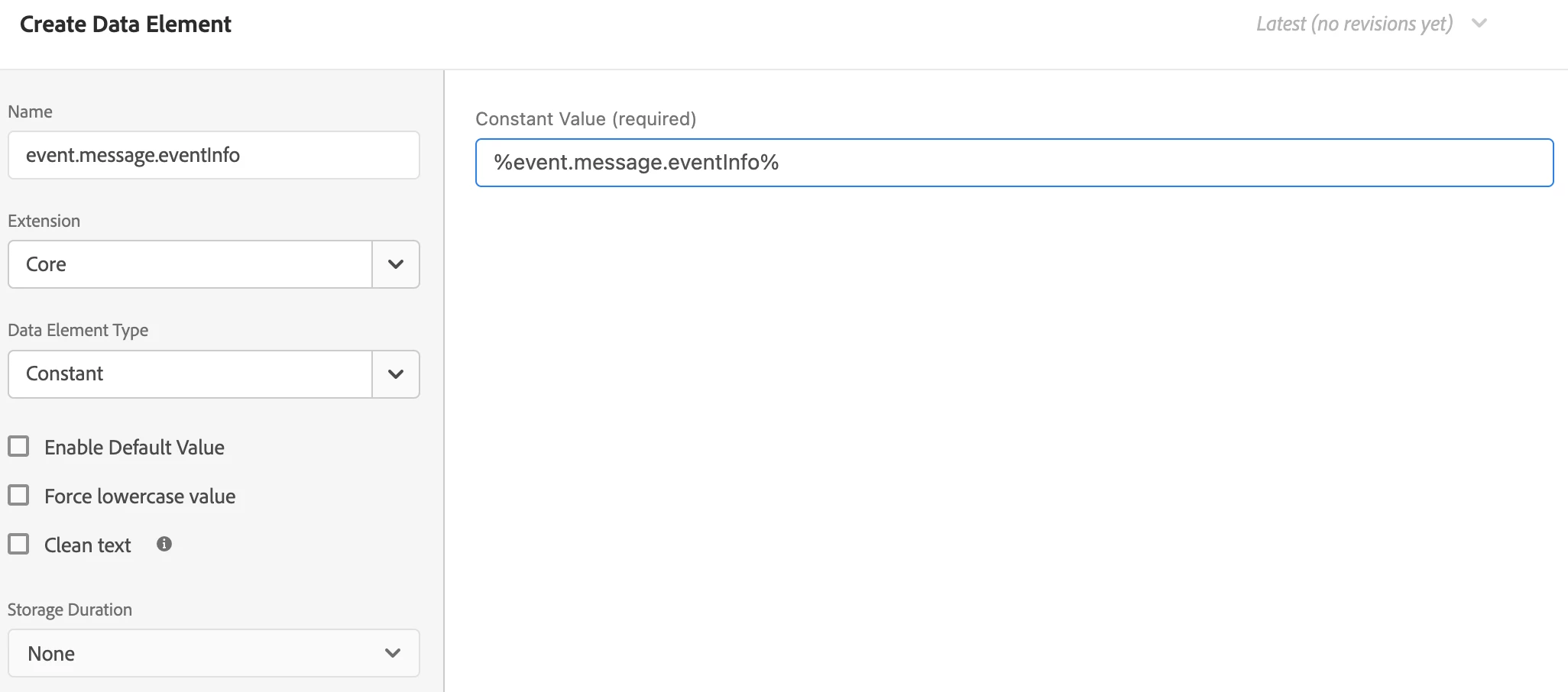
  2. Create a Constant data element (from the Core extension) and specify the value "%event.message.eventInfo%". This will be used to read from the "eventInfo" object that AEM pushes into adobeDataLayer.
  3. In your Rule:
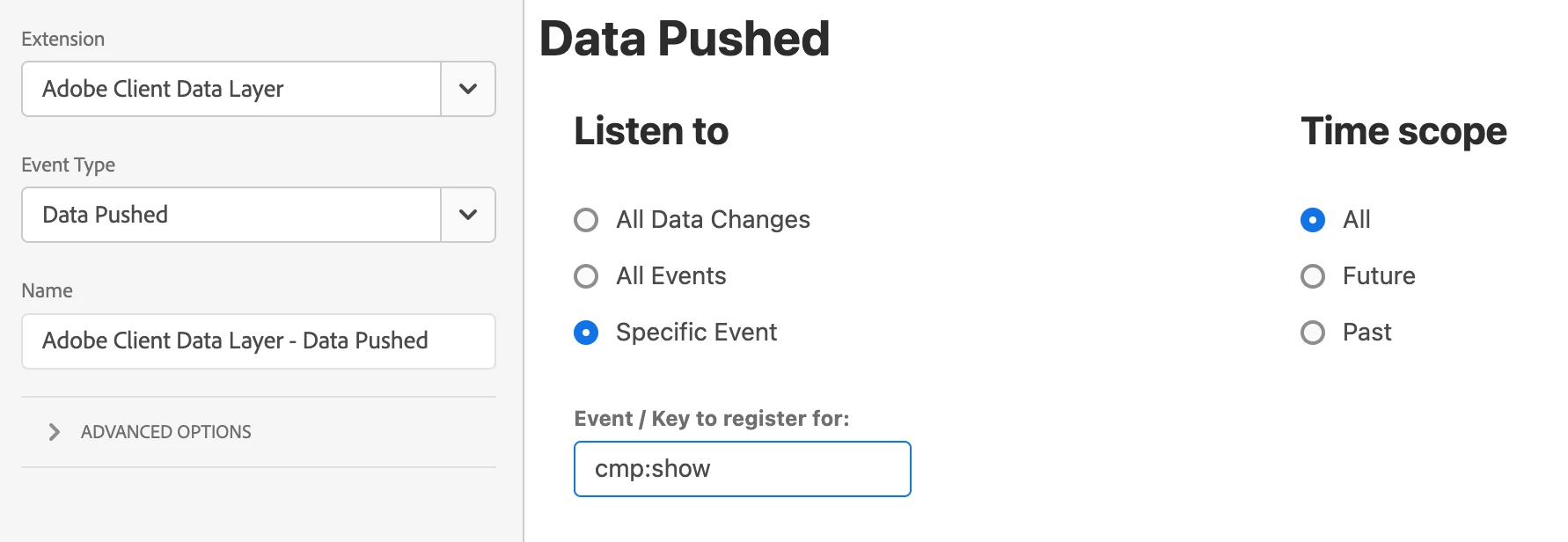
    1. Add the ACDL extension's Data Pushed event. Select "Specific event" and enter "cmp:show".
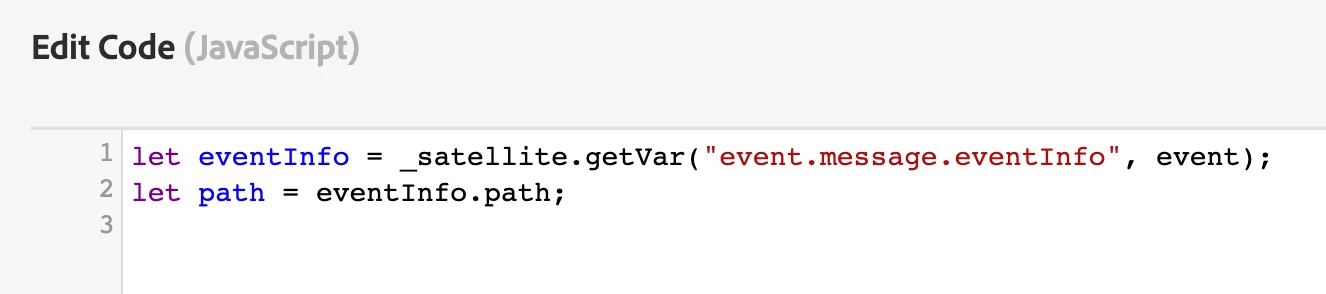
    2. To use the values that AEM pushes into adobeDataLayer, make use of the data element created in step 2. E.g. if you need to use "event.eventInfo.path", then you specify "%event.message.eventInfo%.path" or _satellite.getVar("event.message.eventInfo", event).path

(When "event.eventInfo...." is pushed into adobeDataLayer, it gets "captured" in Adobe Launch's native event object as "event.message.eventInfo....". So the data element created at step 2 helps you to retrieve this.)

I find this setup to be more intuitive because:

  • It doesn't rely on any code like what the docs suggest.
  • It is in line with how Adobe Launch is supposed to be used -- with as little coding as possible.

Hope that works for you!  😀

1 reply

yuhuisg
yuhuisgAccepted solution
New Participant
May 9, 2022

I suggest doing the following in Adobe Launch instead:

  1. Install the Adobe Client Data Layer extension.
  2. Create a Constant data element (from the Core extension) and specify the value "%event.message.eventInfo%". This will be used to read from the "eventInfo" object that AEM pushes into adobeDataLayer.
  3. In your Rule:
    1. Add the ACDL extension's Data Pushed event. Select "Specific event" and enter "cmp:show".
    2. To use the values that AEM pushes into adobeDataLayer, make use of the data element created in step 2. E.g. if you need to use "event.eventInfo.path", then you specify "%event.message.eventInfo%.path" or _satellite.getVar("event.message.eventInfo", event).path

(When "event.eventInfo...." is pushed into adobeDataLayer, it gets "captured" in Adobe Launch's native event object as "event.message.eventInfo....". So the data element created at step 2 helps you to retrieve this.)

I find this setup to be more intuitive because:

  • It doesn't rely on any code like what the docs suggest.
  • It is in line with how Adobe Launch is supposed to be used -- with as little coding as possible.

Hope that works for you!  😀

SkyGazer
SkyGazerAuthor
New Participant
May 10, 2022

Hi @yuhuisg 


I tried the steps which u mentioned, but getting the below error 


VM460:1 🚀 Data element circular reference detected: event.message.eventInfo -> event.message.eventInfo -> event.message.eventInfo -> event.message.eventInfo -> event.message.eventInfo -> event.message.eventInfo -> event.message.eventInfo -> event.message.eventInfo -> event.message.eventInfo -> event.message.eventInfo -> event.message.eventInfo


Anything we missed out in the implementation ?


Cheers,

Chandru A

yuhuisg
New Participant
May 10, 2022

Are you pushing event.message.eventInfo into adobeDataLayer again?

Can you share your action's complete code?