Dataset disappeared | Community
Skip to main content
New Participant
March 2, 2024
Solved

Dataset disappeared

  • March 2, 2024
  • 3 replies
  • 969 views

Hi, I have a dataset "A" in one of my sandbox. The dataset "A" was visible till 5PM but disappeared or got deleted and I can no longer see it in my list of datasets. I have checked the audit logs. Looks like none of the users have performed the delete action. I need the dataset "A" to be up and running. Also, I want to recover the historical data in the dataset.

Any thoughts or suggestions will be appreciated.
This post is no longer active and is closed to new replies. Need help? Start a new post to ask your question.
Best answer by Kumar29917170hcyp

Hi @lalita_snigdhaak ,

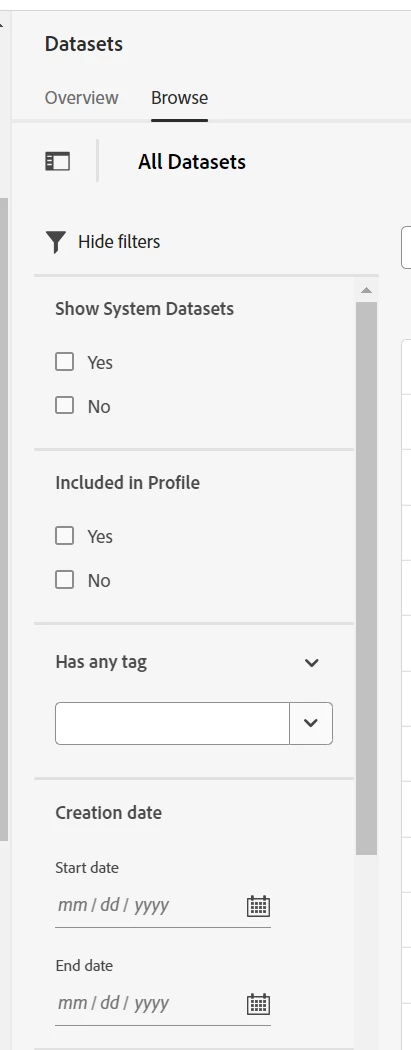
Please check if there are any filters applied on the Dataset Browse screen. Automatic deletion of a custom dataset is not possible.

Thanks!

3 replies

arpan-garg
New Participant
March 15, 2024

Hi @lalita_snigdhaak  - If you are sure that the dataset is gone. Can you go to data lifecyle management and check if none of the users from your team or clients team raised a dataset delete request.


https://experienceleague.adobe.com/en/docs/experience-platform/data-lifecycle/home


Thanks,

Arpan


Employee
March 5, 2024

Hi @Lalita_SnigdhaAk ,

Please check if there are any filters applied on the Dataset Browse screen. Automatic deletion of a custom dataset is not possible.

Thanks!

Kumar29917170hcypAccepted solution
Employee
March 5, 2024

Hi @lalita_snigdhaak ,

Please check if there are any filters applied on the Dataset Browse screen. Automatic deletion of a custom dataset is not possible.

Thanks!

New Participant
October 18, 2024

Hi,


Please confirm if somebody accidentally deleted any dataset, is it possible to restore the dataset?