
DTM - Customize Page Code Section in Adobe Analytics Tool Settings | Community
Skip to main content
Roshanchauhan
New Participant
June 14, 2018
Solved

DTM - Customize Page Code Section in Adobe Analytics Tool Settings

  • June 14, 2018
  • 1 reply
  • 1395 views

Hi,

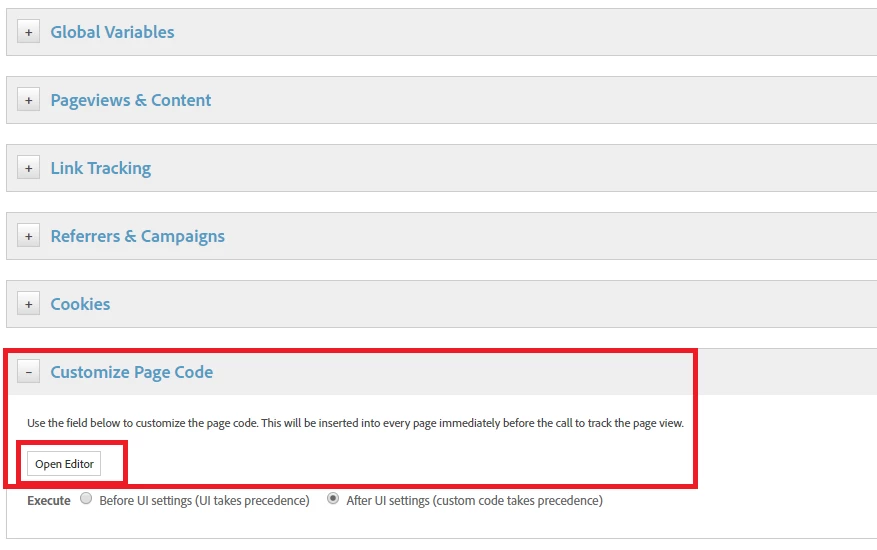
I getting confused in "Customize Page Code" open editor (Adobe Analytics Tool setting). There s specific functions we need to add in this or can write any jQuery or javascript code?

How can we assign a value in evars, events and props through this editor.

How can we execute the code through (s.t) or s.stl()?

once we implement the everything in this should we need to create rule, dataelement or anything?

It would be great if anyone can provide the 2 cases example and detailed information about this section.
Thanks!

This post is no longer active and is closed to new replies. Need help? Start a new post to ask your question.
Best answer by jantzen_b

The section you've highlighted in your screen capture is for your library. Typically, that section would be used install Analytics plugins or fire other non-adobe code.

I wouldn't suggest putting code to send s.t or s.tl calls in that section since that is what the rules are for. You can use page load rule or event based rules to set variables and send s.t or s.tl calls. We've got some great information on community YouTube channel that goes over the basics of DTM.

                               Dynamic Tag Manager (DTM)                    

1 reply

jantzen_b
jantzen_bAccepted solution
Employee
June 14, 2018

The section you've highlighted in your screen capture is for your library. Typically, that section would be used install Analytics plugins or fire other non-adobe code.

I wouldn't suggest putting code to send s.t or s.tl calls in that section since that is what the rules are for. You can use page load rule or event based rules to set variables and send s.t or s.tl calls. We've got some great information on community YouTube channel that goes over the basics of DTM.

                               Dynamic Tag Manager (DTM)