Form submission not firing rule in Adobe Launch to set evar | Community
Skip to main content
New Participant
February 12, 2021
Solved

Form submission not firing rule in Adobe Launch to set evar

  • February 12, 2021
  • 3 replies
  • 3987 views

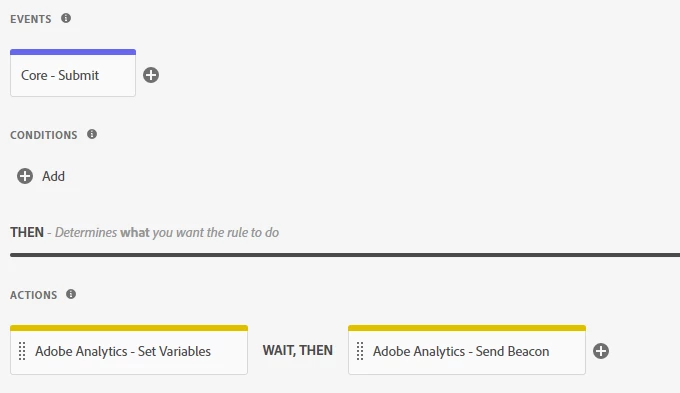
Seems like a basic function of launch so not sure what I am doing wrong. I have created a rule in Launch with an event = Core-Submit. I tried setting it to a specific element = #pardot-form which is the ID in the code. I then switched it to "any element" and it still did not fire. I have no conditions set and the actions are to set variables and send the adobe analytics beacon. 


When I look at the adobe debugger on the form page, you can see the launch tag on the form is working as context data is captured and global link clicks, but nothing shows up in the logs or the analytics tab for the rule after hitting submit.


This post is no longer active and is closed to new replies. Need help? Start a new post to ask your question.
Best answer by e30powar

UPDATE: The rule is firing properly. The set variable action wasn't set properly so the eVar was being populated with "null" . Now the problem is the rule fires every time the form is submitted. Including if you leave the fields blank, click submit, and the page reloads with required field errors.

3 replies

e30powarAuthorAccepted solution
New Participant
February 18, 2021

UPDATE: The rule is firing properly. The set variable action wasn't set properly so the eVar was being populated with "null" . Now the problem is the rule fires every time the form is submitted. Including if you leave the fields blank, click submit, and the page reloads with required field errors.

yuhuisg
New Participant
February 19, 2021
@e30powar isn't that the correct behaviour, though? The form was submitted after all.
e30powarAuthor
New Participant
February 15, 2021
Yes, input type="submit" accesskey="s" value="Submit Your Request". If it helps this is using a Pardot landing page.


Andrey_Osadchuk
New Participant
February 14, 2021

Is the button <input type="submit"> ?

e30powarAuthor
New Participant
February 15, 2021
Yes, <input type="submit" accesskey="s" value="Submit Your Request">. If it helps this is using a Pardot landing page.