Google gtag Issue | Community
Skip to main content
New Participant
November 15, 2018
Solved

Google gtag Issue

  • November 15, 2018
  • 12 replies
  • 16499 views

anyone successfully implement and use the new Google gtag code in Adobe Launch. we keep getting errors as a result of there code when we test in dev. I thought I would ask here before contacting Google directly to see if there was a remedy.

Errors:

  • Uncaught TypeError: dataLayer.push is not a function
  • [Core] Script error. - : 0
  • Uncaught TypeError: a.slice is not a function

We also tried using the new gtag extension someone built but get the same errors. One of the issues is probably because we have an object called "dataLayer" that loads all our pageload data as well. The slice error is coming from the first script tag that references GTM source: src="https://www.googletagmanager.com/gtag/js?id=AW-someaccountcode".


This post is no longer active and is closed to new replies. Need help? Start a new post to ask your question.
Best answer by brandon_pack

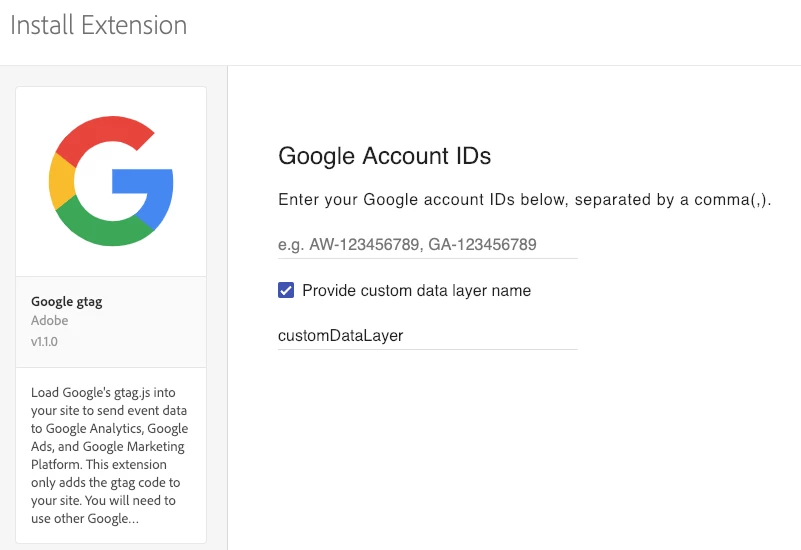
This change has been pushed to production.  In the configuration view you can customize the DataLayer name:

12 replies

Employee
January 22, 2019

Hi Brandon,

Is there a way to address this same issue within DTM? Any help on why this error occurs would be helpful.

Is the issue due to google expecting the data layer to be an object rather than an array? That's what is suggested here Google Tag Manager error: Uncaught TypeError: w[l].push is not a function - Stack Overflow Could the issue be addressed within dtm by placing the data layer in an array?

New Participant
January 16, 2019

awesome!! thank you for adding the custom datalayer name. Everything works great now

brandon_pack
brandon_packAccepted solution
Employee
January 2, 2019

This change has been pushed to production.  In the configuration view you can customize the DataLayer name:

Gigazelle
Employee
December 17, 2018

It will just be for Launch. You will want to use custom code if you intend to do it for DTM.

leos66376844
New Participant
December 3, 2018

Thank you for following up. Is there something similar for DTM?

brandon_pack
Employee
December 3, 2018

Yeah this is code-complete and being tested but Adobe has a polciy to not release or change production code during the holiday when it's a very sensative time and there is less appetite for risk.  So this is likely to be released the first week of January.   If you are willing to test it before then, we can upload it to your org as a Private Extension and you could use it sooner.  It would however mean re-creating your rules if you wanted toswitch to the public one in January and take advatange of future updates.  But let us know.

leos66376844
New Participant
November 30, 2018

Has there been an update on this?

New Participant
November 19, 2018

that would be great, can't wait.

thanks for the feedback

brandon_pack
Employee
November 15, 2018

We are working on adding a new parameter to the gtag extension configuration view that would allow you to rename Google's dataLayer to something else so that it would not conflict.  Hope to be able to get it released before too long but not exact date commitments at this point.

New Participant
November 15, 2018

I don't know gtag, so I can't help there, but maybe you can configure gtag so the object it relies on is called differently.

One other, more complex solution would be to "mask" it by implementing all the array methods in your object and use them to operate on an internal array:

dataLayer._gtagDataLayer = [];

dataLayer.push = function(obj) {

    this._gtagDataLayer.push(obj);

};

dataLayer.pop = function() {

    return this._gtagDataLayer.pop();

};

//etc.

But again, maybe the dataLayer object from gtag has other functionality as you can do crazy stuff with javascript, so probably also ask in their forums how to proceed.