How do you change a segment evaluation method after segment is saved? | Community
Skip to main content
New Participant
March 13, 2023
Solved

How do you change a segment evaluation method after segment is saved?

  • March 13, 2023
  • 2 replies
  • 1438 views

Hi there,


I have a segment that was saved with the Batch Evaluation method as when I initially built it, I didn't realize streaming only works with a lookback of 24 hours with multiple events. 


Realizing this, I created a new segment with the 24 hours lookback period and I can save it with Streaming method. However, I am wondering if there is a way to modify an existing segment's evaluation method, in this case, the segment I saved as batch, since I don't see a drop down option for me. 


Thanks,

Alan

 

Best answer by Danny-Miller

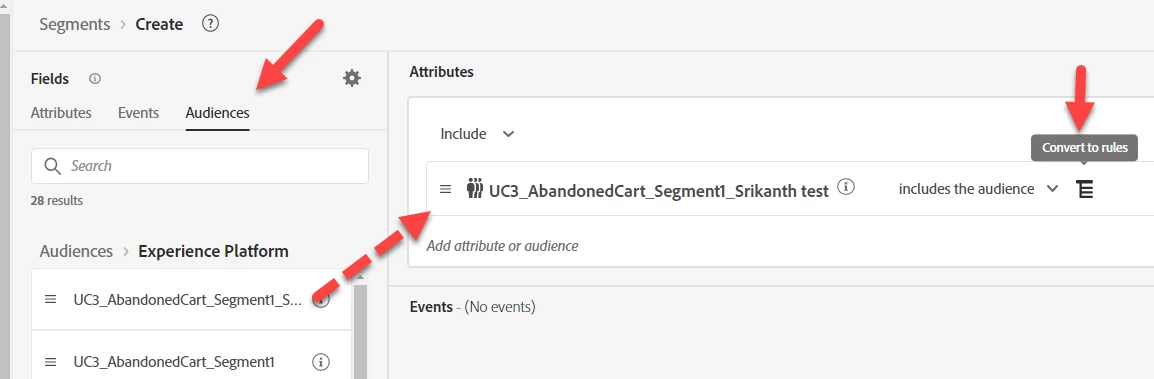
This is a quick work around:

  1. You can always create a new Segment
  2. Add your Segment (under Audiences)
  3. Click Convert to Rules (on the right side of the Audience Name)
  4. Change the new Segments Evaluation Type
  5. Save as a new segment


2 replies

Danny-Miller
Danny-MillerAccepted solution
Employee
March 14, 2023

This is a quick work around:

  1. You can always create a new Segment
  2. Add your Segment (under Audiences)
  3. Click Convert to Rules (on the right side of the Audience Name)
  4. Change the new Segments Evaluation Type
  5. Save as a new segment


_Manoj_Kumar_
New Participant
March 15, 2023

Thanks for this trick @danny-miller 

     Manoj     Find me on LinkedIn
Anil_Umachigi
Employee
March 14, 2023

@akwankl I dont think it allows you to do that, i tried duplicating the segment (copy) but that did not work either. 

Looks like you may have to create the segment all over again.