How to add SmartPixel code in DTM? | Community
Skip to main content
cathyw49544988
New Participant
January 26, 2018
Solved

How to add SmartPixel code in DTM?

  • January 26, 2018
  • 4 replies
  • 3122 views

Recently we want to move all of our tracking work from GTM to DTM.  then I ran into a question:

in GTM, it is pretty easy to add some third party code, like AdRoll, Crazy egg by select those as the tag type and then provide the account info. But I didn't find the similar thing in DTM. Anyone knows how to add those tags in DTM?

Thanks,

-Cathy

This post is no longer active and is closed to new replies. Need help? Start a new post to ask your question.
Best answer by jantzen_b

Hi Cathy,

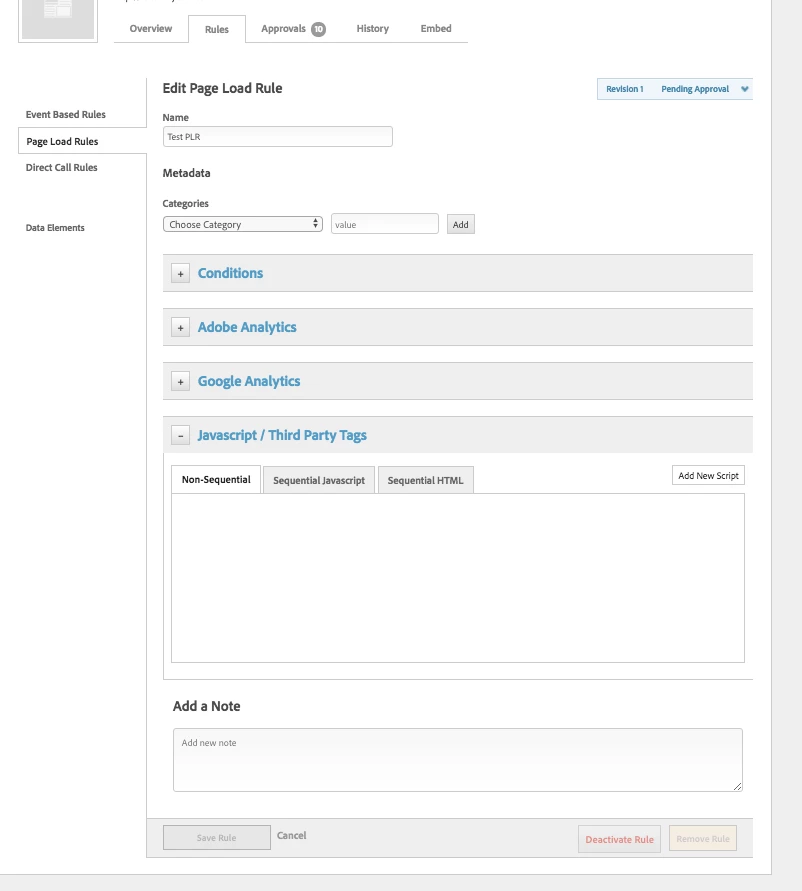
Third party tags can be deployed via the "Javascript/Third Party Tags" section in your rules or tools.

Depending on when the tag should be loaded or fired will depend on which section you should place the tag in. The third-party section supports both sequential and non-sequential javascript and sequential HTML.

Cheers,
Jantzen

4 replies

jantzen_b
Employee
February 16, 2018

Thanks for the great insider tip ^

You are correct, Launch is being built as a platform to accommodate third-party developed extensions to add almost any functionality. If you're interest in learning more about Launch, go ahead and have a look at our Launch, by Adobe​ community.

New Participant
February 15, 2018

Hi Cathy,

Unfortunately DTM does not have the tagging (i.e. doubleclick) pre-implemented feature like GTM. However from what I've seen of Adobe Launch that will have plugins which will be able handle this type of thing.

We currently run GTM for agency 3rd party tags and keep everything Adobe within DTM.

cathyw49544988
New Participant
January 26, 2018

Jantzen,

Yes. This is normally how I add the third party code. But I will have to copy the code there. I am wondering does DTM have the the pre-implemented company code? then we can do similar thing as I did in GTM?

jantzen_b
jantzen_bAccepted solution
Employee
January 26, 2018

Hi Cathy,

Third party tags can be deployed via the "Javascript/Third Party Tags" section in your rules or tools.

Depending on when the tag should be loaded or fired will depend on which section you should place the tag in. The third-party section supports both sequential and non-sequential javascript and sequential HTML.

Cheers,
Jantzen