Landing Page Condition not Working | Community
Skip to main content
New Participant
June 17, 2022
Solved

Landing Page Condition not Working

  • June 17, 2022
  • 1 reply
  • 1534 views

Hi All,


I am new to Adobe Launch and was trying to set up Google Ads conversion tag fires at specific page - www.example.com?results=abc122345678.


Events: Library Loaded (Page Top)

Conditions:

  • Landing Page > Return true if the landing page equals results= (enabled Regex)

Actions:

  • Custom Code > HTML > pasted the Google Ads conversion html code

Anyone can advise how to fix? Thanks a lot!

This post is no longer active and is closed to new replies. Need help? Start a new post to ask your question.
Best answer by _Manoj_Kumar_

Hi @_manoj_kumar_ 


Thanks for your reply.

I am afraid that adding datalayer may not be a feasible option for me as I am not able to edit backend code for the website.


Do you have any suggestion on the regex setting if I want the tag to fire in any pages that contains the string: "results="?


Thanks!


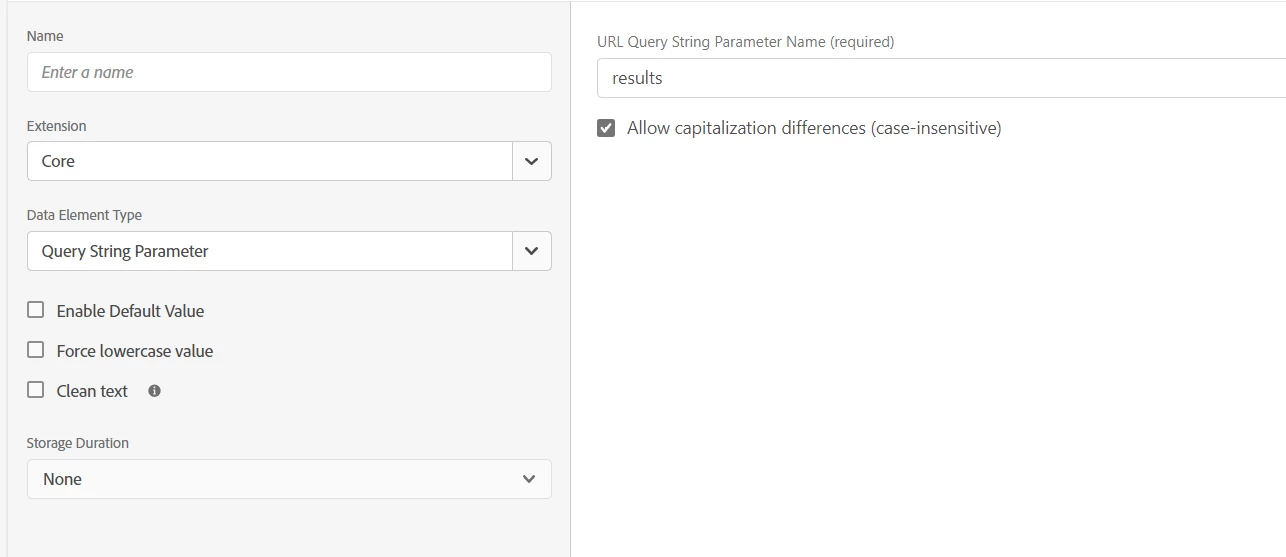
Hello @fppj_kelly 


You can do something like this.


1 reply

New Participant
June 21, 2022

Anyone have ideas on this?☹

_Manoj_Kumar_
New Participant
June 21, 2022

Hello @fppj_kelly 


I am assuming your regex is not working. The easiest way would be to add one variable in your datalayer like purchasePage:true


The in launch condition remove your regex condition and use the datalayer variable to check if the value true or false.

     Manoj     Find me on LinkedIn
New Participant
June 22, 2022

Hi @_manoj_kumar_ 


Thanks for your reply.

I am afraid that adding datalayer may not be a feasible option for me as I am not able to edit backend code for the website.


Do you have any suggestion on the regex setting if I want the tag to fire in any pages that contains the string: "results="?


Thanks!