
Not able to attach not used Environment to Library | Community
Skip to main content
OscarMartinezM
New Participant
May 27, 2022
Solved

Not able to attach not used Environment to Library

  • May 27, 2022
  • 1 reply
  • 1720 views

Hi all, 

I have a property having around 40 environments created for Development. Also, the property has around 10 libraries with environments attached and published in Development stage.

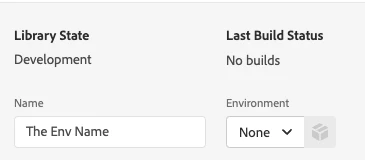
But, when I try to create a new Library, I get no Environments to select, the input for selecting is empty.

The thing is, I need to publish changes for a site that is currently using an Adobe Launch file URL that matches one of the non-used development environments. So I created this new Library for publishing the changes, but as I said before, I'm not able to attach environment.
 

Thank you, 

 

This post is no longer active and is closed to new replies. Need help? Start a new post to ask your question.
Best answer by yuhuisg

Try the following:

  1. Restart your browser, then try again.
  2. Log out of your Adobe account, (optionally delete all "adobe.com"-related cookies in your browser,) then log in, then try again.
  3. Try again in a private browser window.

If all of those fail, then contact Client Care to help you to resolve this.

1 reply

yuhuisg
yuhuisgAccepted solution
New Participant
May 28, 2022

Try the following:

  1. Restart your browser, then try again.
  2. Log out of your Adobe account, (optionally delete all "adobe.com"-related cookies in your browser,) then log in, then try again.
  3. Try again in a private browser window.

If all of those fail, then contact Client Care to help you to resolve this.

OscarMartinezM
New Participant
May 30, 2022

Hi! Thank you for your response.


So, it means environment should appear on list? There is no real reason for not being in there? (Steps 1-3 already done). 

yuhuisg
New Participant
May 30, 2022

Correct. As far as I know, there is no real reason for your environments to not be in there.