Problems with Experience Cloud ID Service extension's Pre Opt In Approval ECID | Community
Skip to main content
dieterc73936239
New Participant
March 12, 2020
Solved

Problems with Experience Cloud ID Service extension's Pre Opt In Approval ECID

  • March 12, 2020
  • 2 replies
  • 5843 views

Hi everyone


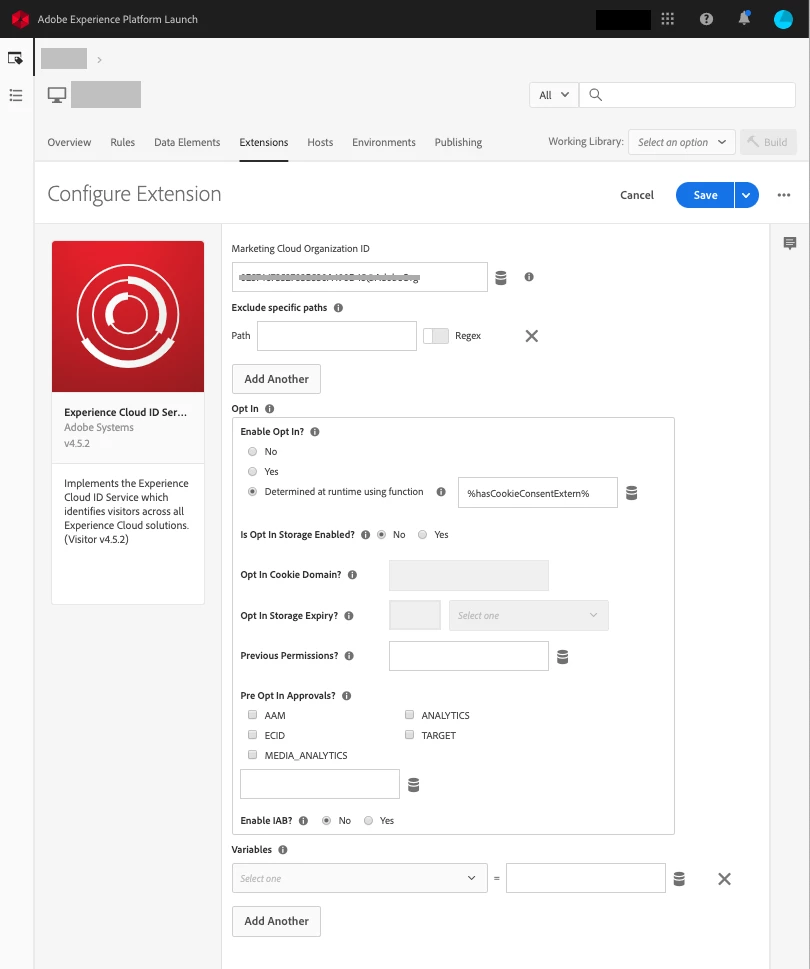
While setting up the Experience Cloud ID Service I ran into an issue. In our configuration of the extension we left all the checkboxes blank in de "Pre Opt In Approvals?" setting (see screenshot). By testing the implementation in the Launch development environment (debug) we noticed that the ECID is still being set, even if the checkbox ECID is not activated. I also tried to set the Pre Opt in explicitly to false ("ecid":false), but the issue remains.

European privacy legislation prescribes that we can only use the ECID after accepting a consent. 


So what is the use of the ECID checkbox? Is this an issue or is this expected behaviour?


thanks in advance
 

This post is no longer active and is closed to new replies. Need help? Start a new post to ask your question.
Best answer by dieterc73936239
Ok so we found the issue.
 
The naming of the title ‘enable Opt-in?’ is a little ambiguous.
 
We thought that on the question ‘enable Opt-in?’, as long as the data element would be false, you weren’t opt-in so no cookies would be set and when you accept cookies (true) you are opt-in so cookies would be set.
 
However the adobe logic works the other way around. So as long as 'enable opt-in?' is true the user didn't have a correct consent and cookies are not set. Once the correct consent is given the flag should be set to false, and cookies will be set. 
 
So 'enable opt-in?' rather corresponds to 'should cookies be blocked?then what we thought 'is a user Opt-In?'.
 
This wasn’t really clear in the current documentation.

2 replies

dieterc73936239
dieterc73936239AuthorAccepted solution
New Participant
March 19, 2020
Ok so we found the issue.
 
The naming of the title ‘enable Opt-in?’ is a little ambiguous.
 
We thought that on the question ‘enable Opt-in?’, as long as the data element would be false, you weren’t opt-in so no cookies would be set and when you accept cookies (true) you are opt-in so cookies would be set.
 
However the adobe logic works the other way around. So as long as 'enable opt-in?' is true the user didn't have a correct consent and cookies are not set. Once the correct consent is given the flag should be set to false, and cookies will be set. 
 
So 'enable opt-in?' rather corresponds to 'should cookies be blocked?then what we thought 'is a user Opt-In?'.
 
This wasn’t really clear in the current documentation.
New Participant
August 31, 2023

Hi Anyone recently configured the suggested approach?

I am not able to restrict the AMCV cookie and if i am using enable opt-in as yes and it is blocking the adobe analytics call completely. Screenshot referring how it should be done would help greatly.


Thanks

New Participant
March 13, 2020
Yes, we bumped into this issue as well!