Query Service - Querying dataset from DB visualizer client | Community
Skip to main content
New Participant
August 24, 2022
Solved

Query Service - Querying dataset from DB visualizer client

  • August 24, 2022
  • 1 reply
  • 1138 views

Hi All,


I've integrated query service with DB visualizer client and querying dataset. But it gives me syntax error.


Query : Select * from my_dataset

Error : [Code: 0, SQL State: 42601] ERROR: line 1:28: mismatched input ',' expecting {<EOF>, '.', '[', 'AT', '+', '-', '*', '/', '%', '||', '::', '^'}

Query Service log : 

 

To check this issue, I've integrated query service with HeidiSQL client and executed the same query successfully.

Thanks.

This post is no longer active and is closed to new replies. Need help? Start a new post to ask your question.
Best answer by AtulChavan

I see, issue could be with path. Do you have any attribute/column which is a root node and doesn't require (.) operator. E.g: Select timestamp from xxxxx . Also please check log on AEP side in query service section.

Edit : Can you please also confirm, which version of DBV you're using ? I tried same stuffs and they're working fine with DBV 13.0.4. 


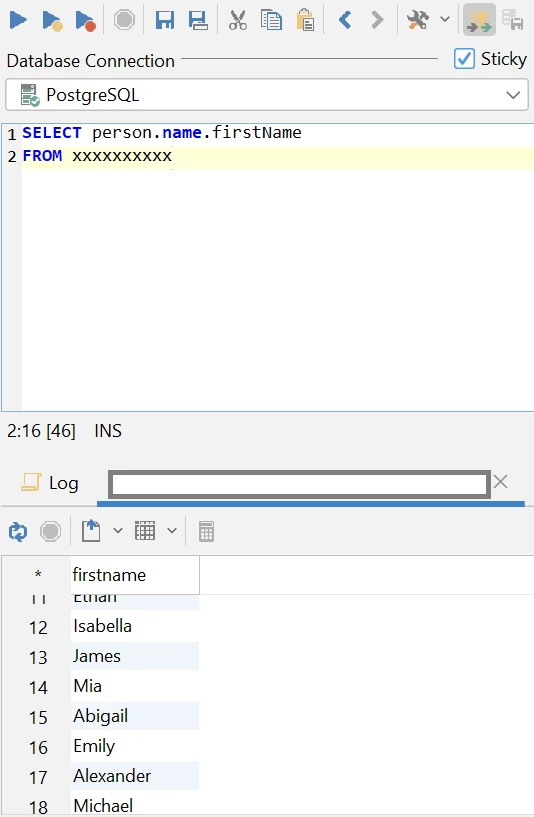
I feel, this is something to do with DBV not AEP. Looking at your editor of DBV if you see column path 'name' is interpreted as keyword. It could be earlier version of DBV results into error but they might have fixed it in latest version ? 

1 reply

AtulChavan
New Participant
August 24, 2022

Hi @vikashyadav,
You may try listing actual column names that are required instead '*'.     

New Participant
August 24, 2022

Hi @atulchavan ,

thanks for your reply.

Tried with column name but facing same error. Same query running successfully in AEP query service but not in DB visualizer.


AtulChavan
AtulChavanAccepted solution
New Participant
August 24, 2022

I see, issue could be with path. Do you have any attribute/column which is a root node and doesn't require (.) operator. E.g: Select timestamp from xxxxx . Also please check log on AEP side in query service section.

Edit : Can you please also confirm, which version of DBV you're using ? I tried same stuffs and they're working fine with DBV 13.0.4. 


I feel, this is something to do with DBV not AEP. Looking at your editor of DBV if you see column path 'name' is interpreted as keyword. It could be earlier version of DBV results into error but they might have fixed it in latest version ?