Rule firing no Analytics code | Community
Skip to main content
New Participant
Oct 1, 2018 9:19 AM UTC
Solved

Rule firing no Analytics code

Hello,

I've been a happy DTM + Analytics user for 2 years now on my project. In my company a new team is also willing to use the solution and I'm trying to help them.

I set up the projects and I have been trying a few things with no success so far.

I created a simple page load rule, with no condition, setting evar1=1 and sending event1 and with custom page code to display a message in the console.

When I load the page the satellite javascript is loaded, the page load rule is fired (as seen in the console & in debugger) but there's no call to Analytics (and no message in the console)...
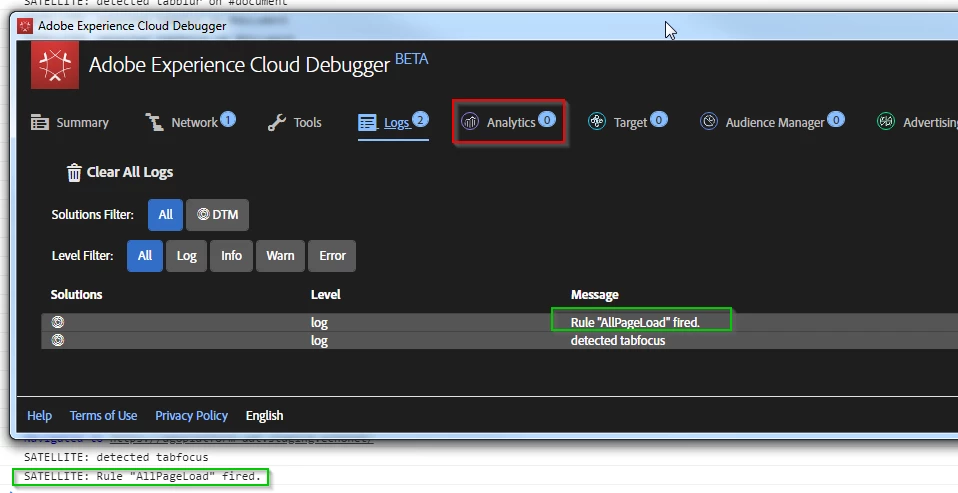
I guess I'm missing a basic setup but I've been scratching my head for a few days now...

an idea ?

thanks for your feedback

Nico

This post is no longer active and is closed to new replies. Need help? Start a new post to ask your question.
Alexis_Cazes_
Alexis_Cazes_Accepted solution
Level 10
Dec 14, 2018 10:00 AM UTC

Please attach a screen shot of your rule configuration. Would help...

Check the following:

  • Have you configured Adobe Analytics tool in DTM
    • The tool should load the Adobe Analytics and you should see that in the logs when it is loaded
  • Your page load rule does not send Adobe Analytics server call by default, the tool will by default unless you have put return false in the custom code section at the bottom
    • Make sure rule loads before Adobe Analytics tool is loaded. So load Adobe Analytics at the bottom and load rule at page top.

9 replies

Alexis_Cazes_
Alexis_Cazes_Accepted solution
Level 10
Dec 14, 2018 10:00 AM UTC

Please attach a screen shot of your rule configuration. Would help...

Check the following:

  • Have you configured Adobe Analytics tool in DTM
    • The tool should load the Adobe Analytics and you should see that in the logs when it is loaded
  • Your page load rule does not send Adobe Analytics server call by default, the tool will by default unless you have put return false in the custom code section at the bottom
    • Make sure rule loads before Adobe Analytics tool is loaded. So load Adobe Analytics at the bottom and load rule at page top.
Translate
Stewart_Schilling
New Participant
Dec 11, 2018 1:56 PM UTC

At the risk of asking a dumb question...

If this is a new DTM property, have you included and configured the Adobe Analytics Tool on the property?

Translate
Gigazelle
Employee
Dec 5, 2018 7:39 PM UTC

Were you able to figure this one out? I'd love to help, but I'm not what else can be done on my end without looking at the implementation directly.

Translate
NicolasJ1Author
New Participant
Oct 10, 2018 4:17 PM UTC

Unfortunately No public urls where this is deployed :-(

only accessible via 2 factors authentication.

Translate
Gigazelle
Employee
Oct 10, 2018 4:14 PM UTC

Do you have a URL where this is deployed so we could take a look at it?

Translate
NicolasJ1Author
New Participant
Oct 10, 2018 2:37 PM UTC

Hello Atul

I just tried in Incognito mode and with all plugins disabled - still no calls to load the img from Adobe...

thanks for the suggestion anyway.

Nico

Translate
NicolasJ1Author
New Participant
Oct 10, 2018 2:33 PM UTC

Hello Gigazelle

There was no custom code originally. I just added a _satellite.notify message to try to pinpoint what was happening. I've removed it now - but with no change in the behaviour.

thanks for the suggestion anyway !

Translate
Employee
Oct 10, 2018 2:12 PM UTC

Sounds like browser specific issue or some plugin holding the call.

Could you please the same in incognito window of Chrome disabling all the plugins including Experience Cloud Debugger ?

Translate
Gigazelle
Employee
Oct 9, 2018 10:11 PM UTC

Custom code syntax errors can potentially be image request ruiners. Can you try removing any and all custom code to see if that's the issue?

Translate