Segment using fields of Lookup entity is not working | Community
Skip to main content
New Participant
November 2, 2021
Solved

Segment using fields of Lookup entity is not working

  • November 2, 2021
  • 2 replies
  • 1124 views

Hello Experts,


As part of a POC using Lookup entities, I am trying to build a segment of audiences who are viewing any product which is priced more than $50. I have been using the below schemas:

  • Luma Product Catalog Schema
  • Luma Web Events Schema

Luma Web Events Schema has a SKU under "productListItems" which refers to the SKU (primary identity) field of "Luma Product Catalog Schema".
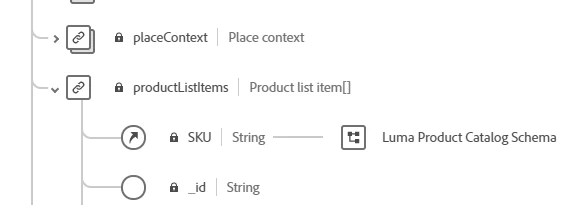
 

I have gone through the data ingestion process for the dataset related to "Luma Product Catalog Schema". Below is the snippet of it. For testing purpose, I am using the below highlighted product details, as its price is more than $50.

 

The segment rule I have created is as shown below:
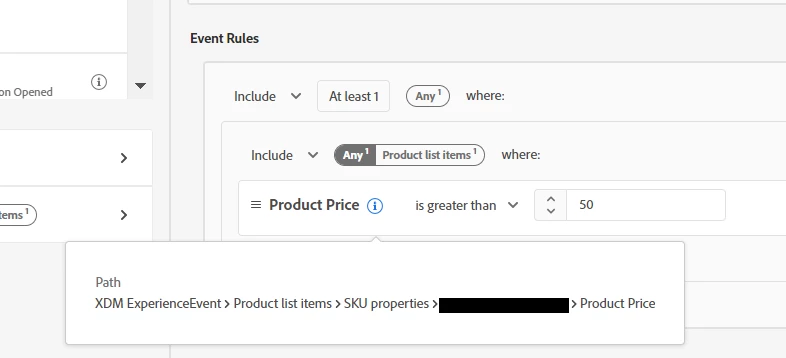
After configuring all these, when I am triggering the event by passing the correct SKU (no price information is passed in the event), I could see the event in AEP correctly tied to the profile, but I am not able to see the profile under the segment as the product price is more than $50. 


Any idea why I am not able to make this segment work? 


Thanks a lot in advance.

 

This post is no longer active and is closed to new replies. Need help? Start a new post to ask your question.
Best answer by Danny-Miller

@bitunsen A few things to troubleshoot this:

  1. Check the Event is on the Profile (you said it is)
  2. Check the value of the Price on the Lookup (you said you did)
  3. The segment is probably batch so make sure you have enabled the schedule
  4. Create another Segment(s) that do things like "price exists" or sku = xyz or even remove the lookup dataset altogether to isolate where the issue is.

Good luck

2 replies

Danny-Miller
Danny-MillerAccepted solution
Employee
August 12, 2022

@bitunsen A few things to troubleshoot this:

  1. Check the Event is on the Profile (you said it is)
  2. Check the value of the Price on the Lookup (you said you did)
  3. The segment is probably batch so make sure you have enabled the schedule
  4. Create another Segment(s) that do things like "price exists" or sku = xyz or even remove the lookup dataset altogether to isolate where the issue is.

Good luck

New Participant
August 12, 2022

I know the answer is bit late but the probable reason could be the schema/ dataset is not enabled for profiles .