Track clicks on button using DTM | Community
Skip to main content
srikanths356410
New Participant
January 18, 2018
Solved

Track clicks on button using DTM

  • January 18, 2018
  • 11 replies
  • 16385 views

Hi, Can anyone tell me how to track clicks for this button (Request Information) on this page (www.vitas.com). I have defined an event based rule in DTM (rule name: Request information button clicks) with event type as click, element tag selector as div, manually assigned a property as id=purpleheaderbutton, used allow event to bubble on child elements, set tracking to s.tl() and assigned it to an event. But still this rule won't fire on my page and adobe debugger doesn't record my assigned event. Can anyone tell me how to setup this rule correctly to track clicks for this button.
This post is no longer active and is closed to new replies. Need help? Start a new post to ask your question.
Best answer by SarahEOwen

Hi -

That's great that you are seeing the rule fire off now!

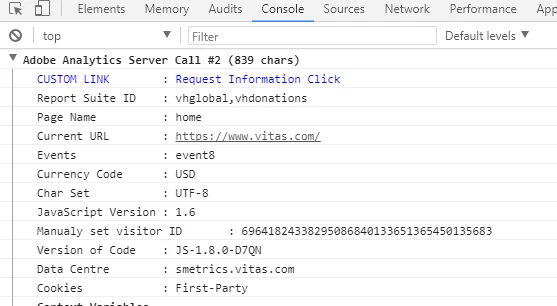
As for event8, I am seeing it in the analytics call that is fired off (see screen shot below)

The debugging tool that I use is called "Debugger for Adobe Analytics". I like it because it puts the analytics calls in the Console tab of the Developers' Tools so you can easily spot them and scroll through them. Here is the link to this debugger in the Chrome Store Debugger for Adobe Analytics - Chrome Web Store

Thanks -

Sarah

11 replies

SarahEOwen
New Participant
January 18, 2018

Hi -

In DTM, please:

  1. uncheck the "Manually assign properties & attributes" checkbox
  2. in the "Element Tag or Selector" field, put this value  #purpleHeaderButton   

          Note: you need to match the capitalization from the code affiliated to the button - so the H and B need to be capital

This is what the above will look like in DTM:

The # is jquery that tells DTM to "look for an id that has this specific value" 

Here is a good article on the various ways to find selectors (i.e. id, class, etc.) jQuery Selectors

Thanks -

Sarah