
Solved
Track multi choice
Hello everyone,
How can I track multi-choice and have an evar like this Contemporary Arts|Visual Arts.
Thanks
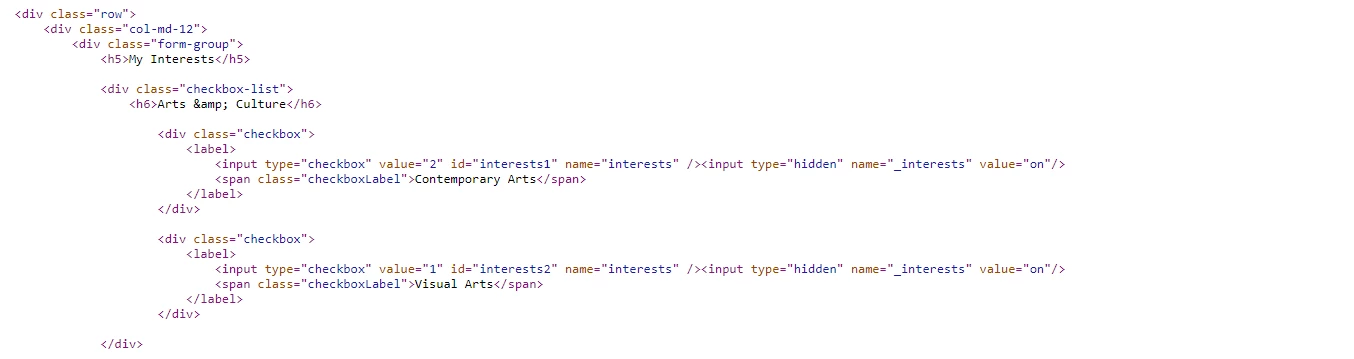
Hello everyone,
How can I track multi-choice and have an evar like this Contemporary Arts|Visual Arts.
Thanks
I'd probably create a data element in Launch that's based on custom JS (see below). You'd then just reference the data element in the rule that executes when the form is submitted (or whenever you want to collect the info) to populate your eVar (listVar, listProp...).
var retval = [];
var elements = document.querySelectorAll("input[name='interests']");

if (elements.length > 0) {
  elements.forEach(function (item) {
    if ((item).checked === true) {
      var chosenOne = item.parentElement.querySelector("span").innerText;
      if (chosenOne) {
        retval.push(chosenOne);
      }
    }
  });
}

return retval.join("|");
Assuming the HTML structure matches what's in your post, the above logic checks each checkbox to see if it is checked. If checked, it looks for the related <span> tag to get the name (eg// "Contemporary Arts"). This should work whether there's one option or 100.
Enter your E-mail address. We'll send you an e-mail with instructions to reset your password.