tracking servers for multiple domains | Community
Skip to main content
Level 4
Jun 28, 2018 2:58 PM UTC
Solved

tracking servers for multiple domains

Hi all,

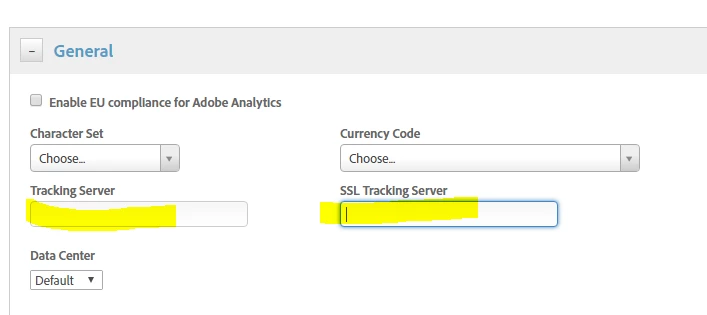
I have one web property that has 3 domains. Each domain has there own first party cookie tracking server (secured and unsecured). I assume I can write an if statement in the custom code area of the adobe analytics tool so that the tracking server will change based on the domain. Does that mean I should leave the tracking server fields under general tab blank? Also, is there another maybe easier way, to get the same result?

This post is no longer active and is closed to new replies. Need help? Start a new post to ask your question.
jantzen_b
jantzen_bAccepted solution
Employee
Jun 29, 2018 6:18 PM UTC

You'll need to write custom code to also populate these variables in the visitorAPI.js file. The Analytics tool only populates the values in the AppMeasurement.js file. The Experience Cloud ID Service tool populates the values in the visitorAPi.js file. I believe I've seen some customers use data elements for this purpose but I can't point you to a particular example.

5 replies

jantzen_b
Employee
Jul 9, 2018 4:45 PM UTC

Yes, if you were to put the VisitorAPI file in the custom section of your Analytics tool, you'd want to remove the ECID tool. Like I said previously, I believe you can accomplish this with data elements and then reference the data element in the ECID tool. this would be the preferred method since it would keep the ECID tool installed.

Translate
Level 4
Jul 2, 2018 3:13 PM UTC

So if I use the visitorAPI.js file then I will have to remove the experience cloud ID tool correct?

Translate
jantzen_b
jantzen_bAccepted solution
Employee
Jun 29, 2018 6:18 PM UTC

You'll need to write custom code to also populate these variables in the visitorAPI.js file. The Analytics tool only populates the values in the AppMeasurement.js file. The Experience Cloud ID Service tool populates the values in the visitorAPi.js file. I believe I've seen some customers use data elements for this purpose but I can't point you to a particular example.

Translate
Level 4
Jun 28, 2018 3:51 PM UTC

another question.

Do I also keep the tracking server fields in the experience cloud ID service tool blank as well? I assume the tracking servers I created in the adobe analytics tool will be used and pertain to ID service as well?

Translate
Level 4
Jun 28, 2018 3:25 PM UTC

ok, I figured it out. I leave the fields blank in the general tab and specify using the below code for each secured and unsecured tracking server wiithin my if statement.

    s.trackingServer="tag.somethinghere.com";

    s.trackingServerSecure="securedtag.somethinghere.com";

works perfect.

Translate