Why do my event-based DTM rules result in no custom link data going to Adobe Analytics? | Community
Skip to main content
New Participant
September 12, 2017
Solved

Why do my event-based DTM rules result in no custom link data going to Adobe Analytics?

  • September 12, 2017
  • 12 replies
  • 5548 views

I have a new Web Property and I added the Adobe Analytics tool via manual configuration.  I'm fairly confident that the Adobe Analytics tool is correctly configured as I'm seeing data for Visitors and other basic stats in Adobe Analytics Reports.

I have created a couple of event-based rules in DTM.

The rules trigger in response to clicks on certain DOM elements.  I have confirmed that the rules are triggering when expected by adding Javascript tags that make entires in the console.log().

I have added this type of Adobe Analytics configuration to each rule:
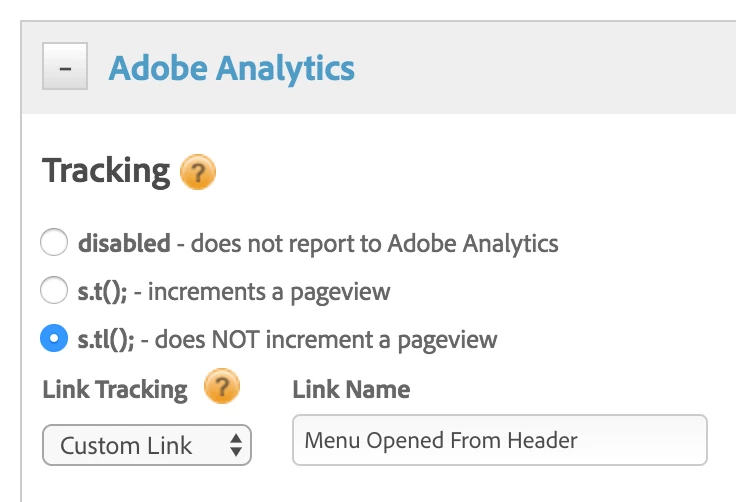
Using Chrome dev tools Network tab, at the time the rules are triggered, I am not seeing the browser load anything.  Furthermore, I'm not seeing any Custom Event data appear in Adobe Analytics Reports.

I've had a look at the logs in the global _satellite object created by DTM and I see only the expected messages about rules being triggered, but I don't see anything about Adobe Analytics.

Any ideas what might be wrong here or how I can further debug?  Am I right to expect the browser to load something from my reporting server hostname?  Any gotchas on configuration of the Adobe Analytics Tool to look out for?  Or maybe I'm overlooking some required value in the Rule configuration?

This post is no longer active and is closed to new replies. Need help? Start a new post to ask your question.
Best answer by mikea36017390

It turns out I had the 'eu cookies' flag set in the Adobe Analytics Tool configuration within DTM.  This causes DTM to silently skip initialization of Adobe Analytics if the sat_track cookie is not set to a value of '1'.  It would be helpful to console log this condition to make it more difficult to debug.

12 replies

New Participant
September 13, 2017

Thanks for the advice!

I installed the plugin and it confirmed that my rules are firing, but the Network tag of the Chrome debug tools shows no requests being made to my configured tracking server domains.  Any idea how to debug why this might be?

jantzen_b
Employee
September 13, 2017

I'd suggest installing the DTM switch plugin - Installing the Debugging Tools

Once you've got the switch installed, turn on the debug mode. Then you can reload your page with the console open. It will show you a lot more debug information. You should be be able to see if the rules are indeed firing.

If you'd like me to take a look, I'd be happy to. I just need the URL and the rule name.

Cheers,
Jantzen