Activity QA preview link issue | Community
Skip to main content
New Participant
March 8, 2022
Solved

Activity QA preview link issue

  • March 8, 2022
  • 1 reply
  • 1728 views

Hi, 

Our team is trying to setup an A/B test using an Experience Fragment. The colleague that did the last changes on the experience sees in the preview QA URL all the elements aligning properly; on my end and other colleagues there are some alignment issues. So the same preview URL is rendered differently on different machines. 
I tried clearing cache, going incognito, different browsers, clearing the preview with ?at_preview_token= parameter but nothing worked so far. 

What other investigation routes we might take?  
This post is no longer active and is closed to new replies. Need help? Start a new post to ask your question.
Best answer by ryanr7

Hi @ralucatanase

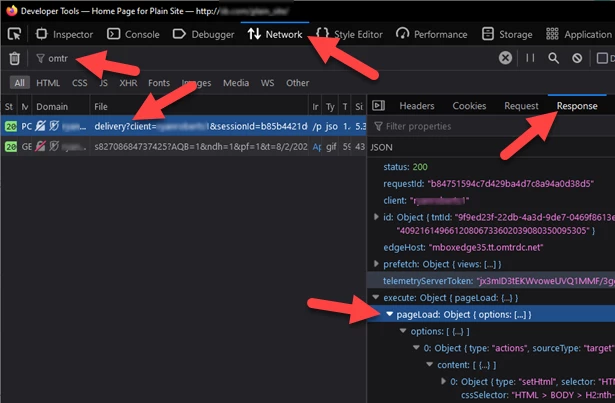
Can you confirm that the device where the preview link isn't working is getting a Target response to the page? Assuming your implementation of Target is the typical client-side (meaning the browser makes calls to Target directly when the page loads). You can use the Developer Tools network tab. You can filter for "omtr" to see just the Target requests. Open the preview or response tab of the request to see if anything shows up in the execute.pageLoad portion of the object.

What could be happening is that the person who's properly seeing the QA links has the Target VEC Helper extension installed on their browser. It will help render QA links even if Target isn't properly deployed on the page. 

1 reply

ryanr7Accepted solution
Employee
March 8, 2022

Hi @ralucatanase

Can you confirm that the device where the preview link isn't working is getting a Target response to the page? Assuming your implementation of Target is the typical client-side (meaning the browser makes calls to Target directly when the page loads). You can use the Developer Tools network tab. You can filter for "omtr" to see just the Target requests. Open the preview or response tab of the request to see if anything shows up in the execute.pageLoad portion of the object.

What could be happening is that the person who's properly seeing the QA links has the Target VEC Helper extension installed on their browser. It will help render QA links even if Target isn't properly deployed on the page.