Adobe Target to Resize Images of Website | Community
Skip to main content
New Participant
January 29, 2024
Solved

Adobe Target to Resize Images of Website

  • January 29, 2024
  • 1 reply
  • 477 views

Hi,


Is it possible to use Adobe target to resize images on the homepage ? If yes, what are the steps ?


Thanks.


This post is no longer active and is closed to new replies. Need help? Start a new post to ask your question.
Best answer by aj23

Hi vinc112,


Yes you can resize image in VEC. 


Steps to Resize:

1. Open site in VEC. Select Image that you want to be resized.

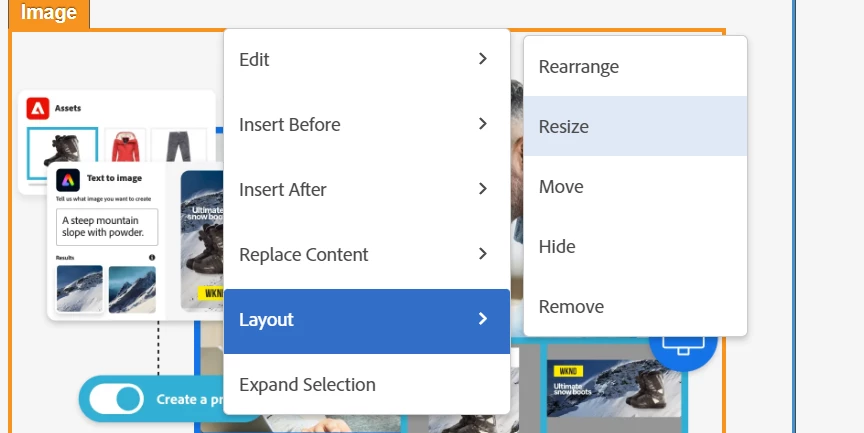
2. Click on Layout then resize


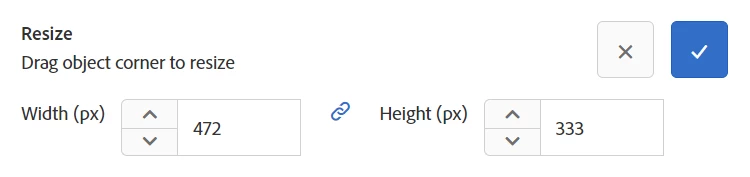
3. Once you click on Resize option will appear to change the Width and Height:


4. Click on right click to save the changes.


Reference document: https://experienceleague.adobe.com/docs/target/using/experiences/vec/viztarget-options.html?lang=en


Regards,

Akshat Jain

1 reply

aj23Accepted solution
Employee
January 29, 2024

Hi vinc112,


Yes you can resize image in VEC. 


Steps to Resize:

1. Open site in VEC. Select Image that you want to be resized.

2. Click on Layout then resize


3. Once you click on Resize option will appear to change the Width and Height:


4. Click on right click to save the changes.


Reference document: https://experienceleague.adobe.com/docs/target/using/experiences/vec/viztarget-options.html?lang=en


Regards,

Akshat Jain