Android - How to make a success metric call | Community
Skip to main content
Employee
October 24, 2017
Solved

Android - How to make a success metric call

  • October 24, 2017
  • 2 replies
  • 3220 views

Hi,

I have integrated Target into an Android application by following instructions from the following sample: mobile-demo-android/MboxCaller.java at master · adobe-target/mobile-demo-android · GitHub

I am having trouble sending success event for the mbox that I have created. I am not sure how to associate the createOrderConfirmRequest with the mBox for which I want to send the success event.

TargetLocationRequest orderConfirm = Target.createOrderConfirmRequest(name, orderId, orderTotal, productPurchasedId, parameters);

Below is the goal that appears on the Target Overview page for this Activity.

Goal

I want to...Increase Conversion
Measured by...Clicked on mbox <MY_MBOX_NAME>

Regards,

Vishal

This post is no longer active and is closed to new replies. Need help? Start a new post to ask your question.
Best answer by Amelia_Waliany

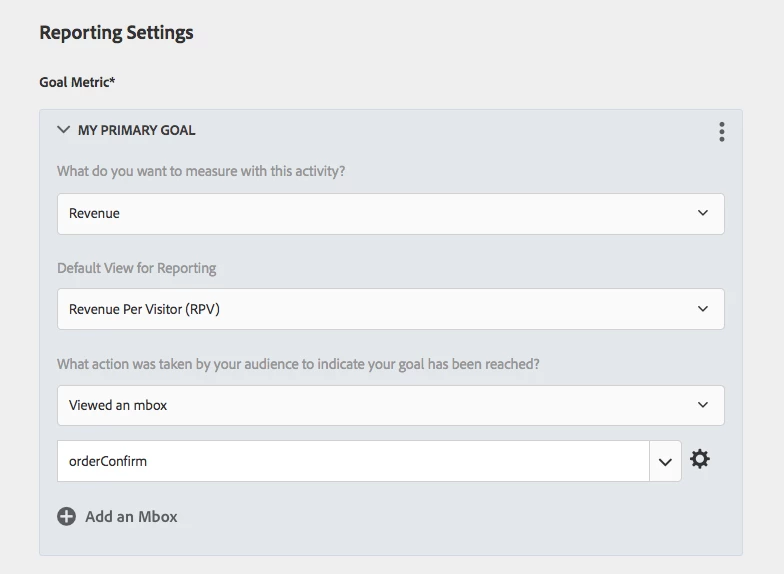
Hi Vishal! Thanks for your question. You will want to add the order confirm mbox to your organization:

Viewed an mbox ---> mbox name specified in the code.

Hope this was helpful!

Warmly,

Amelia

2 replies

meanewoneAuthor
Employee
November 11, 2017

Thank you. I followed up on your suggestions and created another mBox. Thanks.

Amelia_Waliany
Amelia_WalianyAccepted solution
Employee
November 11, 2017

Hi Vishal! Thanks for your question. You will want to add the order confirm mbox to your organization:

Viewed an mbox ---> mbox name specified in the code.

Hope this was helpful!

Warmly,

Amelia