
☕[AT Community Q&A Coffee Break] 10/14/20, 8am PT: Jon Tehero, Group Product Manager for Adobe Target☕ [SERIES 2] | Community
Skip to main content
Amelia_Waliany
Employee
September 29, 2020

☕[AT Community Q&A Coffee Break] 10/14/20, 8am PT: Jon Tehero, Group Product Manager for Adobe Target☕ [SERIES 2]

  • September 29, 2020
  • 11 replies
  • 11479 views

Join us for our next monthly Adobe Target Community Q&A Coffee Break

taking place Wednesday, October 14th @ 8am PT

👨‍💻👩‍💻Register Now!👨‍💻👩‍💻

We'll be joined by Jon Tehero aka @jontehero, Group Product Manager for Adobe Target, who will be signed in here to the Adobe Target Community to chat directly with you on this thread about your Adobe Target questions pertaining to his areas of expertise:

  • AI improvements
  • A4T for Auto-Target
  • Slot-based Recommendations
  • General Adobe Target backend & UI

Want us to send you a calendar invitation so you don’t forget?  Register now to mark your calendar and receive Reminders!

A NOTE FROM OUR NEXT COMMUNITY Q&A COFFEE BREAK EXPERT, JON TEHERO 


REQUIREMENTS TO PARTICIPATE 

  • Must be signed in to the Community during the 1-hour period
  • Must post a Question about Adobe Target
  • THAT'S IT!  *(think of this as the Adobe Target Community equivalent of an AMA, (“Ask Me Anything”), and bring your best speed-typing game)

INSTRUCTIONS 

  • Click the blue “Reply” button at the bottom right corner of this post
  • Begin your Question with @jontehero 
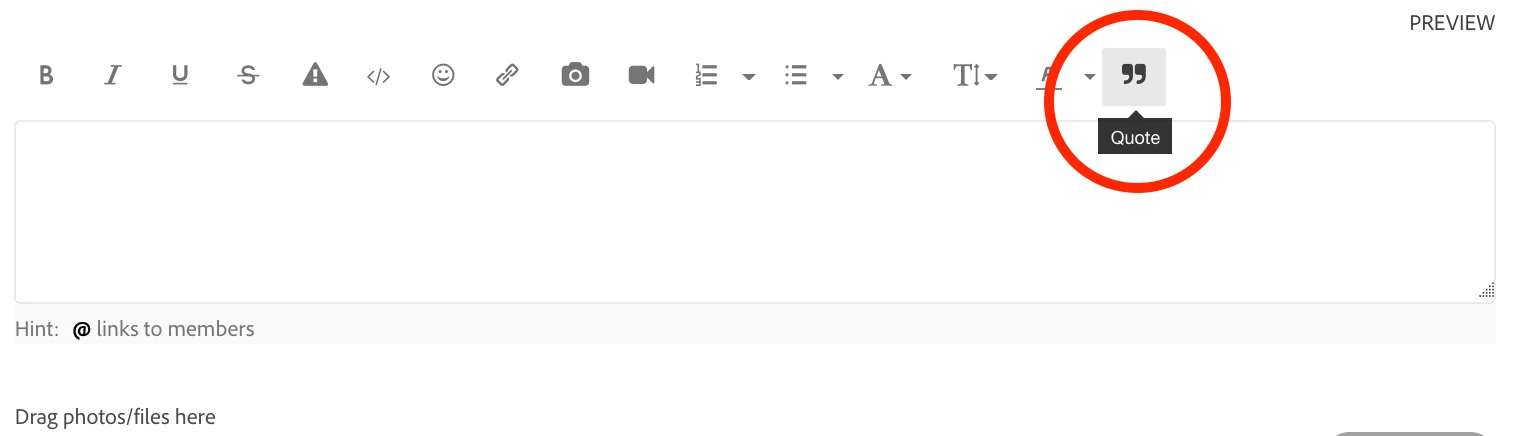
  • When exchanging messages with Jon about your specific question, be sure to use the editor’s "QUOTE" button, which will indicate which post you're replying to, and will help contain your conversation with Jon



Jon Tehero is a Group Product Manager for Adobe Target. He’s overseen hundreds of new features within the Target platform and has played a key role in migrating functionality from Target's classic platforms into the new Adobe Target UI. Jon is currently focused on expanding the Target feature set to address an even broader set of use-cases. Prior to working on the Product Management team, Jon consulted for over sixty mid- to enterprise-sized customers, and was a subject matter expert within the Adobe Consulting group.


Curious about what an Adobe Target Community Q&A Coffee Break looks like? Check out the threads from our first Series of Adobe Target Community Q&A Coffee Breaks

This post is no longer active and is closed to new replies. Need help? Start a new post to ask your question.

11 replies

New Participant
September 30, 2020

Hi @Jon_Tehero thank you for your time today - these coffee break sessions are great 🙂  I wanted to share our experience regarding A4T offline significance calculations. As a whole, the process is quite time consuming and most of our experiments require that we do offline calculations – it would be more practical if the Target UI/Analytics Reporting/A4T workspace panel could compute calculated metrics, but even improving the performance of Data Warehouse UI would be a great improvement to the process, since it's a requirement for those of us that select A4T as the reporting source in the activity.

With the current process, monitoring tests does not seem really practical b/c of the manual processes involved, but it is truly a requirement for high-risk tests and there is no way around it, we can't wait for the test to reach the required sample size/# of conversions to end the test and complete the significance analysis.

Currently we have to take these steps to perform offline significance calculations for A4T activities due to analytics continuous variables: 1) we have to create multiple segments that are compatible with data warehouse, 2) pull various reports from data warehouse to break down the data in a digestible format, 3) after the report is available sometimes hours or a day or 2 later, we then have to enter formulas in excel to calculate visitors and compute sum of success metric squared 4) followed by inputting the data into the excel spreadsheet confidence calculator.

In general, the process makes monitoring tests difficult, very time consuming, and I would go as far and say it may even discourage the monitoring cycle of the testing process because it requires a lot of effort. The level of effort required isn't ideal either after a test ends, but re-doing these steps in week intervals for example when a test is running for a test that could be identified as high-risk for the business isn't practical. 

Is there an improvement to this process in the road-map or any recommendation on how to create efficiencies with existing functionality? There isn't much information I could find in the Adobe Cloud documentation that provided alternative solutions, but was hoping you could provide more insight to future improvements or potentially other ways that we can achieve the same result with less effort?

Thank you!

Employee
October 14, 2020

@shani2 wrote:

Hi @Jon_Tehero thank you for your time today - these coffee break sessions are great 🙂  I wanted to share our experience regarding A4T offline significance calculations. As a whole, the process is quite time consuming and most of our experiments require that we do offline calculations – it would be more practical if the Target UI/Analytics Reporting/A4T workspace panel could compute calculated metrics, but even improving the performance of Data Warehouse UI would be a great improvement to the process, since it's a requirement for those of us that select A4T as the reporting source in the activity.

With the current process, monitoring tests does not seem really practical b/c of the manual processes involved, but it is truly a requirement for high-risk tests and there is no way around it, we can't wait for the test to reach the required sample size/# of conversions to end the test and complete the significance analysis.

Currently we have to take these steps to perform offline significance calculations for A4T activities due to analytics continuous variables: 1) we have to create multiple segments that are compatible with data warehouse, 2) pull various reports from data warehouse to break down the data in a digestible format, 3) after the report is available sometimes hours or a day or 2 later, we then have to enter formulas in excel to calculate visitors and compute sum of success metric squared 4) followed by inputting the data into the excel spreadsheet confidence calculator.

In general, the process makes monitoring tests difficult, very time consuming, and I would go as far and say it may even discourage the monitoring cycle of the testing process because it requires a lot of effort. The level of effort required isn't ideal either after a test ends, but re-doing these steps in week intervals for example when a test is running for a test that could be identified as high-risk for the business isn't practical. 

Is there an improvement to this process in the road-map or any recommendation on how to create efficiencies with existing functionality? There isn't much information I could find in the Adobe Cloud documentation that provided alternative solutions, but was hoping you could provide more insight to future improvements or potentially other ways that we can achieve the same result with less effort?

Thank you!


Hi Shani2,


Thank you for your question! We've received a lot of request for supporting calculated metrics. We know that this would improve the overall process/workflow for our customers. My peers on the Analytics product management team have this feature in their backlog but we do not have any specific dates at this time. 


If you have access to the Experience Platform and have your analytics data landing on platform, the query service is probably the best option for achieving this today.

Employee
October 14, 2020

@shani2 Check out this Spark page on additional best practices for leveraging A4T: https://spark.adobe.com/page/Lo3Spm4oBOvwF/