
[AT Community Q&A Coffee Break] 7/8: Rob Hornick, Adobe Target Product Manager | Community
Skip to main content
Amelia_Waliany
Employee
July 7, 2020

[AT Community Q&A Coffee Break] 7/8: Rob Hornick, Adobe Target Product Manager

  • July 7, 2020
  • 12 replies
  • 9692 views

Join us for our next Adobe Target Community Q&A Coffee Break

taking place Wednesday, July 8th @ 10am PDT

👨‍💻👩‍💻--> REGISTER NOW <-- 👨‍💻👩‍💻

We'll be joined by Rob Hornick aka @rhornick, Senior Adobe Target Product Manager, who will be signed in here to the Adobe Target Community to chat directly with you on this thread about your Adobe Target questions pertaining to his areas of expertise:

  • Personalization
  • Machine Learning & Artificial Intelligence 
  • Recommendations
  • Auto-Allocate
  • Auto-Target
  • Automated Personalization 

Want us to send you a calendar invitation so you don’t forget? Register now to receive a reminder!

A NOTE FROM NEXT WEEK'S COMMUNITY Q&A COFFEE BREAK EXPERT, ROB HORNICK 


REQUIREMENTS TO PARTICIPATE 

  • Must be signed in to the Community during the 1-hour period
  • Must post a Question about Adobe Target
  • THAT'S IT!  *(think of this as the Adobe Target Community equivalent of an AMA, (“Ask Me Anything”), and bring your best speed-typing game)

INSTRUCTIONS 

  • Click the blue “Reply” button at the bottom right corner of this post
  • Begin your Question with @rhornick 
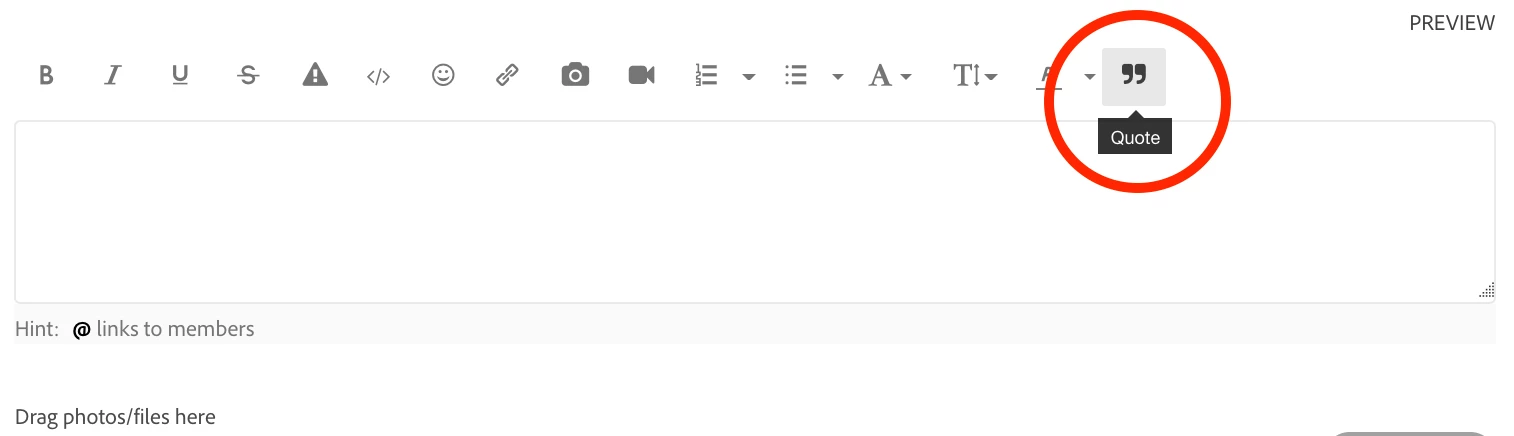
  • When exchanging messages with Rob about your specific question, be sure to use the editor’s "QUOTE" button, which will indicate which post you're replying to, and will help contain your conversation with Rob



Rob Hornick is the Senior Product Manager for Machine Learning and Personalization with Adobe Target, based in San Francisco. Rob is energized by both building tools to personalize digital experiences and putting advances in machine learning into marketers’ hands. Prior to joining Adobe, Rob was a Manager with Accenture Digital where he helped marketers optimize their processes and technology.


Curious about what an Adobe Target Community Q&A Coffee Break looks like? Check out the thread from our last break with Ram Parthasarathy, Principal Product Manager for Adobe Experience Cloud

This post is no longer active and is closed to new replies. Need help? Start a new post to ask your question.

12 replies

Amelia_Waliany
Employee
July 8, 2020

Hi @rhornick, this Question was previously posted in the Community by @saif-1 :


I want to use two different recommendations design in the same recommendations activity and divide the traffic between the 2 designs making it a 50/50 split.

This idea makes it a combination of recommendations and A/B test.

Since recommendations only allows one version apart from control, we are not able to add more designs as different versions in the same activity.

Please let me know how we can achieve something like this

@ryanr79035901

Employee
July 8, 2020

@amelia_waliany wrote:

Hi @rhornick, this Question was previously posted in the Community by @saif-1 :


I want to use two different recommendations design in the same recommendations activity and divide the traffic between the 2 designs making it a 50/50 split.

This idea makes it a combination of recommendations and A/B test.

Since recommendations only allows one version apart from control, we are not able to add more designs as different versions in the same activity.

Please let me know how we can achieve something like this

@ryanr79035901


Hi @saif-1 , you have two options:

  1. Set up your test as an A/B test activity and then insert Recommendations offers into each variant. This allows you to test a number of different design/algorithm combinations. For example, you could set up a test with 4 variations based on the number of items to display (4 or 6 items) and the algorithm to use (recently viewed or top sellers). You can then specify the exact traffic split you want (even or otherwise). For more on this option, see: https://docs.adobe.com/content/help/en/target/using/recommendations/recommendations-as-an-offer.html 
  2. To accomplish your goal in a Recommendations activity, select a single Criteria, then select multiple Designs during the "Select a Design template" section of the activity creation workflow before continuing. Recommendations activities allow you to test either multiple Criteria or multiple Designs, but not both at the same time. Recommendations activities also force an even traffic split between all non-control variations. For more on this option, see: https://docs.adobe.com/content/help/en/target/using/recommendations/recommendations-activity/create-recs-activity.html 
Amelia_Waliany
Employee
July 8, 2020

Hi @rhornick, thanks for this insightful coffee break! This Question was previously posted in the Community by @petero3 :  


I know the general guidelines on the Adobe site around Auto Target are;

When Conversion is your success metric: 1,000 visits and at least 50 conversions per day per experience, and in addition the activity must have at least 7,000 visits and 350 conversions.

How rigid are these, i.e. if I have roughly 960 visits a day and 40 / 35 conversions, is this still viable to run and it will take longer to achieve confidence? Does this work in the same way for say 800 visits? 

I would like to try auto targeting but volume is an issue so I wanted to try and see if we could still run auto targetting.

Employee
July 8, 2020

@amelia_waliany wrote:

Hi @rhornick, thanks for this insightful coffee break! This Question was previously posted in the Community by @petero3 :  


I know the general guidelines on the Adobe site around Auto Target are;

When Conversion is your success metric: 1,000 visits and at least 50 conversions per day per experience, and in addition the activity must have at least 7,000 visits and 350 conversions.

How rigid are these, i.e. if I have roughly 960 visits a day and 40 / 35 conversions, is this still viable to run and it will take longer to achieve confidence? Does this work in the same way for say 800 visits? 

I would like to try auto targeting but volume is an issue so I wanted to try and see if we could still run auto targetting.


Hi @petero52240340, thanks for your question. It's still possible to create an Auto-Target activity with less traffic than the recommended guidelines. However, it will take additional time for Adobe Target to build predictive models, and the predictive models may be lower-quality. Some quick tips to get better performance from Auto-Target activities with less traffic:

  • Direct less traffic (10%) to the control option. This ensures that plenty of traffic is available for exploration and exploitation. (The tradeoff is you may have a less accurate measure of the overall activity's lift.)
  • Use fewer, more distinctive experiences. For example, use 3 very unique, distinct experiences (e.g. headline and hero image and product change) rather than 10 experiences with small differences (e.g. changed background color of product image.)
  • Use a conversion metric rather than an engagement or revenue metric. Binary conversion metrics are easier to model in low traffic scenarios.
surebee
Employee
July 8, 2020

Hi @rhornick, this question was posted in the community by @dsu50:


Do Adobe Target Auto-Target and Auto-Allocate options use Bayesian or frequentist statistics? Is there a documentation that describes the statistical methods these options use? 

Employee
July 8, 2020

@surebee wrote:

Hi @rhornick, this question was posted in the community by @dsu50:


Do Adobe Target Auto-Target and Auto-Allocate options use Bayesian or frequentist statistics? Is there a documentation that describes the statistical methods these options use? 


Hi @dsu50 . In both Auto-Allocate and Auto-Target we start with a prior probability of conversion for each experience and then update the estimate over time, so both use Bayesian methods. More info about Auto-Allocate is available here: https://docs.adobe.com/content/help/en/target/using/activities/auto-allocate/automated-traffic-allocation.html

More info about Auto-Target's model is available here (note the same model powers Automated Personalization): https://docs.adobe.com/content/help/en/target/using/activities/automated-personalization/automated-personalization.html 

Amelia_Waliany
Employee
July 8, 2020

Hi @rhornick this question was previously posted in the Community by @ambikatewari_atci


Hi Experts,

As per help doc, Entity attribute values expire after 61 days. This means that you should ensure that the latest value of each entity attribute is passed to Target Recommendations at least once per month for each item in your catalog.

does this mean if the same value for an entity attribute is updated then attribute will not expire. ? or should it have new value for entity attribute not to expire?

Employee
July 8, 2020

@amelia_waliany wrote:

Hi @rhornick this question was previously posted in the Community by @ambikatewari_atci


Hi Experts,

As per help doc, Entity attribute values expire after 61 days. This means that you should ensure that the latest value of each entity attribute is passed to Target Recommendations at least once per month for each item in your catalog.

does this mean if the same value for an entity attribute is updated then attribute will not expire. ? or should it have new value for entity attribute not to expire?


@ambikatewari_atci (love the user name!), you do not need to change the value. Sending the same value will still let us know that the product data should not expire.

surebee
Employee
July 8, 2020

Hi @rhornick, this question was posted in the community by @anils5920589:


Had a question on how Target derives reward probabilities for the MAB algorithms implemented for Auto Allocate, Auto Target and Automated Personalization activities.


Was going through your docs and found out that there are three ways of feeding data into Target:

  • mbox parameters
  • Profile parameters/attributes
  • Server side APIs for profile updates.

Since MAB algorithms need reward probabilities of each experience/variant as an input which change over time as more visitors participate in an activity, does Target derive the reward probability from the data supplied using the above methods ?

Employee
July 8, 2020

@surebee wrote:

Hi @rhornick, this question was posted in the community by @anils5920589:


Had a question on how Target derives reward probabilities for the MAB algorithms implemented for Auto Allocate, Auto Target and Automated Personalization activities.


Was going through your docs and found out that there are three ways of feeding data into Target:

  • mbox parameters
  • Profile parameters/attributes
  • Server side APIs for profile updates.

Since MAB algorithms need reward probabilities of each experience/variant as an input which change over time as more visitors participate in an activity, does Target derive the reward probability from the data supplied using the above methods ?


Hi @anils5920589

The Auto-Allocate multi-armed bandit feature is a non-contextual bandit so does not leverage the aforementioned attributes to derive a reward probability; instead it solely examines prior behavior at the aggregate level.


The Auto-Target and Automated Personalization feature act as contextual bandits and, as you've correctly inferred, leverage the provided profile and contextual (mbox) parameters to derive an estimated probability of conversion (per experience for Auto-Target and per offer for Automated Personalization). To learn more, see: https://docs.adobe.com/content/help/en/target/using/activities/automated-personalization/ap-data.html and https://docs.adobe.com/content/help/en/target/using/activities/automated-personalization/uploading-data-for-the-target-personalization-algorithms.html .

Employee
July 8, 2020

Hi all! Looking forward to answering your questions today.

ActiveMitchell
New Participant
July 8, 2020

Hello - how can I get into the Conversation? first timer here - already registered, not seeing the link.  thanks.

New Participant
July 8, 2020

Ha. I have a similar question. I think you are in it. AMA. Forum style.

Nicolas_Swisscom
New Participant
July 8, 2020

@Rob_Hornick why is AP and AT not an activity type of it's own i.e. and currently "inside" the A/B Test flow?

What is the difference between AP, AT and Recommended for you? Are all 3 using the same algorithm?

How would I be ablecable to use AT or AP together with a propensity score (hopefully from AA)? Any examples or tips how to achieve this?

Can you share some examples of websites that sucessfully use AP, AT or Recs.?

How do I use Recs. within a Single Page Application? Trigger Views?

Merci beacoup!

Nicolas

Employee
July 8, 2020

@nicolas_swisscom wrote:

@Rob_Hornick why is AP and AT not an activity type of it's own i.e. and currently "inside" the A/B Test flow?

What is the difference between AP, AT and Recommended for you? Are all 3 using the same algorithm?

How would I be ablecable to use AT or AP together with a propensity score (hopefully from AA)? Any examples or tips how to achieve this?

Can you share some examples of websites that sucessfully use AP, AT or Recs.?

How do I use Recs. within a Single Page Application? Trigger Views?

Merci beacoup!

Nicolas


Nicolas!  Great to connect with you and hope all is well in your neck of the globe!  Automated Personalization (AP) is its own activity type, but Auto-Target (AT) is embedded within the testing activity workflow for ease of "one-click" personalization, evaluating each individual's profile for determining the next best experience to deliver.  It makes it easier to consider utilizing personalization when considering traffic allocation to different experiences (when you are in the 2nd step of our 3-step testing activity workflow), and to consider leveraging our algorithms for dynamically decisioning for each individual (equivalent of taking action off of hundreds of tests in a single moment) 


A good reference for the underlying algorithms is our Automation Infographic: https://wwwimages2.adobe.com/content/dam/acom/en/marketing-cloud/target/pdf/54658.en.target.infographic.automation-sensei-update-2017-summit.pdf


Here is more information on our Recommended For You algorithm and use cases, written by Rob: https://theblog.adobe.com/delivering-dynamic-personalized-experiences-with-adobe-targets-new-user-based-recommendations-algorithm/  


AT.js, our javascript library, is built for integrations within Single Page Applications.  This enables leveraging triggerviews for delivering experiences discretely within an SPA experience.  

surebee
Employee
July 8, 2020

@drewb6915421 wrote:

@nicolas_swisscom wrote:

@Rob_Hornick why is AP and AT not an activity type of it's own i.e. and currently "inside" the A/B Test flow?

What is the difference between AP, AT and Recommended for you? Are all 3 using the same algorithm?

How would I be ablecable to use AT or AP together with a propensity score (hopefully from AA)? Any examples or tips how to achieve this?

Can you share some examples of websites that sucessfully use AP, AT or Recs.?

How do I use Recs. within a Single Page Application? Trigger Views?

Merci beacoup!

Nicolas


Nicolas!  Great to connect with you and hope all is well in your neck of the globe!  Automated Personalization (AP) is its own activity type, but Auto-Target (AT) is embedded within the testing activity workflow for ease of "one-click" personalization, evaluating each individual's profile for determining the next best experience to deliver.  It makes it easier to consider utilizing personalization when considering traffic allocation to different experiences (when you are in the 2nd step of our 3-step testing activity workflow), and to consider leveraging our algorithms for dynamically decisioning for each individual (equivalent of taking action off of hundreds of tests in a single moment) 


A good reference for the underlying algorithms is our Automation Infographic: https://wwwimages2.adobe.com/content/dam/acom/en/marketing-cloud/target/pdf/54658.en.target.infographic.automation-sensei-update-2017-summit.pdf


Here is more information on our Recommended For You algorithm and use cases, written by Rob: https://theblog.adobe.com/delivering-dynamic-personalized-experiences-with-adobe-targets-new-user-based-recommendations-algorithm/  


AT.js, our javascript library, is built for integrations within Single Page Applications.  This enables leveraging triggerviews for delivering experiences discretely within an SPA experience.  


Here is a nice article illustrating the difference between AP and AT for your reference: https://docs.adobe.com/content/help/en/target/using/activities/auto-target-to-optimize.html#section_BA4D83BE40F14A96BE7CBC7C7CF2A8FB 

New Participant
July 8, 2020

@rhornick I will do just about anything to get the 50 profile param limitation on AT 2.3 removed. Thoughts?

New Participant
July 8, 2020

@rhornick do you have any advice on hooking up internal decisioning (algos) to Adobe Target as the last mile of determining eligibility for running experiments?

Employee
July 8, 2020

@evidana wrote:

@rhornick do you have any advice on hooking up internal decisioning (algos) to Adobe Target as the last mile of determining eligibility for running experiments?


Hi Eric, there are a few options you might consider here for bringing external decisioning data into Adobe Target.

  1. For product and content recommendations based on a key value (like customer ID or current product ID) that can be pre-computed, consider the "Custom Criteria" feature of Target Recommendations, which allows you to upload custom recommendations for each key value. See: https://docs.adobe.com/content/help/en/target/using/recommendations/criteria/recommendations-csv.html 
  2. For real-time rules-based targeting based on an external signal, you can call your external system prior to calling Adobe Target, then pass the signal to Adobe Target as a profile or mbox parameter.
  3. You can use Target's Data Providers capability to ingest external data sources: https://docs.adobe.com/content/help/en/target-learn/tutorials/integrations/use-data-providers-to-integrate-third-party-data.html

This is an area of active investment for us. We're currently working on a feature, "Auto-Target with Custom Model", that will enable Target Premium users to bring their own model into Target's Auto-Target feature. If participating in a beta of this feature is of interest to you, please reach out through your Adobe CSM.