AT: request failed Error: Errors: field - [context.address.url] - size must be between 0 and 4096 | Community
Skip to main content
New Participant
June 1, 2021
Solved

AT: request failed Error: Errors: field - [context.address.url] - size must be between 0 and 4096

  • June 1, 2021
  • 3 replies
  • 2025 views

Hello Team,
There is a bug in Adobe target. Please find the details below:
We have a requirement where the length of the size can be more than 4096. I am using at.js 2.0. Due to the URL length of more than 4096. I am getting the below response from the Adobe target server.


Error: AT: request failed Error: Errors: field - [context.address.url] - size must be between 0 and 4096


I have tried different ways to fix this issue. It would be nice to add a feature that could update context variable in Adobe Target when needed. Also, this thing needs to be handled from the Adobe target server-side as well.

Have you guys face this issue before. If yes, How did you handled it?

Regards
AJ
This post is no longer active and is closed to new replies. Need help? Start a new post to ask your question.
Best answer by Gaurav_Singh_02

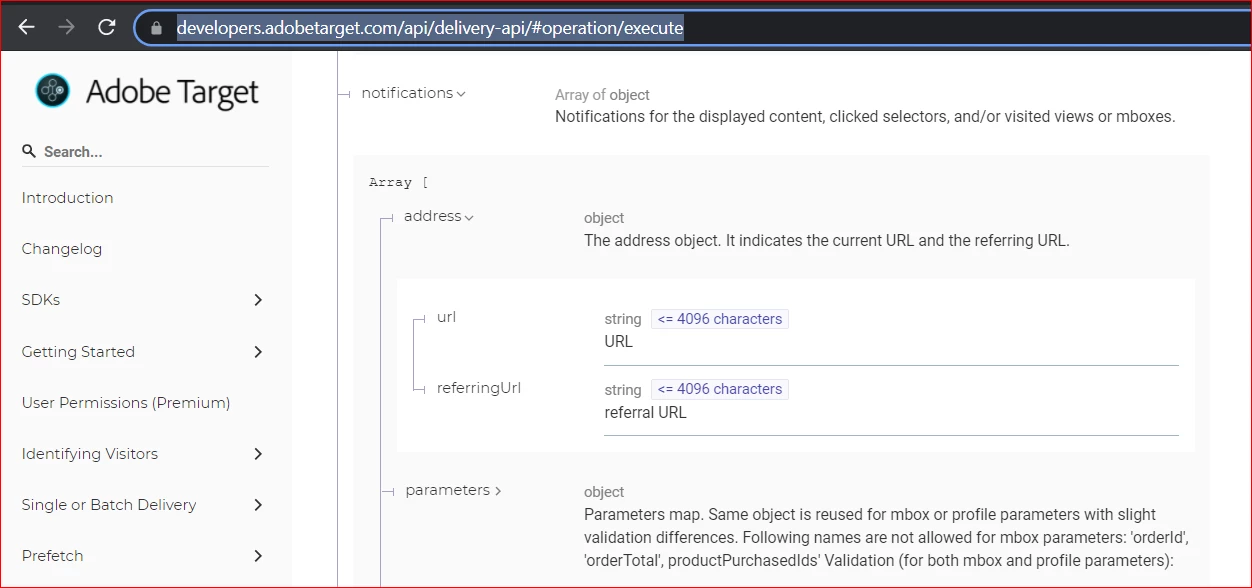
@aj4989 @kraz @aj18  so the error you are getting is intended . This is not a bug but a defined/documented  limit for request url . You may have a look at this document for more details : https://developers.adobetarget.com/api/delivery-api/#operation/execute 


3 replies

Gaurav_Singh_02Accepted solution
Employee
July 16, 2021

@aj4989 @kraz @aj18  so the error you are getting is intended . This is not a bug but a defined/documented  limit for request url . You may have a look at this document for more details : https://developers.adobetarget.com/api/delivery-api/#operation/execute 


New Participant
July 27, 2021
I already assumed that it is by design if an error comes back. My question is more how can I prevent that, the limit is not by any URL specs and I have not seen in the documentation how to set the parameter with a shortened URL to make sure it always works?
New Participant
June 14, 2021
Same error here, any udpate from Adobe?
New Participant
June 10, 2021
I would love have any update from Adobe? If they are planning to fix any time? If yes, how long is it going to take?