Cross-Origin Request Blocked | Community
Skip to main content
New Participant
October 18, 2021
Solved

Cross-Origin Request Blocked

  • October 18, 2021
  • 1 reply
  • 4184 views

Hi All, 

I cant able to qualify any target experience in Firefox, I'm getting below error(Cross-Origin Request Blocked: The Same Origin Policy disallows reading the remote resource at). Anyone has any solution ?


Thanks!

This post is no longer active and is closed to new replies. Need help? Start a new post to ask your question.
Best answer by Khushboo_Kalia

Hi @kirti_23 

This is the behavior of Firefox, and expectation too; that Target sometimes fails to load in this particular browser. I believe, if you will try in Chrome then it will certainly work.

The reason behind this is some kind of fundamental network error. In many cases, it is caused by a browser plugin (e.g. an ad blocker or privacy protector) blocking the Target request. In today's time, it is generally Firefox's built-in tracking protection called as "Enhanced Tracking Protection". Under this tracking protection, Firefox blocks some network calls. Below is a link that talks more about it.

https://support.mozilla.org/en-US/kb/enhanced-tracking-protection-firefox-desktop

Now, here is the SOLUTION - You have to disable "Enhanced Tracking Protection" in Firefox, please find below the steps to achieve the same.

  • Click on the shield icon in the address bar.

         

  • Toggle the switch at the top of the panel from "ON" to "OFF".
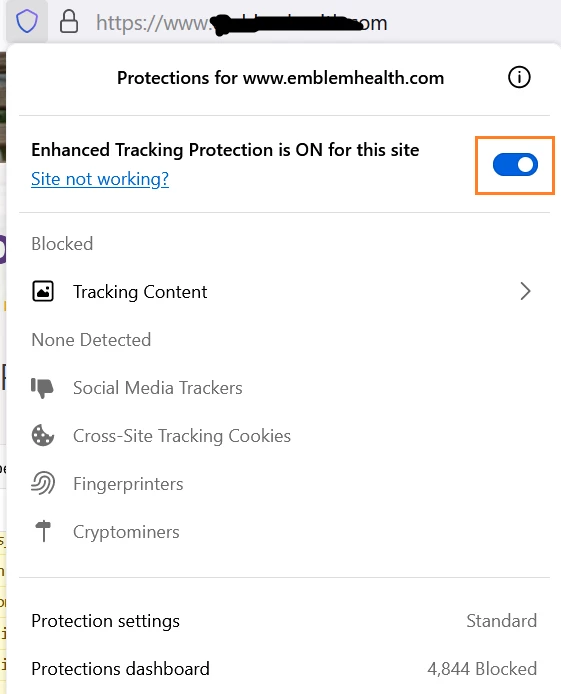
         

  • Disabling the tracking protection reloads the site page and this time, with Target loaded successfully on it.




1 reply

Khushboo_Kalia
Khushboo_KaliaAccepted solution
Employee
October 19, 2021

Hi @kirti_23 

This is the behavior of Firefox, and expectation too; that Target sometimes fails to load in this particular browser. I believe, if you will try in Chrome then it will certainly work.

The reason behind this is some kind of fundamental network error. In many cases, it is caused by a browser plugin (e.g. an ad blocker or privacy protector) blocking the Target request. In today's time, it is generally Firefox's built-in tracking protection called as "Enhanced Tracking Protection". Under this tracking protection, Firefox blocks some network calls. Below is a link that talks more about it.

https://support.mozilla.org/en-US/kb/enhanced-tracking-protection-firefox-desktop

Now, here is the SOLUTION - You have to disable "Enhanced Tracking Protection" in Firefox, please find below the steps to achieve the same.

  • Click on the shield icon in the address bar.


  • Toggle the switch at the top of the panel from "ON" to "OFF".


  • Disabling the tracking protection reloads the site page and this time, with Target loaded successfully on it.


New Participant
October 19, 2021

Hi
The answer should be focus on CORs policy update
Best practice will be white list all the domain the application/web is using (its good for content security)


https://developer.mozilla.org/en-US/docs/Web/HTTP/CORS

Access-Control-Allow-Origin: https://foo.example