Target Global Parameter passed via DTM not working | Community
Skip to main content
YogitaBist
New Participant
February 12, 2018
Solved

Target Global Parameter passed via DTM not working

  • February 12, 2018
  • 8 replies
  • 6884 views

ryanr8ameliaw95025277

I followed the instructions given in the help link to pass global mbox parameters but its not working.

help article referred : Passing Parameters to a Global mbox

I followed the below steps....

I created a data element 'prodctCategory'.
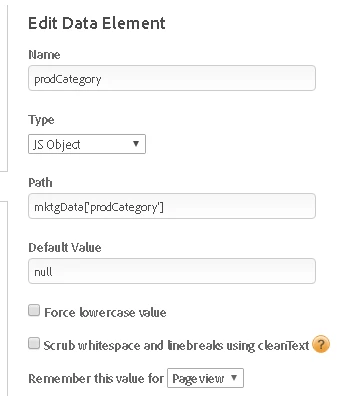
Post this, I created Global Parameter

productCategory  %prodCategory%

Am I, missing out on something ?

Regards

Yogita

This post is no longer active and is closed to new replies. Need help? Start a new post to ask your question.
Best answer by ketansing.pardeshi

Hi yogita,

data layer example :

<script type="text/javascript">

      window.dataLayer= {

           'pagename':"indexPage",

           'City' : "Mumbai"

                            }    

</script>

Since you are using data Layer here you can do it like this.

Go to the data element create new -> type JS object -> path you can set like

dataLayer.City

This will access the value in global parameters.

Regards,

Ketan Pardeshi

8 replies

New Participant
February 13, 2018

Glad to know it worked !

YogitaBist
New Participant
February 13, 2018

ketangp28686788

It's working now. Thanks a lot for your help.

YogitaBist
New Participant
February 12, 2018

its not working

i changed it to mktgData.prodCategory. The value is passing in console but not working from DTM.

New Participant
February 12, 2018

Sure .

If It solves your issue please mark this question as answered.

Regards,

Ketan Pardeshi

YogitaBist
New Participant
February 12, 2018

thanks a lot. I quickly try this.

ketansing.pardeshiAccepted solution
New Participant
February 12, 2018

Hi yogita,

data layer example :

<script type="text/javascript">

      window.dataLayer= {

           'pagename':"indexPage",

           'City' : "Mumbai"

                            }    

</script>

Since you are using data Layer here you can do it like this.

Go to the data element create new -> type JS object -> path you can set like

dataLayer.City

This will access the value in global parameters.

Regards,

Ketan Pardeshi

YogitaBist
New Participant
February 12, 2018

Yes.

New Participant
February 12, 2018

Hi Yogita,

Is this your data Layer element that you are passing mktgData['prodCategory'] ?

Regards,

Ketan Pardeshi.