Solved
Target using the wrong selector
I have an Adobe Target instance that is not selecting the correct element.
Whenever I select an element inside this form, it always grab the selector for the input of id `#optionamountdonation-5e445e51222`. That input, even though also part of the form, cannot even be selected as it is absolute left positioned out of the page view (for accessibility reason).
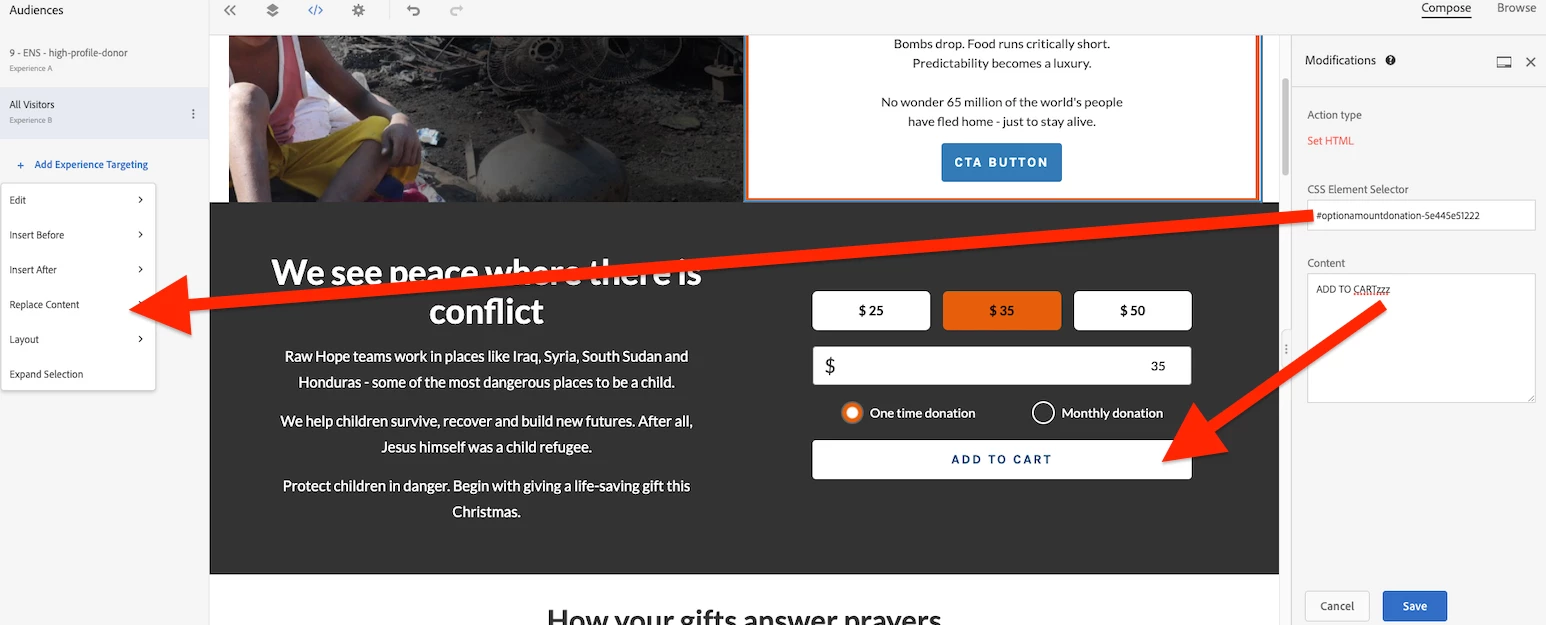
Since we are not getting the selector for "ADD TO CART" button, the changes I applied won't work. This same issue for all the elements inside the form (toggle, amount input, the three amount labels).
But if I select something outside of the form (like the text on the left), it works. I suspect it may be some Javascript acting on the form element that conflict with Target?
I have also recorded a Youtube video here for more detail.
Any advice or suggestions? I am fairly new to Target.
Thanks and much appreciated,