Template testing rules | Community
Skip to main content
New Participant
June 1, 2017
Solved

Template testing rules

  • June 1, 2017
  • 1 reply
  • 2131 views

I am setting up an A/B test where with multiple template rules. I keep getting this prompt

Some of the values for template testing rules contain white spaces. If these are added by mistake please remove them OR add proper encoding for the whitespaces. This may affect content delivery

If anyone can assist, that would be great.

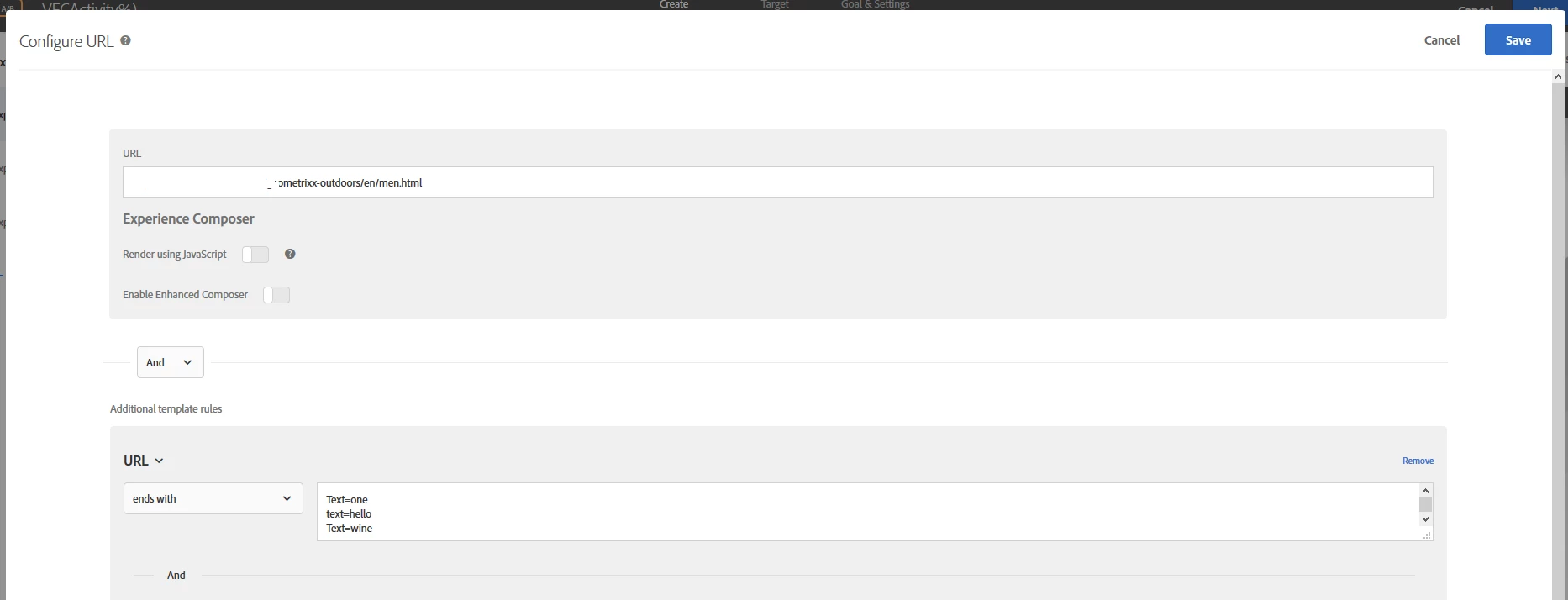
AND URL Contains Ends with Text=one, text=hello, text=wine

The comma doesn't work - or the semi colon - or the carrot ^.

Help:)

Sunny

This post is no longer active and is closed to new replies. Need help? Start a new post to ask your question.
Best answer by ParitMittal

Hi Sunny,

For Template rules in Adobe Target , It is not required to insert comma(,) for multiple values . The only thing you have to do is type a value in the text box and then press Enter  and then again type a value and press Enter like below :

We have tested  the same at our end on a dummy Activity and it's working.

Please do let us know in case of any questions or queries

Regards

Parit Mittal

1 reply

ParitMittal
ParitMittalAccepted solution
New Participant
June 2, 2017

Hi Sunny,

For Template rules in Adobe Target , It is not required to insert comma(,) for multiple values . The only thing you have to do is type a value in the text box and then press Enter  and then again type a value and press Enter like below :

We have tested  the same at our end on a dummy Activity and it's working.

Please do let us know in case of any questions or queries

Regards

Parit Mittal