Using AEP attributes in adobe target for personalisation | Community
Skip to main content
New Participant
October 24, 2024
Solved

Using AEP attributes in adobe target for personalisation

  • October 24, 2024
  • 1 reply
  • 1022 views

Hi,

I am trying to show a personalised banner with audience created in AEP.

using code to fetch data from aep as 
${aep.timeSeriesEvents._experience.analytics.customDimensions.eVars.eVar100 default="testECID"}.


and it is as per Adobe Target documents.
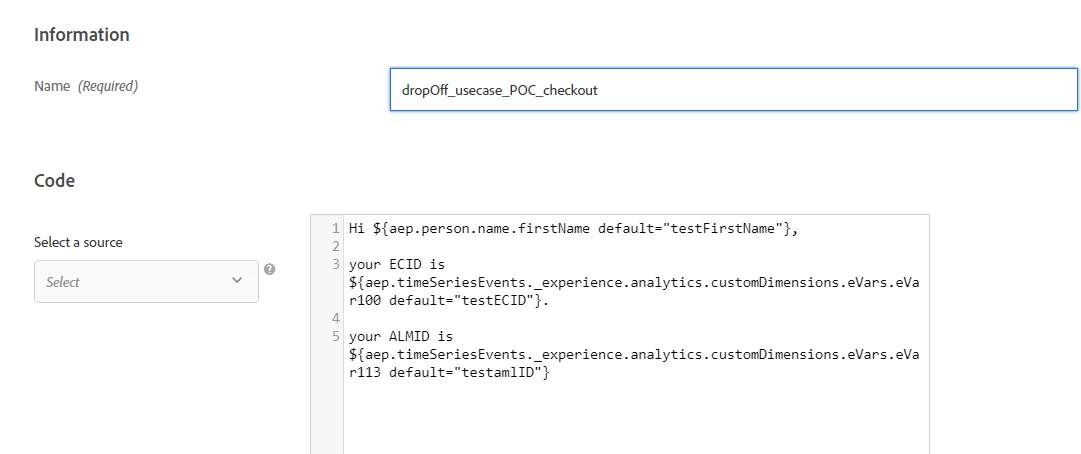
But when I am checking QA link, I see only default value. Audience segment is created in POC environment and very generic anyone call fall into it. I check in profile and my profile was qualified into. not sure what the issue. 

Best answer by Gokul_Agiwal

Hi @rudrawiley 

Regarding the QA link - sometimes QA URLs not  working s as expected. One of our community advisor @kandersen-1 show the way to use QA audience to validate activities

he described how to use it in below thread.  Can you try the steps he mentioned and see your activity working as expected. 

Solved: Re: Adobe Target QA doesn't show variant B - Adobe Experience League Community - 707971 

If you're still facing issues feel free to post here and we can see further. 

Thanks 

1 reply

Gokul_Agiwal
Gokul_AgiwalAccepted solution
New Participant
October 25, 2024

Hi @rudrawiley 

Regarding the QA link - sometimes QA URLs not  working s as expected. One of our community advisor @kandersen-1 show the way to use QA audience to validate activities

he described how to use it in below thread.  Can you try the steps he mentioned and see your activity working as expected. 

Solved: Re: Adobe Target QA doesn't show variant B - Adobe Experience League Community - 707971 

If you're still facing issues feel free to post here and we can see further. 

Thanks 

kandersen-1
New Participant
October 25, 2024

I've actually just posted an article about it, so it will be easier to reference an alternative approach to the QA links - you can find it here: https://experienceleaguecommunities.adobe.com/t5/adobe-target-blogs/struggling-with-qa-links-here-s-your-work-around/ba-p/713477

I share weekly Adobe tips on LinkedIn—connect with me!Every Wednesday: "Something a client recently asked..."LinkedIn Profile