Adding Favicon to ACC Page (V5 Compatibility) | Community
Skip to main content
New Participant
September 7, 2023
Solved

Adding Favicon to ACC Page (V5 Compatibility)

  • September 7, 2023
  • 2 replies
  • 1199 views

Team,


Please let me know how to add Favicon in ACC webapp with Page (V5 Compatibility). With just page activity, it will be part of HTML but with Page V5 , I am not able to find a placeholder to enable favicon. 


Let me know if anyone has enabled the favIcon with Page (V5 Compatibility).


Thanks,

Vikas.
 

@marcel_szimonisz 


This post is no longer active and is closed to new replies. Need help? Start a new post to ask your question.
Best answer by Marcel_Szimonisz

Hello @vikasna ,
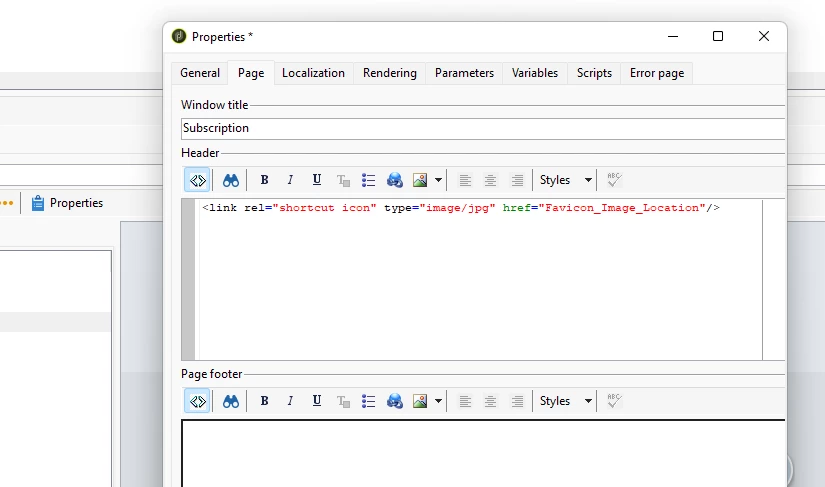
You should be able to add favicon to the header section in page properties


<link rel="shortcut icon" type="image/jpg" href="Favicon_Image_Location"/>


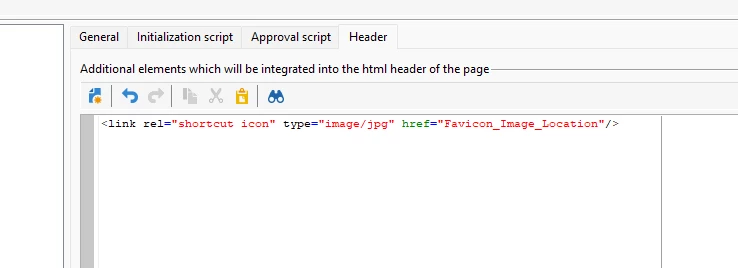
Or in Page (v5 compatibility) activity  header section.


Why do you use this activity? I have one nice workaround for not to use it when building forms. I will tag you when I will write it on blog 🙂


Marcel Szimonisz

MarTech Consultant
for more tips visit my blog
https://www.martechnotes.com/

2 replies

Marcel_Szimonisz
Marcel_SzimoniszAccepted solution
New Participant
September 11, 2023

Hello @vikasna ,
You should be able to add favicon to the header section in page properties


<link rel="shortcut icon" type="image/jpg" href="Favicon_Image_Location"/>


Or in Page (v5 compatibility) activity  header section.


Why do you use this activity? I have one nice workaround for not to use it when building forms. I will tag you when I will write it on blog 🙂


Marcel Szimonisz

MarTech Consultant
for more tips visit my blog
https://www.martechnotes.com/

AkshayAnand
New Participant
September 8, 2023

Hi @vikasna 


You can go to the header section of page tab in webapp properties and write your favicon code there as it should be included in the header tag of HTML page. Please find the link for example.


Regards

Akshay