Adobe Campaign Classic - Folder Structure Creation Using Database Script | Community
Skip to main content
Employee
June 29, 2019
Solved

Adobe Campaign Classic - Folder Structure Creation Using Database Script

  • June 29, 2019
  • 12 replies
  • 10647 views

Hi Experts,

There is a requirement from one of the client in Hybrid (on-prem) where any new user will be onboarded,the Admin will run a "Database Script" to create folder structure. Fo example, input parameter of the "DB script" can be a name of a Bank or any Organization_Name. The sub-folder structure will be fixed for all other users. Please see the below example and it would be great if any one can help me with the "Database Script".

  • Wells Fargo -- > (This name will change everytime and it will be taken as param for example to create the folder structure)
    • Administration
      • Access Management
        • Operators
        • Operator Group
        • Named Rights
      • Configuration
    • Campaign Management
      • Deliveries
      • Typology Management
        • Typologies
        • Typology Rules
      • Campaigns
      • Campaign Workflow
    • Profiles and Target
      • Seed Addresses
      • Recipients
      • Lists
    • Resources
      • Campaign Templates
      • XSL Stylesheets
      • Files Resources
      • Web Apps
      • Delivery Templates

Thanks and regards,

Kaustav

This post is no longer active and is closed to new replies. Need help? Start a new post to ask your question.
Best answer by Florian_Courgey

Hi,

You can use this code:

var rootLabel = 'Wells Fargo';

var prefix = 'wellsFargo';

var root = NLWS.xtkFolder.create({x:{model: 'xtkFolder', label: rootLabel, name: prefix+'Root', 'parent-id': 162522790}});

root.save();

logInfo('Root id', root.id);

// Admin

var admin = NLWS.xtkFolder.create({x:{model: 'xtkFolder', label: 'Administration', name: prefix+'Administration', 'parent-id': root.id}});

admin.save();

// Campaign

var campaign = NLWS.xtkFolder.create({x:{model: 'xtkFolder', label: 'Campaign Management', name: prefix+'CampaignMgt', 'parent-id': root.id}});

campaign.save();

(NLWS.xtkFolder.create({x:{model: 'nmsDelivery', label: 'Deliveries', name: prefix+'Deliveries', 'parent-id': campaign.id}})).save();

var typo = NLWS.xtkFolder.create({x:{model: 'xtkFolder', label: 'Typology Management', name: prefix+'TypologyMgt', 'parent-id': campaign.id}});

typo.save();

(NLWS.xtkFolder.create({x:{model: 'nmsTypology', label: 'Typology', name: prefix+'Typology', 'parent-id': typo.id}})).save();

(NLWS.xtkFolder.create({x:{model: 'nmsTypologyRule', label: 'Typology Rules', name: prefix+'TypologyRules', 'parent-id': typo.id}})).save();

// Profiles

var profiles = NLWS.xtkFolder.create({x:{model: 'xtkFolder', label: 'Profiles and Targets', name: prefix+'Profiles', 'parent-id': root.id}});

profiles.save();

(NLWS.xtkFolder.create({x:{model: 'nmsRecipient', label: 'Recipients', name: prefix+'Recipients', 'parent-id': profiles.id}})).save();

(NLWS.xtkFolder.create({x:{model: 'nmsSeedList', label: 'Seed addresses', name: prefix+'Seeds', 'parent-id': profiles.id}})).save();

(NLWS.xtkFolder.create({x:{model: 'nmsGroup', label: 'Lists', name: prefix+'Lists', 'parent-id': profiles.id}})).save();

// Resources

var res = NLWS.xtkFolder.create({x:{model: 'xtkFolder', label: 'Resources', name: prefix+'Resources', 'parent-id': root.id}});

res.save();

(NLWS.xtkFolder.create({x:{model: 'xtkXslt', label: 'XSL Stylesheets', name: prefix+'Xsl', 'parent-id': res.id}})).save();

Replace XXX with the id of your desired parent folder. It's an int and it can be found in the folder advanced properties.

To dynamically generate the following structure:
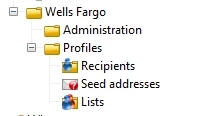
Note: the "model" key in the JSON is used to automatically set all the default parameters. You may find the values for model in \datakit\nms\eng\package\folder.xml and core.xml (look for <entities schema="xtk:folder"> node)

Note 2: the "save()" method is intelligent, it will update the folders if they already exist, no need to delete them

Note 3: some schemas don't have a folder-id, such as XSL stylesheets, so every brand will be able to see other brands XSL. You may have to hardcode a filter in the advanced parameters > restriction.

Kind regards

12 replies

ghoshdasAuthor
Employee
July 3, 2019

Thanks Florian for you quick help..!!

I will check the code and will let you know in case of any issues.

Florian_Courgey
Florian_CourgeyAccepted solution
New Participant
July 1, 2019

Hi,

You can use this code:

var rootLabel = 'Wells Fargo';

var prefix = 'wellsFargo';

var root = NLWS.xtkFolder.create({x:{model: 'xtkFolder', label: rootLabel, name: prefix+'Root', 'parent-id': 162522790}});

root.save();

logInfo('Root id', root.id);

// Admin

var admin = NLWS.xtkFolder.create({x:{model: 'xtkFolder', label: 'Administration', name: prefix+'Administration', 'parent-id': root.id}});

admin.save();

// Campaign

var campaign = NLWS.xtkFolder.create({x:{model: 'xtkFolder', label: 'Campaign Management', name: prefix+'CampaignMgt', 'parent-id': root.id}});

campaign.save();

(NLWS.xtkFolder.create({x:{model: 'nmsDelivery', label: 'Deliveries', name: prefix+'Deliveries', 'parent-id': campaign.id}})).save();

var typo = NLWS.xtkFolder.create({x:{model: 'xtkFolder', label: 'Typology Management', name: prefix+'TypologyMgt', 'parent-id': campaign.id}});

typo.save();

(NLWS.xtkFolder.create({x:{model: 'nmsTypology', label: 'Typology', name: prefix+'Typology', 'parent-id': typo.id}})).save();

(NLWS.xtkFolder.create({x:{model: 'nmsTypologyRule', label: 'Typology Rules', name: prefix+'TypologyRules', 'parent-id': typo.id}})).save();

// Profiles

var profiles = NLWS.xtkFolder.create({x:{model: 'xtkFolder', label: 'Profiles and Targets', name: prefix+'Profiles', 'parent-id': root.id}});

profiles.save();

(NLWS.xtkFolder.create({x:{model: 'nmsRecipient', label: 'Recipients', name: prefix+'Recipients', 'parent-id': profiles.id}})).save();

(NLWS.xtkFolder.create({x:{model: 'nmsSeedList', label: 'Seed addresses', name: prefix+'Seeds', 'parent-id': profiles.id}})).save();

(NLWS.xtkFolder.create({x:{model: 'nmsGroup', label: 'Lists', name: prefix+'Lists', 'parent-id': profiles.id}})).save();

// Resources

var res = NLWS.xtkFolder.create({x:{model: 'xtkFolder', label: 'Resources', name: prefix+'Resources', 'parent-id': root.id}});

res.save();

(NLWS.xtkFolder.create({x:{model: 'xtkXslt', label: 'XSL Stylesheets', name: prefix+'Xsl', 'parent-id': res.id}})).save();

Replace XXX with the id of your desired parent folder. It's an int and it can be found in the folder advanced properties.

To dynamically generate the following structure:

Note: the "model" key in the JSON is used to automatically set all the default parameters. You may find the values for model in \datakit\nms\eng\package\folder.xml and core.xml (look for <entities schema="xtk:folder"> node)

Note 2: the "save()" method is intelligent, it will update the folders if they already exist, no need to delete them

Note 3: some schemas don't have a folder-id, such as XSL stylesheets, so every brand will be able to see other brands XSL. You may have to hardcode a filter in the advanced parameters > restriction.

Kind regards