Adobe Campaign Client Communication Error With Server | Community
Skip to main content
nikhilgupta86
Level 2
Mar 13, 2019 6:27 AM UTC
Solved

Adobe Campaign Client Communication Error With Server

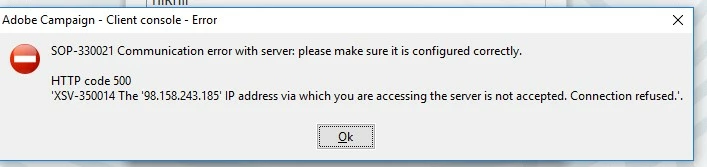
We are getting “SOP-330021 Communication error with server: please make sure it is installed correctly."

Anyone encountered this before? Is there any solution for this problem?
This post is no longer active and is closed to new replies. Need help? Start a new post to ask your question.
Venu_Reddy
Venu_ReddyAccepted solution
Level 6
Mar 13, 2019 8:56 AM UTC

Hello,

Usually such errors are related to IP through which you are tying to access is not present in white-listed zone.

Just check if anybody else who is accessing from same location is also facing this issue.

Close the Adobe Campaign console >> Navigate to - C:\Users\<ur_user>\AppData\Roaming\Neolane\NL_5 >> clear all the files and directory except "nlclient_cnx.xml" >> Open AC console now and try login.

Please check the below link and you will get an idea where you are missing:

Failure to connect

Perhaps these can help:

Accessing an external database

Configuring Campaign server

Regards,

Venu

1 reply

Venu_Reddy
Venu_ReddyAccepted solution
Level 6
Mar 13, 2019 8:56 AM UTC

Hello,

Usually such errors are related to IP through which you are tying to access is not present in white-listed zone.

Just check if anybody else who is accessing from same location is also facing this issue.

Close the Adobe Campaign console >> Navigate to - C:\Users\<ur_user>\AppData\Roaming\Neolane\NL_5 >> clear all the files and directory except "nlclient_cnx.xml" >> Open AC console now and try login.

Please check the below link and you will get an idea where you are missing:

Failure to connect

Perhaps these can help:

Accessing an external database

Configuring Campaign server

Regards,

Venu

Translate